Just switched from CSP to KRITA and i am really loving the brush engine. I’m not sure if this is the correct place for this question. I would like to know if there is a way to remove some of the preset brush sizes that are in the quick settings docker. Basically, i would like to have less presets so that when scrolling i can get to what i want faster. Is that something that can be done?
Sadly there is no GUI for configuring the docker at the moment.
However, since it’s a python plugin, and if you’re a technical user, you can technically overwrite the list of options for now. Below is what you obtain if you remove every size below 20 pixels at line 69 of quick_settings_docker.py, from plugins/python/quick_settings_docker · master · Graphics / Krita · GitLab.
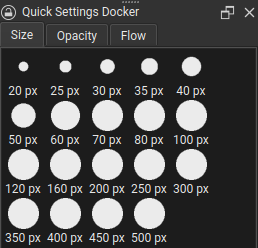
You can download the plugin from above and import it with your local changes, though keep in mind, if you choose to do this, your local copy of the plugin will not update when the copy of the plugin packaged with Krita is updated.
2 Likes
Okay, so all i would need to do is place the origial code before doing a Krita update? Can you tell me the file path for quick_settings_docker.py
Okay, so all i would need to do is place the origial code before doing a Krita update?
Perhaps you misunderstand. The Quick Settings Docker is a python plugin packaged with Krita by default, and adding another copy locally with your own changes will make it so that Krita uses the local copy instead. The downside of this is that any official fixes or updates to the Quick Settings Docker will not trickle down to your local, changed copy when Krita is updated.
Can you tell me the file path for quick_settings_docker.py
The directory is linked above.
This might be too advanced. I’l see if I can implement a config GUI for the docker for 5.2. For now, I’d recommend leaving things alone until it’s implemented.
Yeah, i just just watched some videos on how to add plugins to Krtita, super cool. Thank you for answering my questions. I guess if i decide to add your copy i can just delete and reinstall Krita when the new update comes out.
Eeer, reinstalling Krita wouldn’t be necessary. If you took the above steps then you’d just need to remove the local plugin you’ved installed yourself.
Ahhhh thats great. You can tell i’m new to Krita. I must admit, it has a bigger learning curve than CSP but the brush engine is amazing, well worth it. Do all 3 files go in the pykrita folder?
init.py
kritapykrita_quick_settings_docker.desktop
quick_settings_docker.py
quick_settings_docker.desktop would go in pykrita/.
quick_settings_docker.py and __init__.py would go in pykrita/quick_settings_docker/
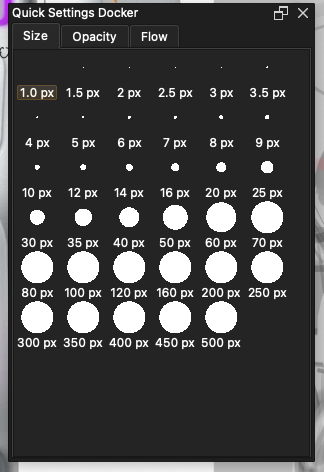
Okay, gave it a go and it worked. Thank you for explaining the process to me. I deleted 0.7 just make sure all files are in the correct place.
1 Like
This topic was automatically closed 15 days after the last reply. New replies are no longer allowed.