Thanks, I managed to import on to me XP-Pen magic pad. It does take a while with the bigger files. I got worried but just left it alone and it imported just fine.
2 Likes
Thank you so much!  And sorry for the comically late answer. I actually made this pack to make it easier to switch for me as well (previous PS and CSP user), and it was one of my goals in sharing it. So I’m so so so happy to hear that!
(And thanks for answering the question about license, Ahab!)
6 Likes
I don’t know why I didn’t download the bundle file
I think this is one of the best, most complete, most well organized brush bundle I’ve tried on Krita. I love that you took the time to design all the little icons for different brush types (and very well designed!). Thank you for sharing!;
Ps.: the pencil brush that uses tilt is amazing, very well calibrated. I always struggle with these kind of brushes because tilt never really works as it should with wacom like stylus, but this is one is perfect, it compensates for the limitations in tilt angles.
3 Likes
I also want to mention your ink sakura pen is one I always use for lineart, it has never left my favourites for years now. Thank you! 
3 Likes
Thank you so much! I’m very happy to hear that, your comment made my day even as I was just starting my day 
Haha the reason we like the pencil tilt calibration is probably because I have only used my brushes with Wacom, so I’ve designed it for how it feels with my pen and tablet (Wacom Cintiq 13 HD)  I’m glad my taste in the brush can fit other people’s taste
1 Like
That’s so warming to hear, thank you Draneria! It’s an honour to hear that you have had the Sakura Ink there for so long 
1 Like
i adore these brushes, i’ve used them with every version of krita i’ve used so far over the last few years! thank you so much for making them, and for free too!
1 Like
Thank you very much  Happy to hear
Hello! I’m using Manjaro, and for some reason, the brushes aren’t working at ALL like they used to. For example, this is how most all chalk brushes appear to work. Is anyone else experiencing this issue? How do you recommend going about fixing this?
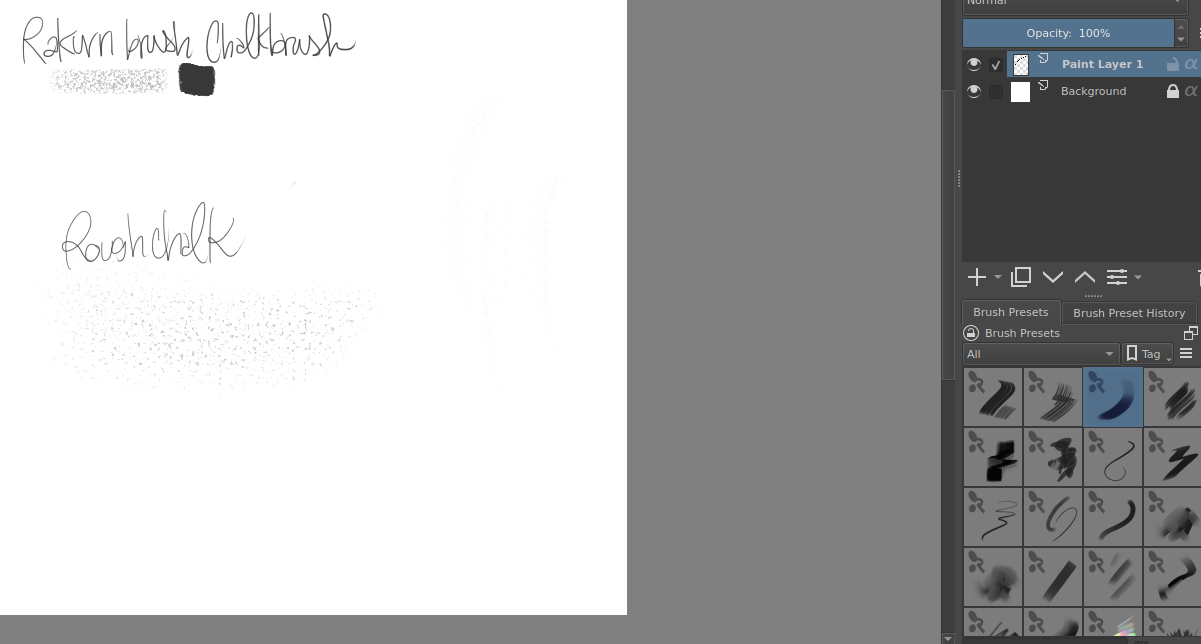
Hi! I see that you use the brush set made for Krita 4 (V.1 or V1.1). These might not work on Krita 5 and newer. Please try the latest version of the Brush Set (V2.1) here https://ko-fi.com/s/8b17a544d5
Most, though not all, are in the new version, along with new ones. Please let me know if that helps!
2 Likes
So unfortunately, the problem persists as I am using Krita 4.2!
There have been at least a dozen updates since Krita 4 came out. Is there a reason you haven’t updated? Many brushes will not work properly with a version that old because the changes from 4.x to 5.x were significant.
1 Like
Ah. Sorry, I won’t support older versions of Krita, as it would take focus away from making new brushes, so this will not be solved. I do quite like newer versions of Krita, there are many improvements, so I recommend upgrading if you can
2 Likes
I actually downgraded because this issue was persistent in the newest version of Krita, I’m sorry for leaving that out, I’m a bit airheadded these days. ^^;
To be honest, I even did a clean install of Manjaro because of these issues! And the problems still persist with version 5 of Krita. That’s how much I love your brushes! I don’t see anyone else having these issues, so could it be a strange interference with my distro?
1 Like
I have no problems with Rakurri’s brushes but I’m on Windows.
It might be better if you make a new post in the support category and ask for help. There may be something off in your settings or possibly you’re not using the official appimage from krita.org. Many times the repo versions have problems (they are not created by the Krita team).
2 Likes
That is the set of brushes I am playing with. The brushes are fabulous. Thank you so much for the excellent work.
Since I have no idea how the brushes will behave, I usually have no idea or image in my mind when I start sketching. This is something I did kind of by accident with the rbt collection.

4 Likes
This is wonderful to see! 
Thank you so very much for using the brushes and sharing! It always brings a smile to my face to see my brushes used in such fun and creative ways!
Now for the big question. Does anybody do cool stuff with the Magic Fill and or the Vanvidd brushes? I can see using short strokes to create rough shapes with the magic fill, but the Vanvidd is out of my control.
1 Like
That is a good question!
I like to use Magic Fill to fill areas, make those rough shapes you mention, do flat-shading, making sillhuettes, swirl it around to get cool shapes like hair, smoke and others. I also some times find it faster than using the Lasso Tool for blocking in shapes.
The Vanvidd (translated from Norwegian is “Madness”) is indeed intended to be out of control haha, there is a trick to it based on how fast you move the pen and in what directions, but it is just a wild shape generator.
It is intended more as a fun thing where you can get a random shape that can inspire you or challenge you to make it into something, like a Rorschach test or Coffee stain art 
2 Likes