It is becoming increasingly common to post timelapses of your artwork to prove your authenticity and show your progress for fans
Krita’s recorder docker is just functional enough to be called a timelapse feature, but is highly inefficient and relatively difficult to use if you don’t know what you’re doing.
A large list of features which come to mind to help jumpstart discussion and show how extensible the docker could be if given some attention:
Store the timelapse data in the krita file itself, or in a custom wrapped zip format in a file next to the main file (configurable). Manage or delete the recording in the docker.
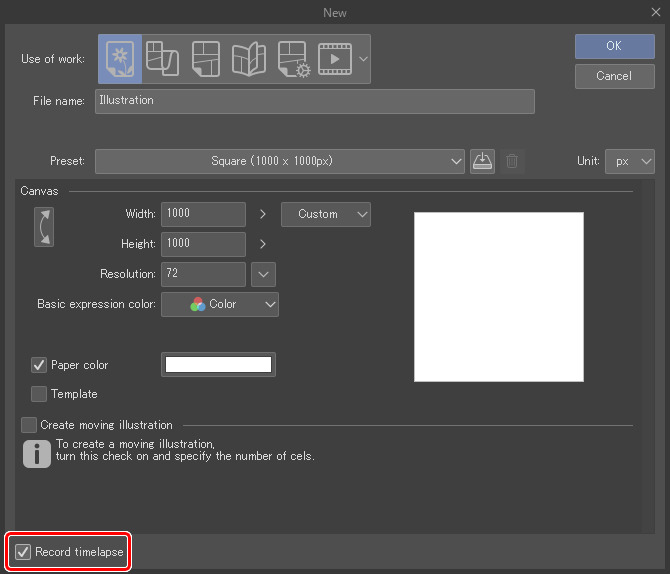
Checkbox to record progress or not in the ‘new file’ dialogue.
Save ‘is recording’ as a flag in the file. When you open a file, if the file is flagged then it will pick up where it left off. No need to remember if you’re recording or not (or have it recording all the time for no reason) which is an absolute pain
IIRC Krita already knows what area got changed in each operation for efficiency sake, why not use those coordinates to only save the parts that change, along with metadata about where that part is, and only reassemble into a full image when exporting.
Simplify the options, hide advanced settings behind an ‘advanced’ tab for the adventurous.
It doesn’t seem like a good idea to me to bloat the .kra file with the timelapse frames (which can be much larger filesize than the file itself). And it’s only a reasonable option if you don’t make incremental saves, otherwise you’d have to remember to go back and delete them from the old versions (not just the final).
I’m not sure of the benefit compared to the amount of work to change it? The way it works now, just saving frames into a folder as they are generated, is simple and efficient. Saving into some kind of zip file would probably add slowness or complication.
It might be reasonable, but I’m not sure how useful that is? And you’d have to remember to move it if you move the file.
Might be a fairly simple change, sounds reasonably useful.
Probably not too difficult, but: does this imply changing the recording state should modify the image’s modified state?
To have a smaller timelapse folder? Implementing this sounds a bit complicated. First, I’m not sure if that would be slower for Krita to calculate to save the frames. Second, the frames would need reassembly. Unless FFmpeg has a way to do this itself, Krita would have to do a lot of computations to reassemble all of them and then pass them to FFmpeg. It sounds pretty slow to me.
I agree with most of this. My main concern is that the Docker is way, overwhelmingly, too easy to mess up, and takes too much attention to keep running correctly (as someone with ADHD).
I would be very happy if:
Images are recorded from the start if the ‘record timelapse’ checkbox is checked in the new file dialogue
The recording never, ever, stops for any reason other than me manually stopping it (with a warning, and a default-off checkbox to delete the recording). Even after closing and opening the document or Krita, or after a crash.
There was some sort of way to disable the little recording ui at the bottom (other than maybe a red dot) that flashes every second or so after a pen stroke, it grabs my attention way too often and prevents me from entering any sort of flow state when drawing
I’ve tried recording about 10 drawings now, ranging from 4 hours to 20 hours each, and so far I have managed to fully record one(1) without error. I’ve essentially given up on using the recorder docker indefinitely until I have even a minor sense of trust in it again.
Something like that, yeah.
And the ‘record automatically’ doesn’t work for me,
So every picture I have to 1. Remember to start the recording, and 2. Remember to resume recording when I re-open the image. Meaning I almost never actually manage to record an entire image from start to finish because I will almost inevitably forget at least once.
So what you want is for Krita to remember the status of the recording file?
Regarding this I agree with @freyalupen , saving the time lapse in the krita file would make the file too heavy and could even cause delays when saving as happens with Clip Studio, compressing the images in a zip would also have its difficulties , saving the time lapse next to the file does not seem like a good idea to me, I think that Krita having the recordings (or images in any case) in a separate folder seems perfect to me, I can access only the recordings without having to be looking for the kra file, I say this more than anything because I usually import the sequence of images to Kdenlive so that gives me the freedom to be able to render the time lapses to my liking, more than anything because at the moment there is a bug that makes the start the time lapse skips depending on the input fps, it has already been resolved as far as I know but we still have to wait until Krita 5.3.
Honestly I do kind of agree that the recording preference should be per file and not just universal. I’d think most people would want to record specific pieces while not always recording every doodle or study. Although there might be some file state questions as freya mentioned.
It sounds like the record automatically doesn’t work sometimes for you. Do you have any idea what might cause it to stop working?
Do you just mean the thread progress bar should be removable or also that the progress (red) dot should be smaller?
I agree too that the recorder UI is very overwhelming. I think maybe capture interval, resolution, record automatically, and record/export buttons should be in the “simple” ui? And the current layout should be advanced. What do you think?
I think the closest functionality to this would be how the brush smoothing gets more options based on your selection?
EDIT: Or maybe advanced settings should be how in configure krita-> general -> miscellaneous -> use cumulative undo has advanced button
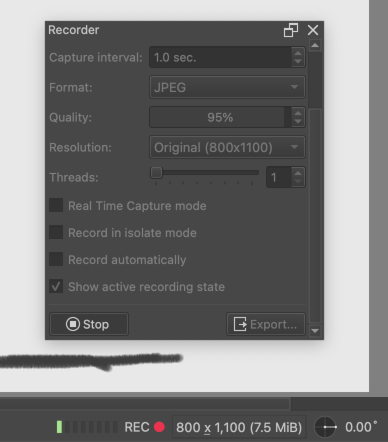
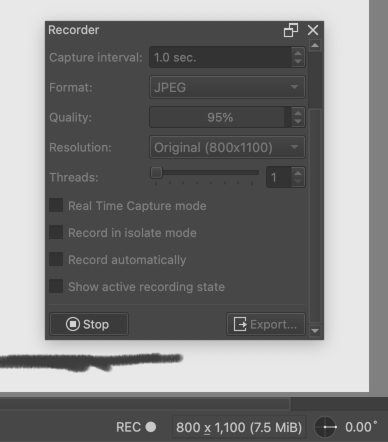
My thought is, the dot turning red is kind of distracting and pointless (unless you are trying to check which actions get recorded), maybe there should be a way to disable the colors for the dot and the threads thing. (Note: the threads bar was added in 5.3-prealpha.) But the “REC” text at least should always be there, to have an indicator that recording is on.
Having some indicator (not colored one) for recording is welcome as it helps for people who do recording occasionally and do not keep it always on. Sometimes people forget to resume recording. And the status bar messages helps us in that case.
I wouldn’t mind a red dot in the bottom corner, just something to glance at to see if it’s recording (though if you have to double check that a picture is in fact recording, you’ve already failed at UX. Once I make a new canvas with recording enabled I should never have to waste a single brain cell ever worrying that that piece isn’t recording again)
But next to the recording dot there’s also a bunch of bright little bars that I have no idea what they’re supposed to be for, but are rather distracting. I could do without those.
Sometime people can enable recording after creating a document. Not all people want automatic recording. Some people can record only part of the process. At such time it is helpful to know if recording is on or not.
I am okay with not having it red in colour and only a text “REC” as freyalupen says.
I think you are referring to the memory utilization bars. It changes colour based on the memory usage and it is also helpful for some people who want to know that they are not stressing their computer which can be really low in specifications
I think this is subjective. For example some people really like colour coded icons but some people find it distracting and want everything in muted colours etc.
In your case I think I can agree with you on forgoing the red dot. I do not know the opinions of others.
The truth is that I would like the icon to remain red, so I realize that it is being recorded without having to go to docker to verify that I am recording, I usually work in canvas mode mostly and I only press tab to see that icon, maybe an option to disable it would be good but in my case it is useful for me to change color to know the status of the recording.
If it says ‘REC’ on the status bar then it’s recording. The ‘problem’ for some people is that the dot goes to black if you don’t paint on the canvas for a period of time equal to the capture interval, because it automatically pauses (not stops) the recording process.
i.e. they see a flashing red dot going on and off while painting and then pausing for whatever reason.
Personally, if I’m painting on the canvas, I can’t even see that it says REC and I don’t notice the dot flashing red/black.
Yes, I’m not entirely sure what this has to do with the suggestion as I never said to remove the ‘start/stop recording’ button. I just want a ‘record file’ checkbox at the start so I can set it and forget it.
If someone wants to leave that unchecked and manually start and stop the recording as desired, then go ham.
It should work like this:
When creating a new document, remember the last setting of ‘record timelapse’, much like canvas resolution
If ‘record timelapse’ checked, start recording immediately on canvas creation. Flag file as ‘recording’. Save flag with file.
If recording is manually stopped, flag file as ‘not recording’.
If recording is manually started/restarted, flag file as ‘recording’
When opening a document, check the flag. If it’s ‘recording’, start recording again. If it’s ‘not recording’, then don’t.
They only show up when I’m actively recording, so forgive me for thinking they’re related to the recording feature.
I don’t really care what the dot looks like or what it says, just a dot, red dot, ‘rec’, ‘recording’, I just wish it would never change color or brightness.
I get why it does it, it lets you know that it paused the recording while waiting for another pen stroke, but I’d argue that that is such an industry standard expectation of a timelapse recorder that it should go without saying (or showing) that it doesn’t record the dead time.
No I was giving you that example for showing the red dot and recording status in the status bar. That helps people who want to know when the thing is recording and when it is not. It was a reaction to your comment here - Quoting so that you do not miss understand again.
So in my opinion we were clearly discussing the red dot in the status bar. to be more clear I did not say you said to remove the ‘start/stop recording’ button.
I do not think it is for that purpose only. It is also for denoting that the user has enabled recording not that it stops recording while you pause painting. Sometimes people can forget they have set recording on or off. This indicator can help these people to know when recording is enabled or not.
In any case I said what I wanted to say about the status bar indicator, I have nothing to add here and to avoid getting misunderstood and getting combative answers based on wrong assumptions I will be quiet
For a user to see whether they activated the recording or not, it’s not necessary to also indicate whether the recording is currently idle or not. Right now, we are indicating that the user pressed record with an icon that then switches colors for every stroke you take. As understand, it’s the latter that OP has an issue with.
So in the latest master build it seems to auto-record at least most of the time, so I decided to give recording a try again and my opinion still stands that the recorder is pretty much unusable.
But I finished a 10 hour drawing today and I was excited to export a time lapse (For once I actually had it recording the whole time)
But it turns out it only recorded about half of the drawing, for no apparent reason. The recording docker was recording the entire time, I know this because I also streamed the artwork and my streams are recorded in full, and I can see the recording active notification throughout the entire drawing process.
But the second half isn’t visible anywhere in the KritaRecorder folders, which is where it’s set to save, so who knows where it went.
I’d report that one as a bug too but I don’t really have any sort of logs or proof so they’d probably just close it as not reproducible.
I feel like an important addition to the recording docker’s missing features is the possibility to export looping GIFs. If we want them to loop, we need to save just the individual frames, reimport them and add the extended result and preview manually. It would be so time saving to be able to tick a box like we do on the video exporter to have the gif loop.
The changes I submitted in the mr change the default gif output to loop indefinitely since I couldn’t think of a good reason for it to stay forever until reloaded.
The next thing I’d like to try my hand at is making some more general improvements the the recorder UI and options, so I’ll keep that in mind.
Weeks ago, I looked into adding an option to turn off the active thread counter and color-changing REC dot. Then I got sidetracked by bugfixes and other things, so I didn’t MR it yet.
Here’s how it looks:
“Show active recording state” on, current behavior (5.3.x version), while drawing:
My preference is to have a single option, with the dot uncolored, as a sort of “distraction free” mode. What does anyone else think? Is it worth having separate options? Should the dot remain red?
The other issue is, where should this option go? The UI already could use some reorganization, without this new option added in. But I haven’t thought about specifics yet.
In addition to that, I looked into making recording state saveable into KRA files, but
I could not figure out how to access the recorder config from the KRA saver/loader.
One last thing I’ve been investigating, which wasn’t previously discussed in this thread, is
a way to avoid needing duplicate libx264 and libopenh264 MP4 presets (which is confusing).
I found a possible solution which is to set encoder as -c:v h264. In my testing it selected the correct encoder with my three FFmpegs; with Krita 5.2’s, libopenh264, with Kdenlive 24.02’s, libx264, and with my self-compiled FFmpeg7, h264_videotoolbox.
But, I don’t know how well it might work in other cases.
(For comparison, leaving out -c:v entirely resulted in Krita’s and my FFmpegs using the mpeg4 encoder, with terrible quality/size, and Kdenlive’s still using libx264.)