Well, I am going to explain a little how to obtain this type of brushes since they are really modifications of the basic brushes that you can find in any drawing program (SAI, Krita, CSP, etc).
I created the brush in SAI and after a few tests I then recreated it in Krita, here is the test:

Well, first of all reviewing the thumbnail gives us an example of what it should look like:
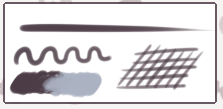
So based on what you can see and what I was able to test, it is a brush with a smooth flow of color, in SAI they used a round mixer brush as a base, but because they deactivated the blending, the best option for us is to use a brush with pixel engine (Basic N° 3 - Flow):

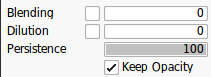
(No Blending, No Dilution, 100% Persistence)
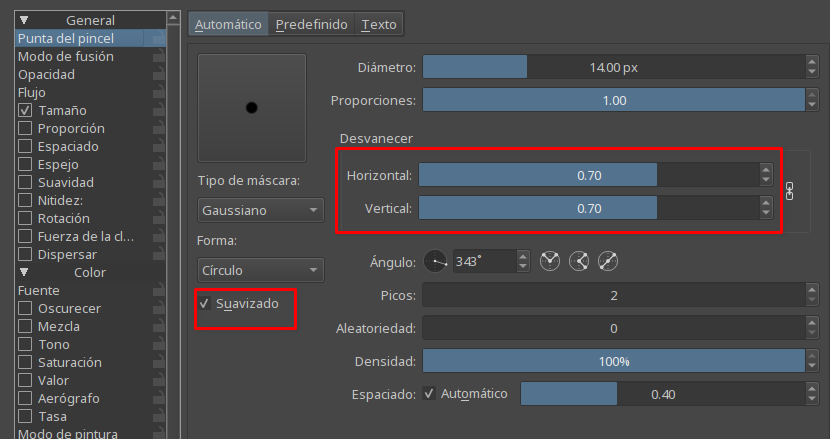
We activate anti-aliasing and then set the smoothing to 0.70, since as the original brush in Sai is a soft brush it has a round tip with smoothing, we also set the size to 14 pixels like the original brush:
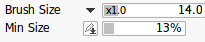
Configuring the minimum size:

(We use an upward curve so that the size transition is smooth)
To configure the density and the minimum density we will use the opacity and flow parameters.
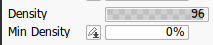
- We set the opacity to 95% and disable the pressure option since we don’t need variation in the opacity (this is the same in SAI, the normal density is not affected by the pressure, only the minimum density.)

- We set the flow to 90% to make it softer and in the pressure curve we make it a downward curve since we need it to be a soft color but not very persistent

This has something to do with the persistence we saw earlier.

I hope this mini-guide helps a bit since really to be able to recreate existing brushes in other programs you have to see the equivalent, in this case in Krita there are some similar things and other things that don’t work the same, for example I can’t set the flow percentage or opacity in krita in 0 because it would not directly have color in SAI that does not give problems due to the persistence of the color and well it is a matter of experimenting =)