Good morning everyone. I have researched this question online and can’t seem to solve the issue. When using the rectangle tool my corners are rounded. How do I remove this option?
Thank you for your help.
Shannon
Good morning everyone. I have researched this question online and can’t seem to solve the issue. When using the rectangle tool my corners are rounded. How do I remove this option?
Thank you for your help.
Shannon
You do that by adjusting the settings in tool options before creating the shape.

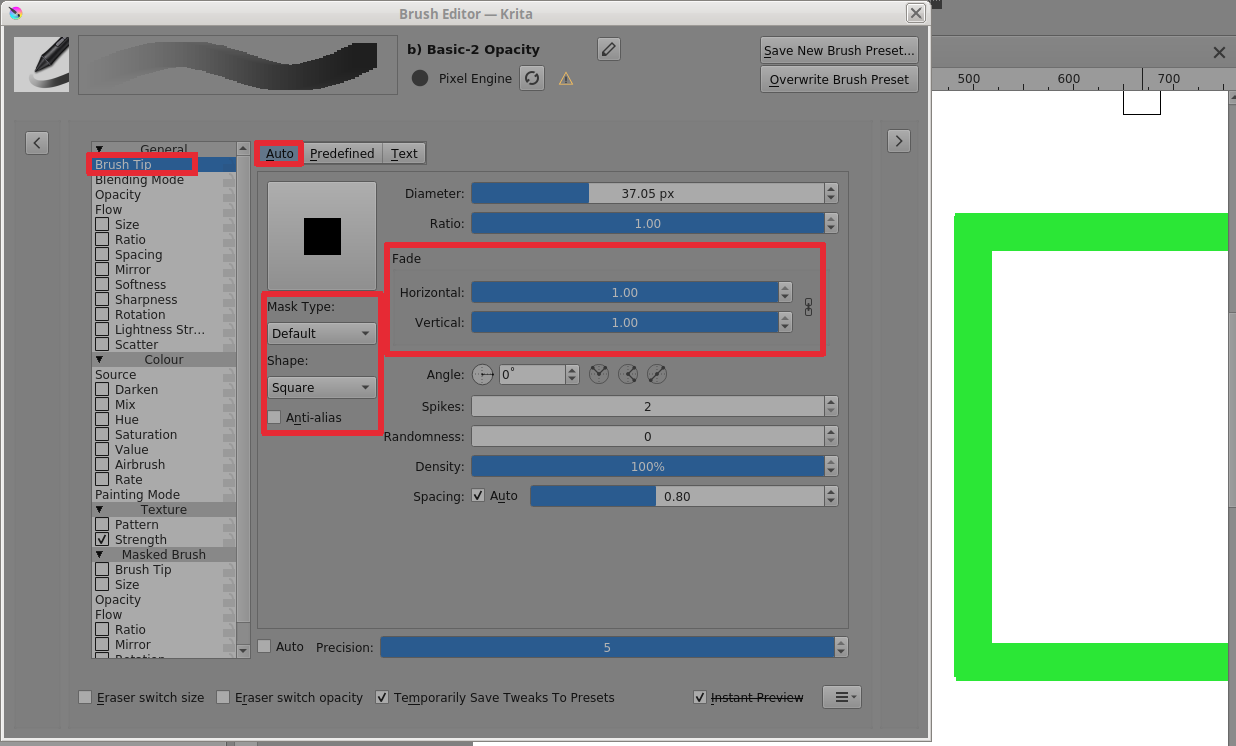
With a raster layer, you can use the brush editor to create a suitable brushtip:
With vectors, you can edit the join style:
@sooz: That Round parameter only works with a suitable brushtip. It’s confusing.
Thanks, @AhabGreybeard - I didn’t know that.
I’ve only just found that out, by playing with it for a while 
The Round settings are for the Fill, which the brush Outline is then painted around. So if you use a round brush and a rounded fill, the results will be compounded.
The results are compounded in a way that seems confusing. Using the Basic-2 Opacity:
The good news is that you can get a perfect rectangle by using a very small brush with a Filled rectangle and Foreground/Background set to the same colour.
Or you could use No Outline.
interesting conversation I noticed this same problem a couple days ago. Even with a Tools option setting of zero there was still some roundness. One would think Zero means Zero. Maybe a little tweaking to the code? 
This topic was automatically closed 30 days after the last reply. New replies are no longer allowed.