I recently watched Ramon’s video on spray brush engine in youtube recently since I wanted to make spray engine brush.I’ve used a spray brush in clip studio paint and wanted to replicate its feel in Krita using the spray brush engine, but there are some difference between how the two software handles how spraying works. “I don’t just want to say clip studio has this x feature and krita” don’t so I’ll explain why adding these extra behaviour in Krita may improve it’s spray engine some more.
I studied clip studio paint’s spray brush engine first and explain how it works to provide some context to how it works compared to Krita.
Clip studio has a spraying effect options that you can activate and contains additional settings
Once you activate it, it will override how the changing of brush size works, so instead of changing the brush tip size, it will change the size of the spray area.
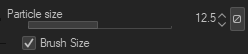
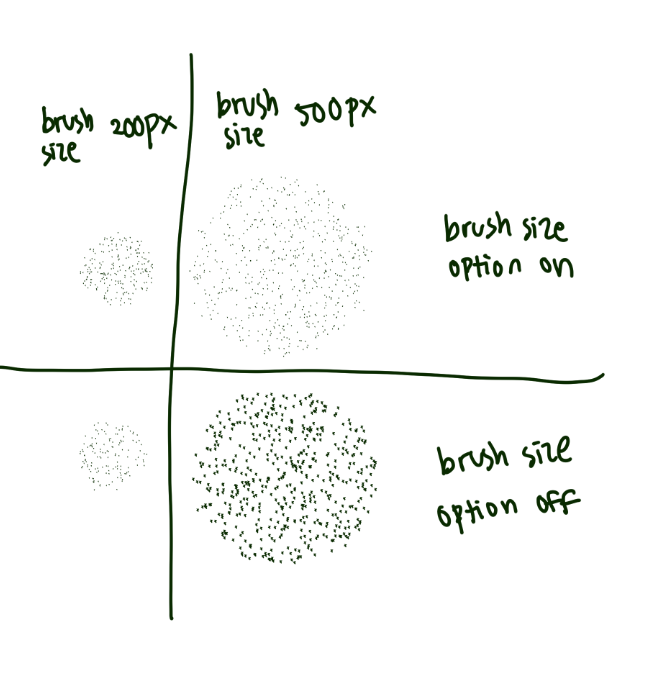
Particle size slider will change the individual brush tip size, while ticking the 'brush size’checkbox will allow the particle size/brush tip size to change according to the size of the spray area.
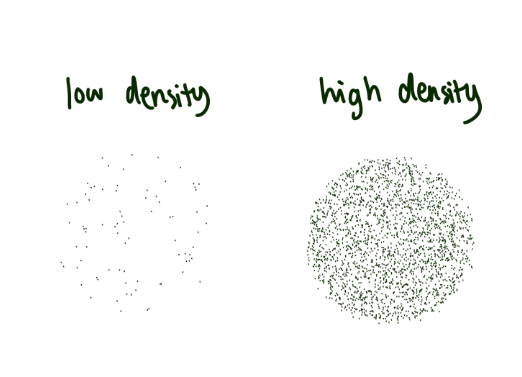
Particle density changes the amount of particles in one spray area. (Krita already have that option)
It can be controlled by controllers such as pressure.
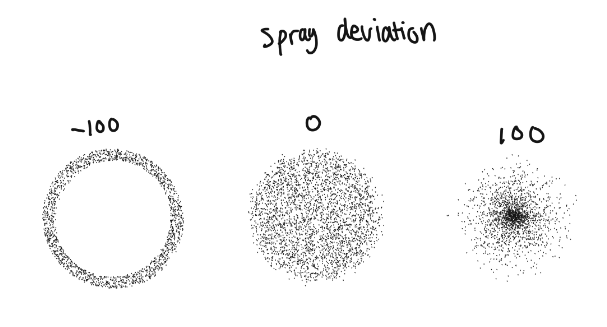
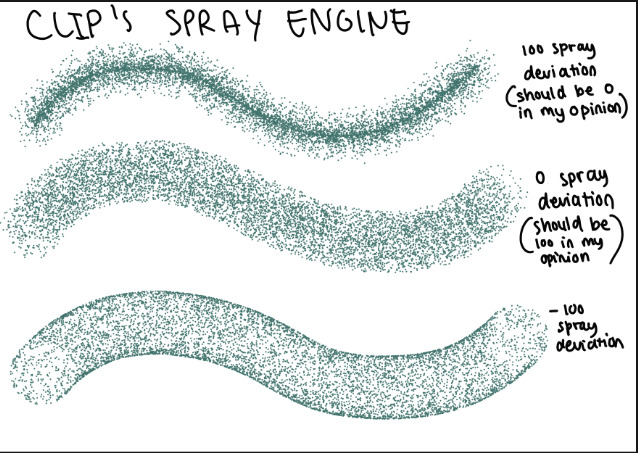
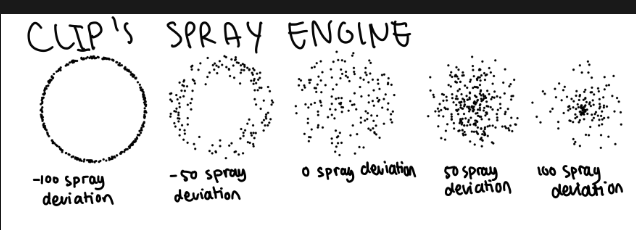
I don’t know why it’s not the other way around but 0 spray deviation will spread the particle evenly in the spray area, 100 will place them closer to the center while -100 or negative values will place them around an empty radius from the center.
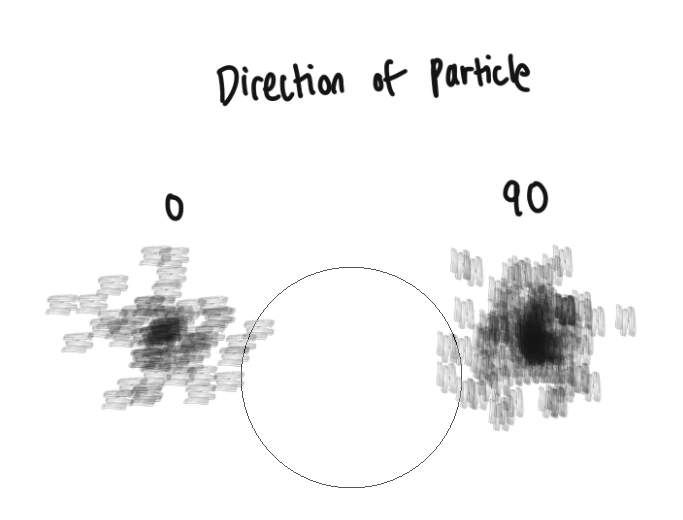
Direction of particle changes the angle of each brush tip. It can be controlled by controllers as well.
Now that I’ve explained each option of the clip studio paint’s particle engine, it’s time to compare it to Krita and how Krita’s own spray engine can be further improved using this as a basis.
By the way, I never want to say one software is better than the other, I love using both software interchangeably and for me Krita has a better analogue feel in its brush texture. I’ve used Krita as an example when asking for feature request for clip studio paint. I just want to use one software as a basis for how certain feature works since it it easier if we have a frame of reference. Krita seems to have almost all of the options already and more but there are some that may need to be added to improve it some more.
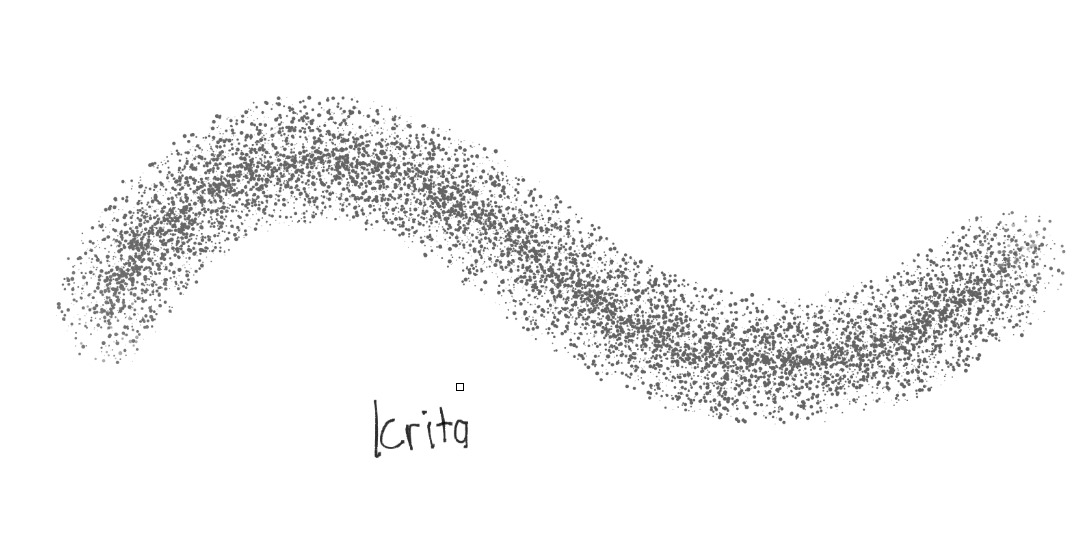
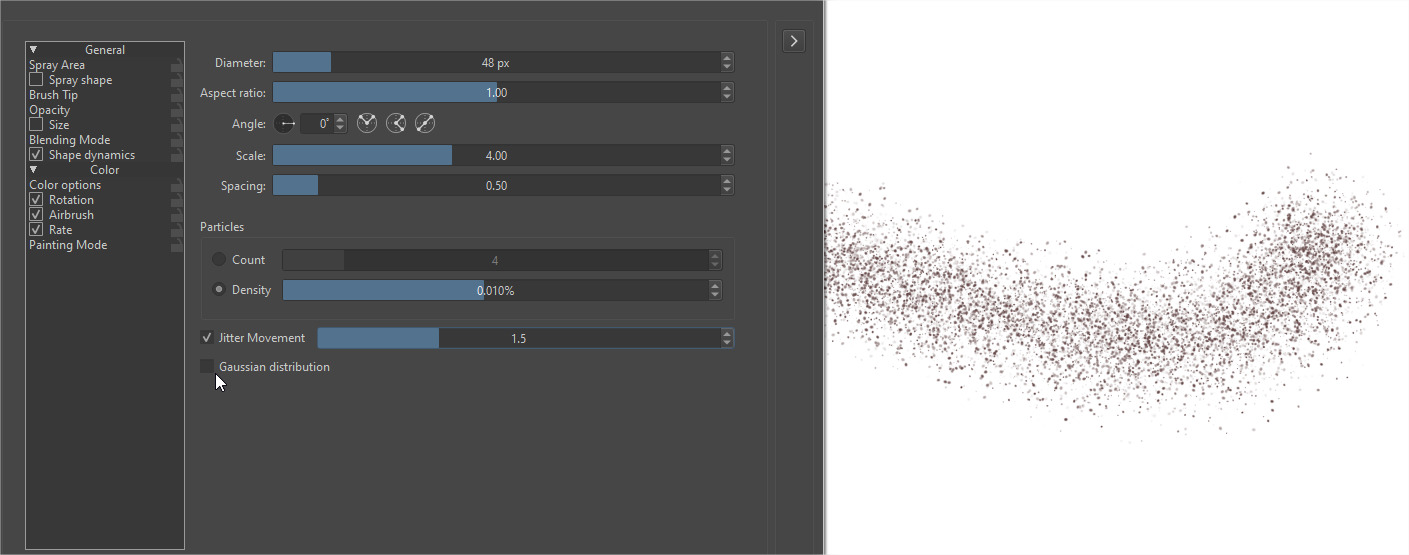
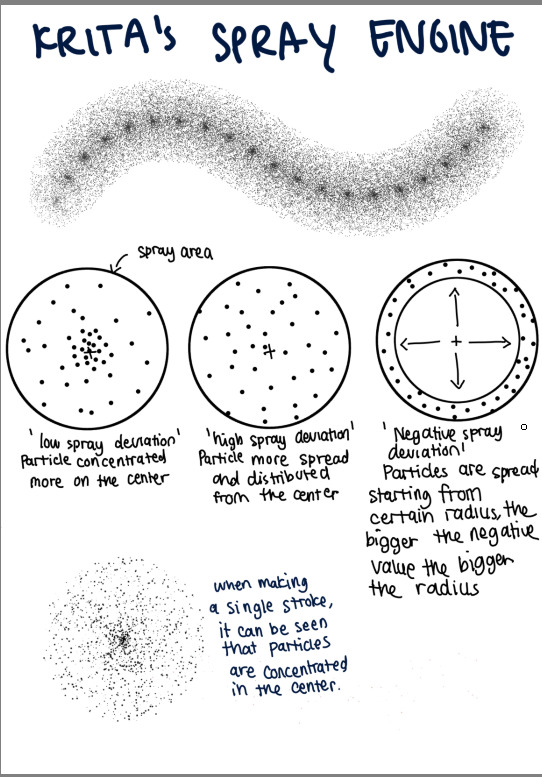
Krita have both particle density and count as an equavalent to Clip’s own so that’s a good feature if you want certain number of particle in a spray area. However, it seems that Krita has no deviation option so particle tends to get concentrated in the center, so when we make a stroke, there will be something like a line in the center of the stroke.
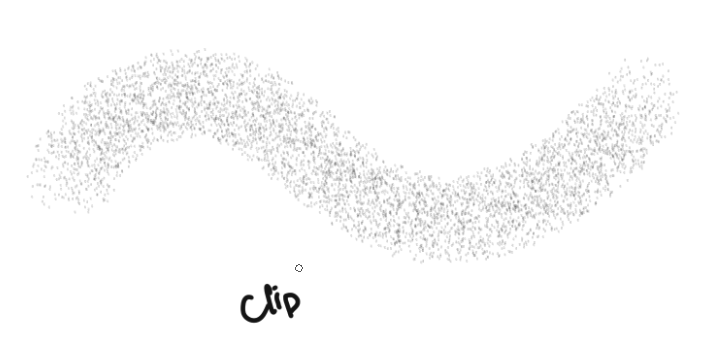
Since you can change clip’s spray deviation, you can avoid the lines effect since the particle are evenly spread and are not concentrated in the center.
If anyone already have a solution to this, please let me know.
Maybe a spray deviation option can be added underneath the density option.
Krita has jitter movement but I think it only randomly spread the whole spray area.
Krita can also scale particle size according to the spray area size but only in spray shape option. This means that if you use any other shape than what’s provided in the spray shape option, you will not be able to scale the particle size according to the spray area. The shapes are limited to ellipse, square, single pixels and image hose.
This option is useful if you want to make say water ripple so I don’t think it should be removed.
Maybe provide the scale size option to the brush tip option as well.
On another note, Krita’s spray engine has more settings that allows for user to have more customisation options so adding extra options can make it more robust and versatile.
That is all for now, I may add some more to this thread if any extra ideas come across my mind.
I am tagging some experts that can help provide more info about this and anyone who I believe may be interested about brush engines so they can provide their two cents. @RamonM@Mythmaker@wojtryb@fizzyflower@kaichi1342
If anyone else who happens to come across this thread also have and additional suggestions or insights, feel free to chime in.
Thank you!
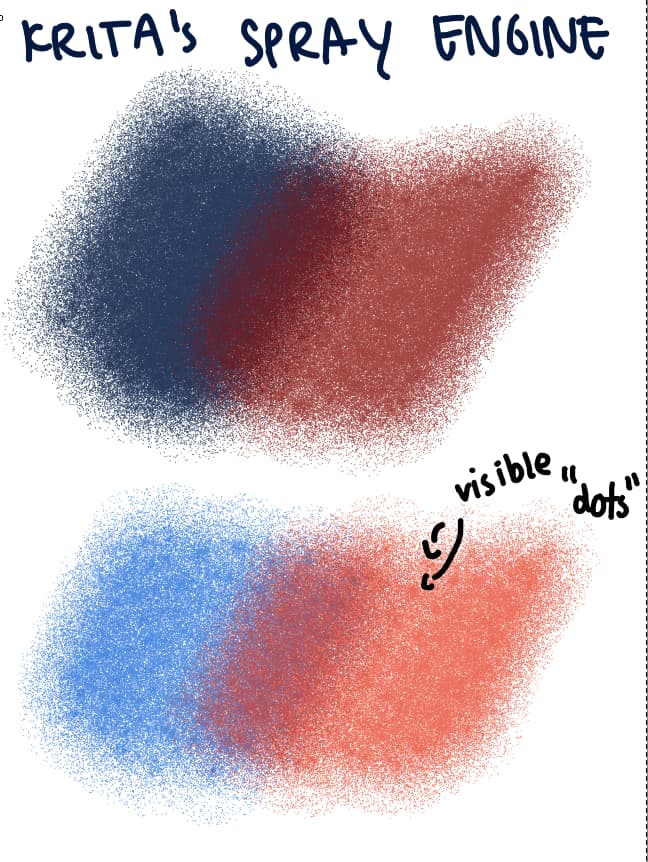
I made a stroke with default spray brush, in Krita the brush tips are concentrated mostly in the seconds, if only there is a setting that can make it more evenly spread in the spray area.
In the second stroke, the particles are mostly spread from the center compared to the first where the particles are concentrated in the center. I don’t understand why they put high deviation for the first image because logically high values of spray deviation means that the particles deviates more from the center. Unless… they deviate from the edge of the spray area and not the center. Either way, it allow us to distribute particles evenly within the spray area.
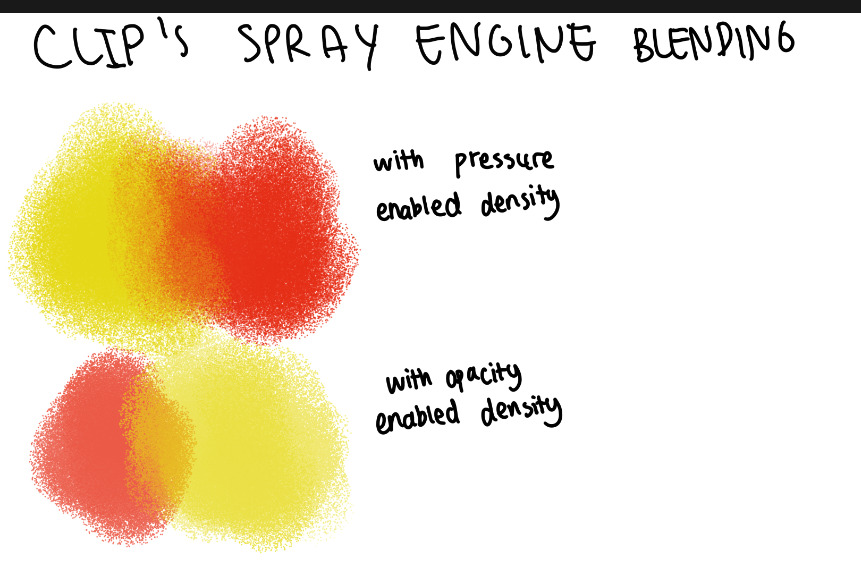
With spray deviation, we can make brush that can act as tone scraping or textured blending brush. Clip have both density and opacity controller for the spray brush. I think Krita only has opacity and not flow(flow is density in Clip). Having flow allows brush to appear more opaque and stronger in colour and allow us to blend using texture generated from the spray instead. This can also give a chalk/pastel like quality to the blending.
This is done in Krita, it’s much harder to create an opaque tool and you can see some dots within the brush strokes since particles are concentrated in the center. Maybe adding a flow controller will also help to enhance the opaqueness.
That’s all my explanation for now, feel free to ask for more additional context if there are things still unclear. I may have not or forget to add some info here, and may add more to this thread later. Thank you for taking the time to read my post. Hopefully it will provide some usefulness to everyone here,
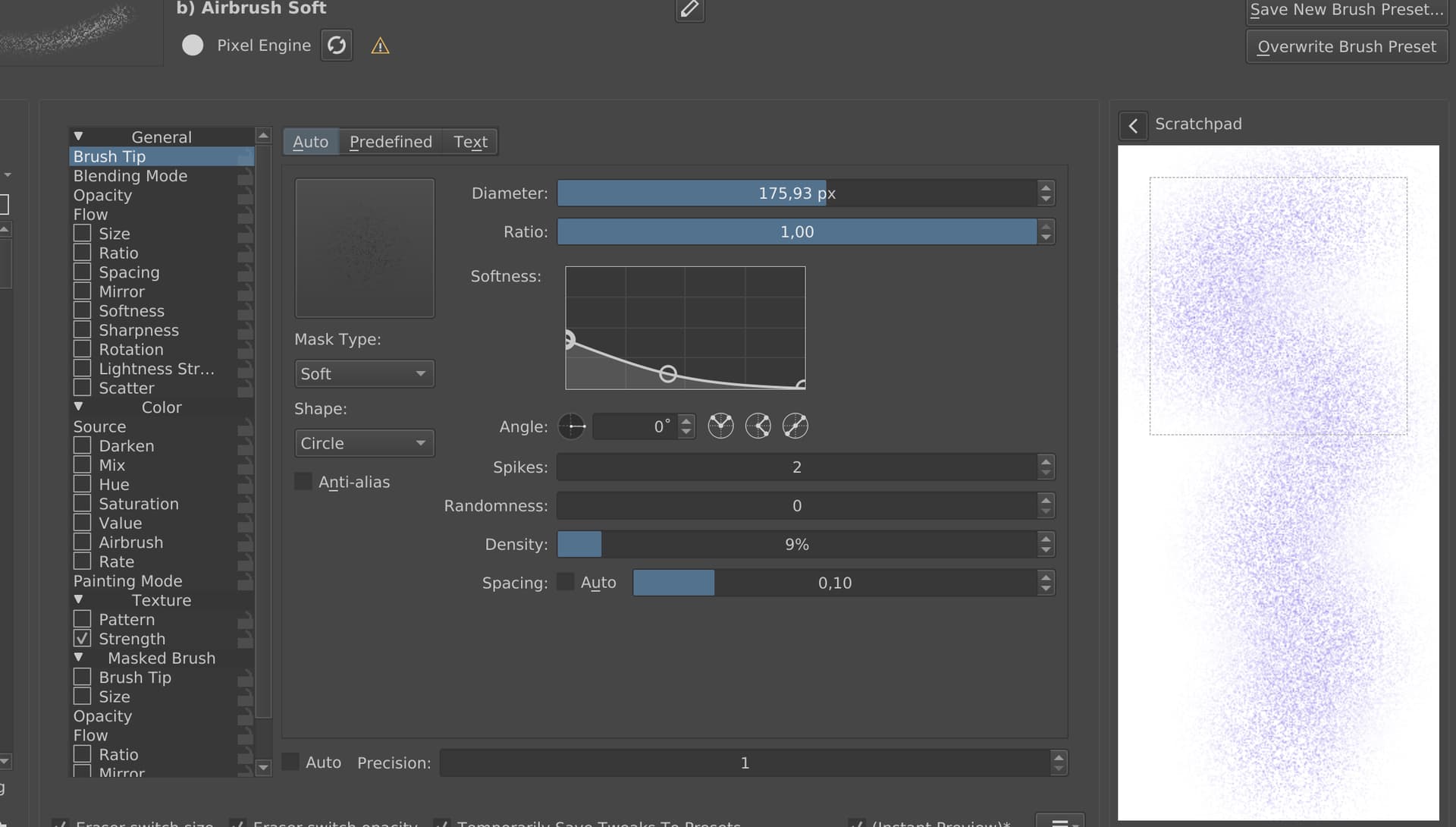
Have you tried using “Density” option from the Pixel Engine instead? For example, take a “b) Airbrush Soft” brush, go to the Brush Tip tab and change Density to 5-10%. You can also play with “Randomness”.
Hmmm… that’s a good alternative to achieve the same effect. The advantage is that there is also a square option for the “spray area”,
but can we use different brush tips for the particles?
I think aside from tone scraping, spray deviation can make it easier to spread particles like hearts, flowers, etc in an even area.
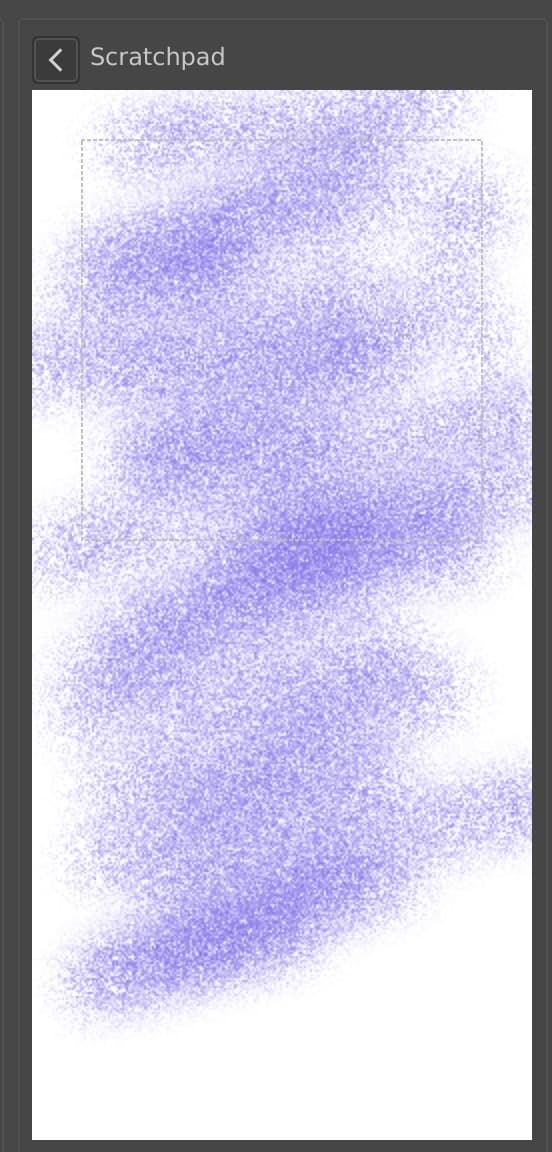
I fiddled with the density settings in the pixel engine and quite like that you can have more control with the softness, but you can’t attach controller to the density though, and there is no way to change the particle size. Good alternative in the meantime still and can function as a tone scrapping brush. It can also serve as a good basis if ever the spray engine will be more build upon in the feature. Thanks for the suggestion!
Quick question…
Can we instead add more options to pixel engine’s scatter settings similar to that of Clip’s instead? I feel that it already functions almost similar to that of clip’s, minus the density, deviation, particle scaling etc. Maybe it will be easier to add those settings instead? Maybe need a coder’s input on that.
Also, I don’t want to rush the developer now that they still have a lot on their plate, but just want to add this as potential feature for the brush engines in the feature.
Yes, actually I searched for the spray brushes video first as I was trying to replicate a brush from Clip Studio,. I downloaded the spray brushes in the video as well since I wanted to tweak them to match the behaviour of that Clip Studio brush. The downloaded brush contains lots of useful utlity like dust or clouds. That’s how I come across the features that has not been added to Krita yet. I was modifying some settings from ‘Spray Special SuperBig-Area’, changing density and brush size and that’s how I found out that Krita has no spray deviation and custom shapes proportional brush sizing.
Hi. I’ve looked into this, and yes, there is a real issue. The main problem is that the particles are distributed in polar coordinates (an angle and a distance relative to the center of the spray area). Think of a uniform distribution (what it should do if “gaussian” is not selected), if one generates to uniform random numbers, one for angle an other for distance, then it seems it should work. But that approach, although it will distribute the particles uniformly in terms of distance, will position more particles near the center in terms of 2D space. What needs to be done is modify the random distribution used so that it takes into account the ratio of the length of the circumference at distance r to the area of the spray area instead of just the distance.
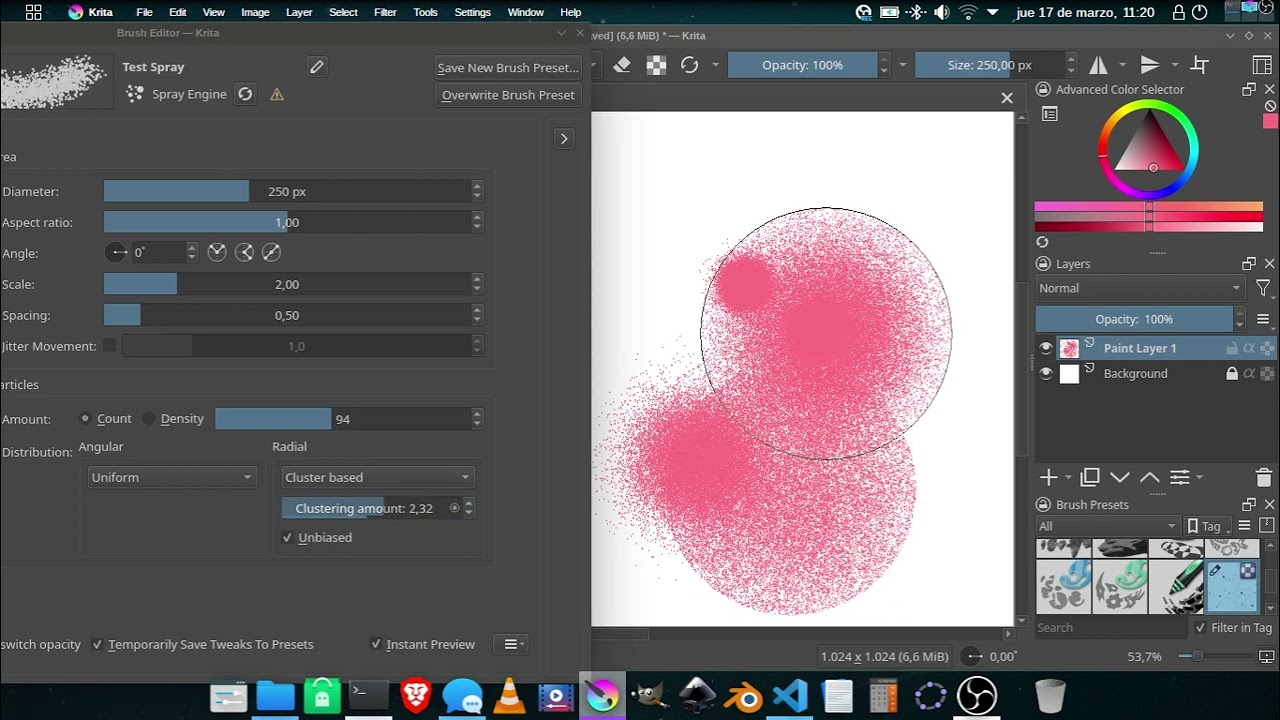
So, I could not resist, and made some improvements, shown in the video bellow. I’ll make a MR later. Please comment on the notes that follow:
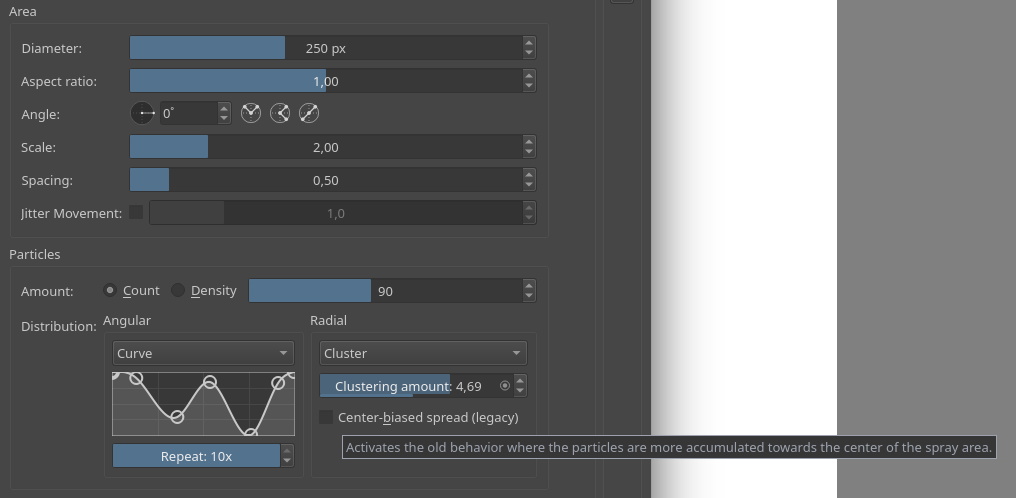
Now one can change the distribution of the angle and the distance.
I implemented 4 different distributions:
Uniform
Gaussian - Uses a normal distribution. Now one can change the standard deviation.
Cluster Based - This is like the deviation in CSP. It uses a normal distribution under the hood
Curve based - One can make a custom probability density function
For angular distribution I only expose “uniform” and “curve based”, since the others are not periodic and look weird here
I need to fine tune the name for the “cluster based” distribution. I don’t like it much, but I also don’t like “deviation” because it can be confused with “standard deviation”, and although they may be related, they act kind of opposite (near 0 “CSP deviation” looks like high “standard deviation”).
To solve the problem of the particles clustering more near the center, I made an “unbiased” check box. If it is selected then the particles will not be biased towards the center. The old method needs to be kept for retro-compatibility reasons. That way the old brushes work as before. But I’m also not happy with the text “unbiased”, so if anyone has a better naming, they are welcomed.
I thought of including in the curve based distribution widgets a “repeat” or “frequency” slider to repeat the curve. That way one can make a repeating curve with less points.
But I’m also not happy with the text “unbiased”, so if anyone has a better naming, they are welcomed.
I would suggest to consider reversing the behavior of the checkbox and calling it something like “Center-biased spread (Legacy)”. Looks nice overall though, new brush engine features are always exciting.
I agree that would be useful, but think that should be made at the level of the curve widget itself. That way the action would be present on any other place it is used.