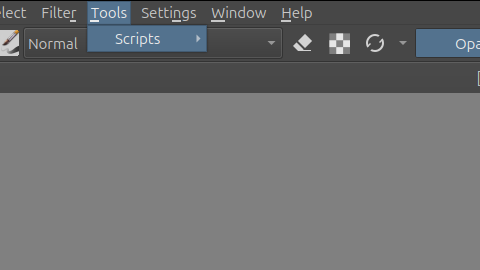
Hello, I am on trying to import a sprite sheet plugin for Krita, to my understanding it is in the script dropdown. However the menu does not open when I hover over it? Any way to fix this or work around it? Thank you.
Also, I saw this: Script menu does not open and I also do not see the python plugin option in Menu Settings → Configure Krita… as suggested in that post.
For context I just installed Krita from the app center and am using Ubuntu and have python installed as well.
Did it resolve both issues, or only the one with the not opening menu below Tools → Scripts, what in most cases can be reactivated through a restart of Krita.
To use the AppImage is always a good idea, because it is the only official version for Linux.
The missing option Settings → Configure Krita → Python Plugin Manager could often be found via scrolling down the sidebar in the Configure Krita-Dialog, at least if the maintainers of the non-official versions were so kind to add it to their build.
 Hello
Hello