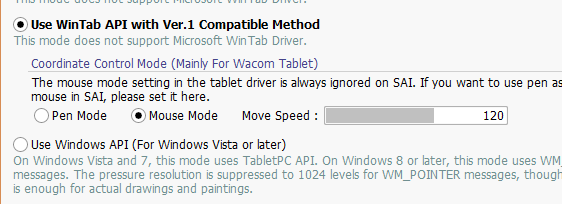
I just got Krita on steam, its been working good so far but i have an issue with my tablet that so far , only SAI has had the proper fix for it, sai’s mouse mode is independent and better than window’s mouse mode as it come with pen pressure, nothing else has pen pressure, not blender, not photoshop, not gimp.
I would like to know if it would be possible to implement a feature for people like me who would rather have the tablet work as a position relative to the last position rather than a screen mapping AND also have pen pressure. that way i can reach the edges of the app while still being in the middle of the tablet and make smaller scale movement while drawing using the entire tablet without the cursor teleporting around the canvas
for those who dont know, mouse mode on sai is a helpful support system that turn the tablet from [the cursor’s position on screen relative to the pen’s position on the tablet] and turn it into [the position of the cursor on screen is relative to where your pen were and resume where it connect again] so you can move from the middle of the tablet and middle of the canvas to the left edge, lift the pen then put it back down on the middle of the tablet and the cursor position will still be on the left side of the screen and track the movement you are doing from where you left it. to me this is a superior method of drawing, as if i was moving around the piece of paper when drawing or using bigger paper and working on it on smaller area for details instead of drawing on a post it note small tablet that the position is unflexible
I grew interest in Krita but it would be appreciated to have this feature considered since photoshop is heavy and cost too much for something that crash all the time and has mouse mode without pen pressure, SAI is great, light and efficient but don’t have timeline for animation and the dev responded a few time saying a timeline will never be considered, and krita is great, has timeline, flexible features but no mouse mode. there isn’t a single program that encompass the features i need to animate comfortably with my small tablet.
Krita doesn’t have tablet specific code and never will , if you want your pen to work in relative mode, you have to activate that in the graphics tablet driver. Relative mode is not the same as mouse mode.
I’m starting to get the impression that you’re just not able to configure your tablet together with Krita so that you can use pen pressure. Because in Krita you can of course work with pen pressure, with or without mouse mode. You just seem to be misinterpreting terms and their meaning, such as Mouse Mode.
There is only one thing that even SAI cannot do: help a mouse to use pen pressure. What is possible, but not only in SAI, but in any software in which you can link brush parameters to the drawing speed or time, is to simulate pen pressure using these parameters.
What graphics tablet do you even have? With mine I basically have three modes. Absolute pointer mode, relative pointer mode (only cursor coordinates behaves like mouse) and mouse mode (for old wacom mice) which has no pressure because it’s supposed to work with mice, which traditionally rarely have pressure, hardware wise.
I could imagine that SAI interfaces with the tablet hardware directly but Krita doesn’t do this. If it gets mouse signals from the operating system it treats the device as a mouse.
According to (wish)bug 383407 – Lack of support for relative/mouse mode for tablet , Krita doesn’t support relative mode. There’s some discussion of how to implement it (with Qt hacks), but it didn’t end up getting worked on. Though the report is several years old, I’m guessing it’s still accurate?
Comment 8 in particular also notes that SAI handles relative mode itself while the driver is still in pen mode, explaining why it’s a setting in SAI itself.
If you think we can read minds, then you are mistaken. You would at least have to tell us what kind of setup or what kind of information about or for what you need, as well as for which operating system it should be. Then we may be able to help you.
windows 10, as for all the other question, same as the OP, in SAI there’s a mouse mode with pen pressure that people here seem to referer as “relative mode”, and then freyalupen sent a link to an old post about attempting to do something about it. i don’t know if there’s an external driver or tool or app or api or resources or plugin that can help with that if krita does not and don’t intend to implement such a feature
What are you talking about? You opened this topic.
“relative mode” is nothing we just made up. It’s an official classification of how pointing devices work. While “Mouse Mode” is something only SAI uses.
As freyalupen wrote no one ever actually worked on this so, no. There is no up to date setup, no Plug-In and probably no external tool.
 Hello
Hello