Hello, i have this issue where using Sample screen tool occasionally results in me continuously picking color of off my screen, which makes it impossible to draw. Although i have plugins installed the issue has been present on clean version of Krita as well.
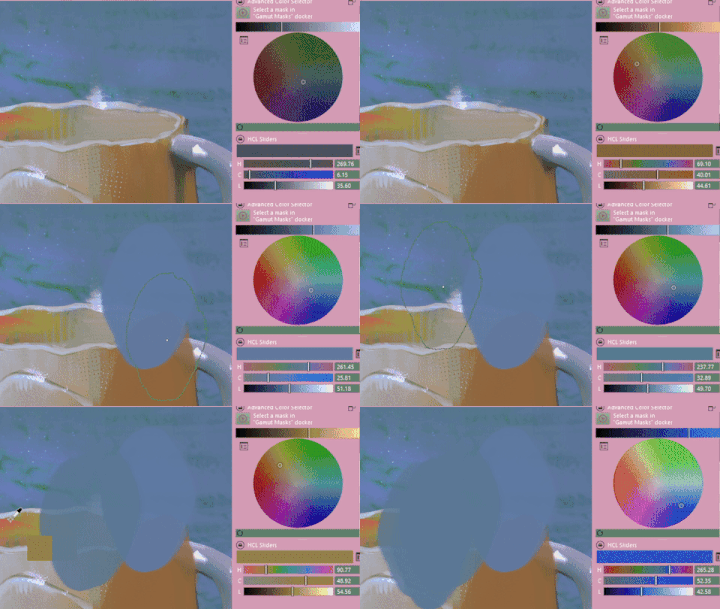
as you can see on the gif the color being picked continuously, and my input is being overwritten.
The issue seems to go away after restarting Krita.
I would appreciate any help! Feel free to ask questions!
Okay, the first questions are, what is your version of Krita, from where did you get it, which operating system are you using?
Do you use the eyedropper via shortcut or through selection of the eyedropper tool from the toolbox?
Because you named it so explicitly, which plugins do you use? Why did you suspect them as a source of the issue, and which in particular?
Michelist
My Krita version is 5.2.2 and i have got it from the official website. I use Windows 10.
I’ve used the eyedropper tool (specifically Sample Screen Color (Sample real canvas)) via a shortcut.
I only mentioned plugins because they were on the gif i sent. And i know that they’re not the issue since it has happened before I’ve ever had any plugins installed, so I decided to clear it up from the beginning.
I don’t know of any tool called “Sample Screen Color (Sample real canvas)” but that may be tooltip text for a non-English language.
The Toolbox colour sampler tool is selected for use by the ‘P’ key, a keyboard shortcut.
Or it can be activated while painting by pressing the ‘Ctrl’ key which is a canvas input setting (since it only works on the canvas).
Which tool are you using and how are you activating/selecting it?
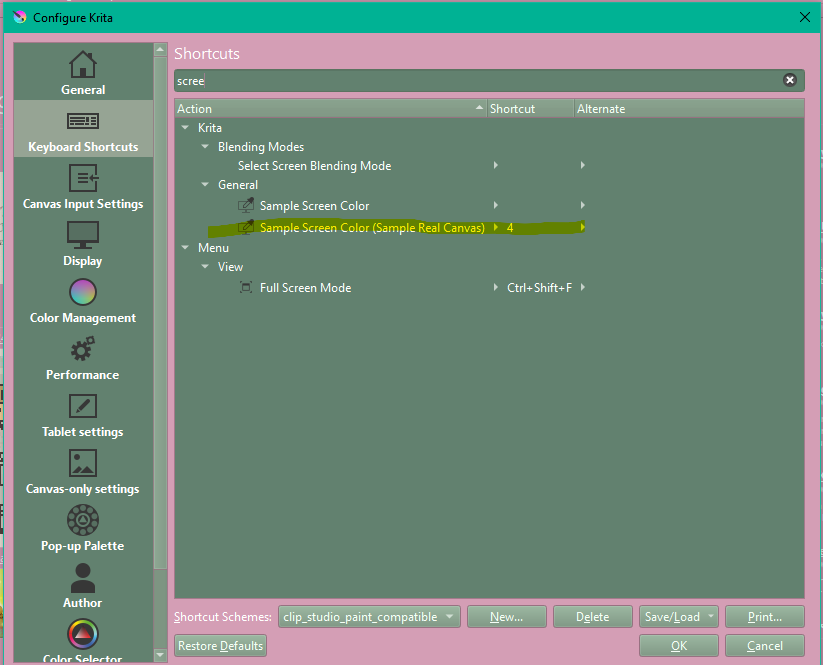
That is a new one and I hadn’t seen it before.
Using it, the cursor changes to a large black ‘+’ icon and when the canvas is clicked then the colour under the cursor is selected and painting mode resumes immediately.
I don’t see the behaviour you recorded.
Also, your recording shows an eyedropper icon so I’m wondering why that is.
I was trying to demonstrate how it looks if i manually color pick, just in case. (partially also that its impossible to paint with this bug :b)
Ok! I know what breaks it!
It all works fine for me if i click to select the color. However if instead of that i press the shortcut again, the color picking won’t stop even if i click.
The pattern is:
- Use the shortcut
- Dont confirm the color selection by clicking
- Use the shortcut again.
So, the bug also exists if you use the eyedropper picker, via the ‘P’ shortcut or by using Ctrl activation?
I just tried the ‘breaks it’ sequence as you described and had no problem.
However, I’m using the Linux 5.2.2 appimage.
I’ll try this on Windows 10 later or someone else might try it in the meantime.
Thanks!
When using Windows 10 and Krita 5.2.2, I do not see this and cannot provoke it.
Michelist
I’ve just tried it on Windows 10 with the 5.2.2 installation and I can induce it.
I set a keyboard shortcut of Shift+4 for Sample Screen Colour (Sample Real Canvas).
This enables you to sample colours from anywhere on multiple monitors which could be very useful.
Then I pressed Shift+4, moved the black cross cursor around and noted that the selected colour chaged continously according to the colour under the black cross cursor.
Then, without clicking anything, I pressed Shift+4 again.
The colour was continuously updated as I moved the black cross cursor around.
Then I clicked on a colour and tried to paint.
The act of clicking and holding it down to paint caused the colour under the painting cursor to be selected for the entire painted stroke.
Also, when not painting but with the paint brush active, the colour was continously updated. This was the case for all painting tools.
It’s as if the Sample Screen Colour function becomes permanently active in this situation.
As noted, this is with 5.2.2 on Windows 10 but it does not happen with the 5.2.2 appimage.
The only way to stop this was to restart krita.
@greenajd Please make a formal bug report as described here:
Report a Bug | Krita
Sign up and sign in the the bug tracker is needed,
When making the bug report, you can give a link to this topic.
Please post a link here to the bug report when it’s completed.
Edit: Minor correction made to a version number.
After reading your detailed description, I repeated this check, and I have to admit that I must have done something different the first time than I thought I had checked correctly.
Based on the description from you, @AhabGreybeard, I was able to recreate this behavior under Windows 10 and Krita 5.2.2, and I was also only able to stop this behavior by restarting Krita. So I can also confirm that this error exists.
Question: “Should I confirm it in the bug tracker too?”
Michelist
One of us can confirm it in the bug tracker when @greenajd has made the bug report and given a link to it here. Or somebody else might see it and confirm it.
Thank you! Ill report the bug!
@greenajd @AhabGreybeard I made some changes to this action and put them in this mr: Fix bug in "sample screen color" action when it was initiated multiple times without completing (!2140) · Merge requests · Graphics / Krita · GitLab
Now pressing a second time the shortcut without completing the previous screen sampling action will do this (when talking about actions here I mean “sample raw screen pixels” vs. “sample real canvas colors” actions):
- Cancel the screen sampling if the action is the same (you pressed the same shortcut twice)
- If the action is not the same, then cancel the previous one and start the new one.
See if you can test it both on windows and linux:
Test packages:
Windows: https://invent.kde.org/graphics/krita/-/jobs/1788161/artifacts/download?file_type=archive
Linux: https://invent.kde.org/graphics/krita/-/jobs/1788159/artifacts/download?file_type=archive
@Deif_Lou The changes work as you described on Linux Mint 21.3 and on Windows 10.
On Windows 10, there is something that I hadn’t noticed before which also happens with 5.2.2 but does not happen on Linux.
If you try to sample a colour from another application window then the black cross cursor changes to the Windows system cursor but still acts to sample the colour under it in the other application window.
At the same time as sampling the colour then the click will also activate any function at that location.
e.g. if you sample a colour from a button icon then the button action will be activated in the other application.
On Linux, the black cross icon does not change and you can sample colours from other application windows with no effects from clicking.
@AhabGreybeard thanks for testing.
For the windows issue, i think it is not related to this but to the underlying system for sampling colors, which was already present before @urzeye and I added these actions. Can you try these 2 things when you have time, please?:
- on windows, use the color sampling feature that is in the select color dialog and, when hovering other app, see if the cursor changes to the windows one, and if the click activates its widgets (the underlying system is the same as the actons one but the activation code changes).
- check the same thing but on an older krita (5.0 or less would be nice).