I do all my artwork on a 15" XP-Pen screen tablet. I’m contemplating getting a 22" or 24" screen tablet. My thinking is… there would be less need for zooming and panning. Does anyone have any thoughts on this? What your experience upgrading to a physically larger screen?
2 Likes
I never had a tablet with a screen, but when it came to screenless devices, I always preferred the large tablets we had at work. These were about 32’’ to 36’’ in size and absolutely fantastic, but in the early 90’s you had to spend a month’s wages on them, if not more.
Michelist
1 Like
This depends mostly on you and your behavior. I have a huge screen tablet and I still zoom in a lot for details (or more likely stick my nose to the screen).
What a big screen allows for is for having much more of your artwork visible all the time. Krita’s UI can stick to the sides and leave you much more space for drawing which allows you to do long uninterrupted lines with precision. On my big screen I rarely use canvas only or full screen mode anymore because that extra space doesn’t really matter much. So I have good access to all the tools and menus and a huge canvas area all the time. It also allows me to draw more with the whole arm instead of just with the wrist. Better precision, control and less strain for the wrist and hand.
On the other side your pen has to travel more distance for many things, but this was easily solved by rearranging Krita’s interface so I have most used dockers on right side, when you’re left handed you probably want it the other way around, so you don’t have to reach to the complete opposite end of the screen too often. Uge displays also take much space which isn’t to much of an issue in my atelier but would be a problem in my old home. My Cintiq is connected to a desk mounted rotatable arm, so it floats and is easily put a side or adjusted, if needed. The keyboard can be put under it for easy access for shortcuts with the other hand.
Also Krita’s interface can get kinda tiny sometimes on huge screens with high resolutions. I would not recommend getting anything below WQHD resolution for bigger screen tablets because otherwise you will see all the individual device pixels all the time and you want to draw and not count transistors. My Cintiq is 27 Inch, I believe and has 4K resolution.
1 Like
I have tried both small (13) medium (16) and larger (22) sizes and all have benefits and drawbacks. With the smaller screens I found the drawing space too cramped and the interface too small to be comfortable, especially with desktop apps like Krita with quite a bit of UI. I thought getting a big 22 inch Huion would be the best thing: more comforable for the eyes, more space to draw. And it was, sort of… but I found it hard to get used to it, as I was using a screenless tablet most of the time, and very accustomed to using keyboard shortcuts. Having a big screen that is hard to move and hard to place a keyboard next to conveniently, so I never really got the hang of it, and as drawing is only a second job and I could not really use it for my main job, I had to put it to the side often, and I used it ever less because of these inconveniences. Another thing with the big screen as Takiro mentioned is that you have to reach around every time to get tools or functions, which was actually quite annoying to me) This is certainly my personal thing and it might be very different to you.
If I would pick a screen tablet right now, I would probably pick a medium to large size (18 inch or so), and make sure that it is not too heavy and cumbersome to maintain. And depending if you have it fixed at your desk or want to be able to move it aside: check how the screen is connected. Some screens have single cables with USB-C which is more convenient if you want to be able to move the tablet. The wiring situation of the Cintiq was so incredibly annoying and fragile that this was one of the main reasons I got rid of it.
1 Like
Thanks you all! This helps me my decision😁
I miss the big sweeping strokes in sketching that we used to do in college, with charcoal on those huge newsprint drawing pads. 
2 Likes
In this case I feel like you should go for a really big tablet, definitely larger than 19 inch.
As long as you can rearrange your work space primarily for art creation, then you should be fine. A monitor arm is an absolute must, and these larger tablets have a VESA mount for it. Figuring out an ergonomic setup is the biggest challenge with screen tablets.
I tried switching to a screen tablet a few times, but the benefits weren’t really there for me. The final nail in the coffin was the fact that I need to share my space with a day job and I didn’t have room for a dedicated art station. On the other hand putting even a large pen tablet away is not that cumbersome.
1 Like
I went from a Wacom bamboo pen and touch to a Wacom Citiq 24 pro. And bigger is better I wanted out of my tiny tablet that did not match my monitors scale and with a tablet with a display it is one to one. My tablet is my monitor now. But I would suggest checking is if the pressure levels and the sensors per area are good. If those two are better you just need to worry with the screen.
Also I would recommend taking a look into ergonomic options since bigger tablets are not pickable. Your back with thank you for it.
2 Likes
I’ve tried a number or tablets throughout my artistic journey, from screenless to different pen displays. Nothing beats a good 24-inch pen display for me. I currently do all my digital work with Huion Kamvas Pro 24 (4k) pen display. I have a 2-monitor setup (a regular one and a pen display), both monitors are on monitor arms so that I could switch them places as I see fit. A smaller screen (like 13-inch) can be good for pixel art. Make sure you use a felt nib with your digital pen - it makes life so much easier :3
1 Like
I have an artist pro 16 tp It’s same screen size as you 15’.
I think it’s a great screen size.
Personally i really don’t mind the size of the screen over 15’ and i thing a big screen just take a lot of space for not really any bonus. And during travel you will really regret it.
Under 15’ it’s a bit annoying because shoulder mouvements are contained.
At 15’ you got a nice °> angle
Wich matter a lot is a minimum 4k resolution for your screen tablet.
Under this i don’t think it is comfortable to draw.
But that is personal taste.
Maybe if you are into traditional painting you will love a big board and then the confort a big screen. Am more pen and ink i don"t need a wall to paint on.
1 Like
@alvawings
I’ve never tried a felt nib. Can you tell me the advantage?
It helps a lot if you’re a traditional artist switching to digital media since it adds much needed friction against the pen display’s screen. Plastic nib feels like you’re trying to draw on a glass surface with a ball pen.
1 Like
15" to 18" is a perfect size for me.
1 Like
I’ve been using Wacom for more than twenty years since the Intyos series. The first one was a small regular board the size of a notebook, a year later I sold it and bought a new bigger model, and that’s how I got to the largest oversized model. It was just huge, with a lot of buttons. I had three pens and a mouse, and I was thrilled with it. Then Cintig models with a screen appeared, and I repeated the journey from the small to the DTK 2400HD. I just love it, it’s big, there are so many buttons that I even tuned a couple of them to music.
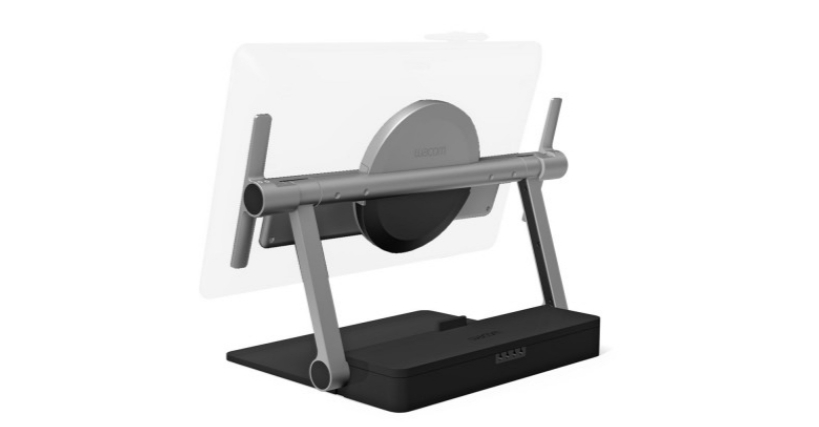
The bottom line is that the hand walks on the canvas from the elbow, many complain that you need to reach out, it won’t affect you, because on Windows, Wacom has native drivers, and you can configure everything on the screen through the circular menu, there are no restrictions on hot commands. The menu pops up right under the tip of the stylus, anywhere on the screen. The main thing is to take a model with 24-bit color Depth support. This is important right now. There, the smoothness of the gradient in the drawings is not visible to the eye. I have my old man 8 bits, and when I open the drawings on the 4K TV screen, the gradient transitions are visible. The time will come to change to a new one, but with a size of at least 27, it’s better to connect the tablet via the DP port on the video card, all other options are nonsense. No matter what anyone says, size plays a big role, in addition, it protects our eyesight, because we sit for hours on end in a creative rush. I’ve tried many models from other manufacturers, and to be honest, even an Apple can’t compare to a Wacom. Do not take a stand on the Scales, it will not give you convenience. Choose a tabletop one, with the ability to place it in different angles like an easel, its advantage is that you can lift the tablet to the maximum and turn it horizontally, and if you sit too long, you can draw standing up. Here is an example of such a stand Now some tips on how to reduce the consumption of consumables. Instead of tips, you can insert a fishing line of a similar cross-section into the stylus, everything works, to protect the screen, buy a roll of a transparent film close to the size of the screen, in which bouquets of flowers are wrapped, and you can pick up any synthetic household gloves, cut off unnecessary fingers, and burn the edges with a lighter so that they do not crumble, and finally, if the brightness of the screen fades then you can open it and replace the LED strips with an LED strip with an indicator of 5000K.
2 Likes
I agree with most of it but this quote. Long drawing session comfort and eyes protection are not related with size of screen. It is with body positioning, distance from the screen and also the type of screen. The size doesn’t matter.
If by comfort we talk about gesture drawing. Yes big screen matters. But I don’t think it’s because you can sleep on the tablet that your back will not hurt if you know what I mean 
But tbh the real reason to buy a screen over 24’ is either you are a professional and need to work on very specific art or a painter and want to simulate the size of a real big board.
Under 15’ you search mobility over comfort like student and some business commercial
And between 15’ an 24’ is well everything else
Ofc you can buy what you desire but real quest is those size of the screen will make you a better artist?
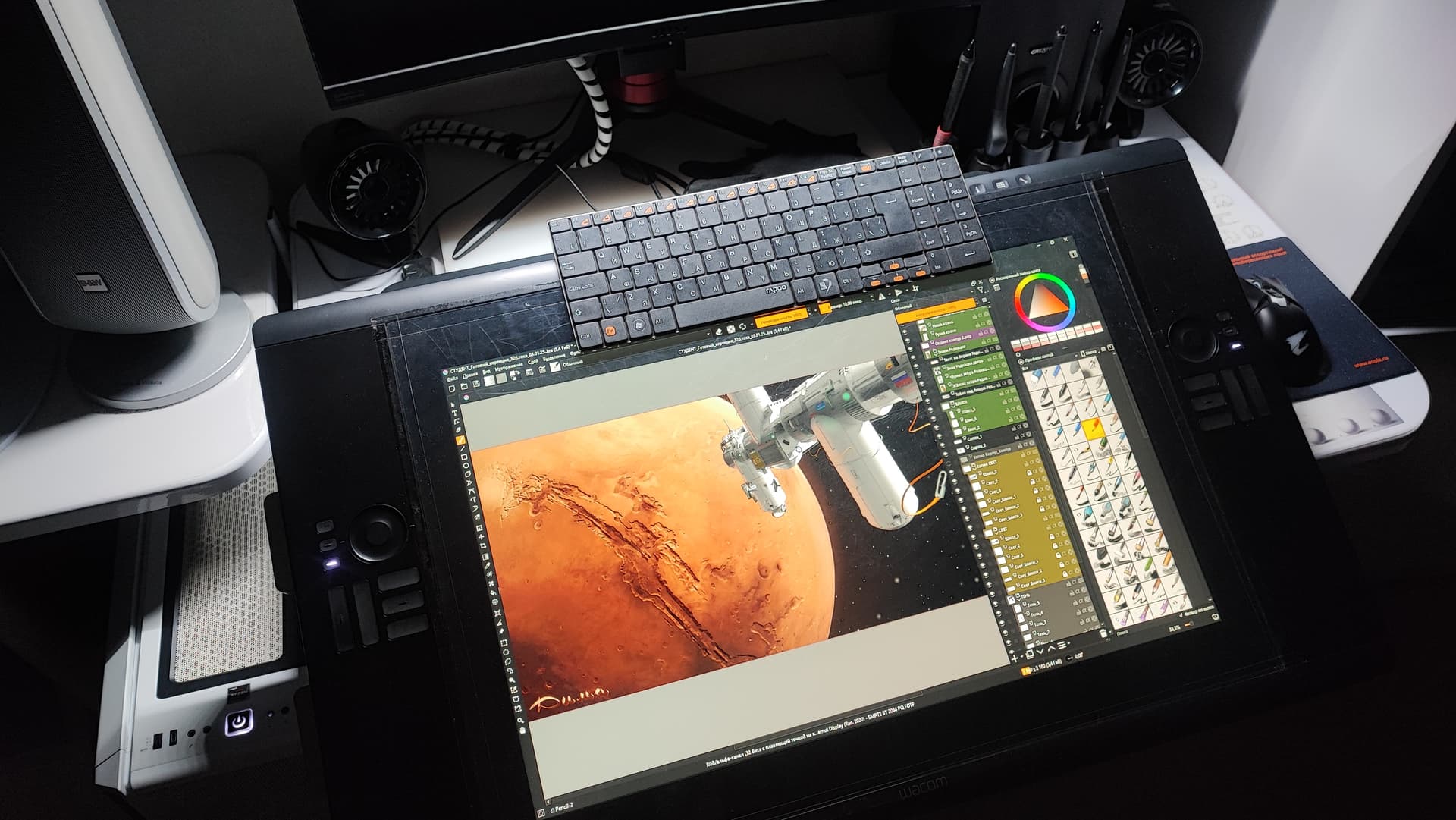
@TheInkedKnight hello. Elixiah asks for advice for herself. Her portfolio and custom-made works speak of her seriousness and knowledge of her business. Based on this, I recommended the large format. If there is an opportunity and a desire, why not. Yes, you’re right, it’s not the brush that makes a person an artist, you can draw with a stick in the sand if you have the talent. I had a lot of models and I couldn’t stand the Cintig 16 for even a year, so I sold it. After an hour, my eyes started to water, I constantly had to zoom in on the canvas, losing its overall appearance, my wrist quickly tired, various supports were needed, and so on. I bought a Cintiq 21UX much better, but I wanted more, even more …  Seven years ago, by the will of fate, an advertising film studio hired me to repair it, of course I boasted and showed how I can draw on a tablet, imagine yourself to see the tablet of your dreams and pass by without touching, you just have to be a fool
  . Their boss was shocked that I started doing
  on him without looking, half the studio was going to watch the show live, like some construction worker in Photoshop drawing
  . Anyway, the boss gave it to me, you know, and he gave me a Cintig 24HD and a bunch of other things. I adore it, it’s comfortable, you can sit or stand on an easel or lean back in an armchair and put it almost on your feet… My verdict is, the more the better. And it doesn’t even matter that it’s for a hobby.
So that you don’t think I’m being silly, I’ll show you a photo that I really know what I’m writing about.


@TheInkedKnight привет. Elixiah спрашивает совет для себя. Её портфолио и работы на заказ говорят о серьёзности и знании своего дела. Исходя из этого я рекомендовал большой формат. Если есть возможность и желание почему бы и нет. Да вы правы, не кисть делает человека художником, можно рисовать и палкой на песке, если есть талант. У меня было много моделей и Cintig 16 Я не смог выдержать и года, продал его. Через час начинали слезится глаза, постоянно приходилось приближать холст, теряя общий вид, запястье быстро уставало, требовались различные подставки и тд. Купил Cintiq 21UX намного лучше но хотелось больше, ещё больше… Лет семь назад по воле судьбы, рекламная киностудия наняла меня делать им ремонт, конечно же я похвалился и показал как умею рисовать на планшете, сами представьте увидеть планшет мечты и пройти мимо не прикоснувшись, надо быть просто дураком. Их Босс был шоке от того что я не глядя начал вытворять на нём, пол студии собралось посмотреть шоу в прямом эфире, как какой то строитель в фотошопе рисует. Короче Босс подарил его мне, понимаете, взял и подарил Cintig 24HD да ещё кучу всяких приблуд к нему. Я обожаю его, удобный, можно сидя, стоя, как на мольберте или откинувшись в кресле опустить почти на ноги… Мой вердикт, чем больше тем лучше. И даже не важно что это ради хобби.
4 Likes
That is an impressive screen tablet! I’m feeling more and more like I want at least a 22" with 4k resolution. Thanks for all your input. 
4 Likes
No I never intended to pretend anyone silly or deny the experience of others. Sorry if my comment touched you. I wanted to share my opinion on that subject that is all because I think that before to be the tool of an artist unfortunately graphic tablets are a business and the price of a big screen is high like really high… compare to the standard. So I personally don’t think that this investment worth it unless you really feel like you need it. Ofc it’s just my point of vue and no offense to any big screen users. And as you mentioned it with the stick example the money we spend on tools is not related with the quality of our work.
Also about configs I can understand that “zooming” and all can be annoying. I don’t share this kind of problem as I draw like I play video games. I have half a keyboard on left hand full of macro and I press 1 button for sometimes 3 actions on the screen. For example i erase with selection tool then when I press B key it delete everything in the selection then deselect and then give me a brush. This kind of stuff. So I feel it differently from the experience you seems had with a small screen moving over and into the page feel like moving the character of a game to me.That is why personally a bigger screen doesn’t worth any money as i just use it as a page. I barely need the dockers to be honest I can draw full page screen because we have so much shortcuts configuration freedom I don’t need them anymore
So to answer to that topic that can be read by many people looking for advices : My answer is no Bigger is not better and unless you really need does extra inches for specific or professional reasons don’t waste your money.
2 Likes
I use my Wacom Cintiq 24 pro with my keyboard. I get the price range argument but I am not locked out of workflows.
1 Like
You didn’t say anything wrong, I wasn’t offended, there’s no need to apologize, you’re entitled to your opinion.  It’s probably my translator who put it wrong. Yes, I agree with you about overcharging.
Вы ничего плохого не сказали, я не обижался, не стоит извиняться, вы имеете право на своё мнение. Вероятно это мой переводчик выразился не верно. Да я согласен с вами, по поводу завышения цен.
1 Like