Hello!
I would like to take a computer screenshot with Krita. What i do now is save the photo through windows and searching for the photo in Krita. Is there a faster method for getting a screenshot and sending it to krita?
Thanks!
Hello!
I would like to take a computer screenshot with Krita. What i do now is save the photo through windows and searching for the photo in Krita. Is there a faster method for getting a screenshot and sending it to krita?
Thanks!
Hello and welcome to the forum 
There is a much faster and better way of taking a screenshot.
On the top row on your keyboard, to the right of the F12 key, there is a key labelled ‘PrtSc’ (Print Screen).
Have krita running, then have some other application active and selected if you want a screenshot of that instead.
Press and hold the Shift Key then press PrtSc. i.e. Shift+PrtSc
That will take a screenshot and place it on the system clipboard.
In krita, do Edit → Paste into New Image. That will give you the screenshot as an image in krita. Then you can do what you want with it.
Thanks a lot for your response! I am currently running six monitors. When I use Shift+PrtSc and Paste into New Image all six screens appear in the photo.
Aside from clicking on the screen I want selected prior to using the hotkey, is there another way of selecting the screen?
You can use the image viewer IrfanView to take screenshots of the monitor in which the mouse pointer is located at the time of the screenshot.
Another advantage of IrfanView over the Windows on-board tools is the ability to photograph the cursor as well. You can find the screenshot tool in the Options menu, the shortcut is the key C.
How it works is described in its help, you can call it via F1 or the Help-Menu…
The software is free to use for non-commercial use, commercially it should be affordable, you can get it from here:
By the way, Windows has another screenshot tool of its own, “Snipping Tool”, you can find it in the Start menu and there in the Windows Accessories folder. I myself don’t like and use it, but there are many users who like it, maybe you will like it, and if meets your needs.
Michelist
Cool! I am using windows snipping tool. after reading your comment I understand how to use it more dynamically for my needs. Ill also look into IrfanVFiew
I have one more question to complete this sequence. After I draw on my photo I would like to copy it with the drawings included and paste it elsewhere. I tried ‘Create Copy From Current Image’ but did not have luck including the drawings with the image. I now see I can use the ‘Rectangular Selection Tool’ and drag across the perimeter of the image. Though, is there a faster way to copy and paste an image that was just drawn on?
When you say “photo”, do you mean the screenshot image. (A ‘photo’ is made using a camera.)
Did you ‘draw’ on your image by creating a new layer and making annotations or whatever on the new layer?
File → Create Copy From Current Image will make a duplicate of the current image in a new tab, including the layer structure.
If you want to have a new image that contains just one layer that has the original screenshot plus whatever you’ve drawn on it, you can right-click anywhere in the Layers docker and do Flatten Image.
To avoid further confusion, you can upload a screenshot of your entire krita window to see what you have in the document you’re working with.
By “photo” I do mean the screenshotted image. It is single layer with text, rectangles, ellipses, etc.
“Copy Layer” Worked for me! Thanks a ton.
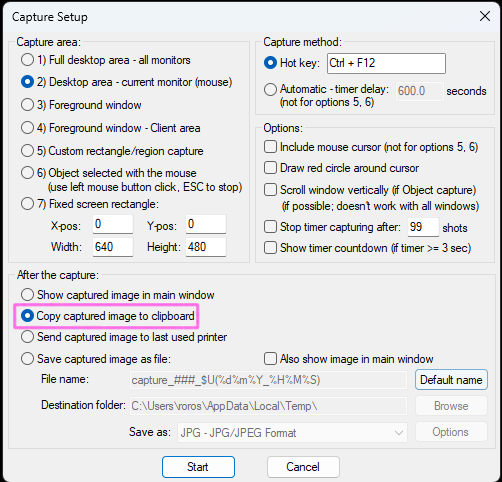
Regarding IrfanView and as seen in the attached screenshot, I would like to screenshot a monitor and ‘Copy captured image to clipboard’. I would then like to ‘Paste into New Image’ onto Krita. Though, this combination between the two software programs is not working for me.
When I change the IrfanView option to ‘Show captured image in main window’, take a screenshot, and copy the screenshot from IrfanView, I am able to send to Krita using ‘Paste into New Image’.
Do you understand why copying to clipboard in IrfanView will not translate to Krita?
Could it be that at the time of the screenshot, you had not yet closed the Windows snipping tool?
Or are you possibly using an advanced clipboard? I’m referring to a program such as ClipMate¹. Or, to also name others, CopyQ, Ditto, ClipboardFusion, for example, which are just embarrassing experiences if you’ve ever used ClipMate seriously.
This kind of software often interferes with each other’s use of the clipboard, only the method suggested by @AhabGreybeard via Shift + PrtScrn, which also works for me only with PrtScrn, works together with all these programs, as it is the original underlying function of screenshots. The others build on it, and there can only ever be one software that intercepts the output to the clipboard, as far as I know.
Only OneNote doesn’t clash with the in-house clipboard, which, if it would clash, I guess would be embarrassing for MS. 
Michelist
¹ Off-topic: Although not developed since 2013, ClipMate is still the best Windows clipboard extension in my eyes, I’ve been using it since 1992. And if you look for example at Alternative.to, a website for pointing out software alternatives, you’ll find similar views there, and not only there, if you search the web.
ClipMate is still distributed for ~35$ (only OneNote from Microsoft comes with ClipMate so about behind, or cheeky formulated first comes ClipMate, then long nothing before OneNote comes and then comes again long nothing before the rest of the pack crawls behind. A big disadvantage of OneNote is that you don’t know who else is reading the collected data. Because OneNote can only be used after logging into his personal MS account.).
This topic was automatically closed 3 days after the last reply. New replies are no longer allowed.