How to make a script to copy the drawing from the active paint layer and paste it into the existing paint layer below?
Right-click on layer, then merge down. Why do you need a script? If you want to keep the drawing layer as well, duplicate it first then merge the original down. It takes only a second.
Welcome to the forum.
Thanks  ! I can do it manually. But I need to automate a step of my work, because I need to do it several times.
Hello @Umbarbudo and welcome to the forum 
I’ve changed the category of your topic to a more suitable one.
Understood.
There is a paid plugin that you can use for such automation tasks, it is called Actuator - Automate Sequences of Actions and you can get it for ~ $/€10.
I use it for lengthy tasks where I have longer order chains that are repeated over and over again. You can assemble your command chains from the commands available in Krita, even functions of installed plugins can be addressed. It also allows you to manage more scripts than with “Ten Scripts”.
Michelist
How to make a script to copy the drawing from the active paint layer and paste it into the existing paint layer below?
I tried using Docker Task Sets, but it doesn’t work as I thought. It only serves to save the step by step, it is not reproducible with one click.
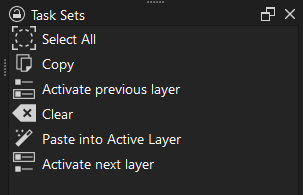
So I tried to make a script for this sequence of actions, but I don’t know anything about programming. It ended up like this:
from krita import *
Krita.instance().action(‘select_all’).trigger()
Krita.instance().action(‘edit_copy’).trigger()
Krita.instance().action(‘activatePreviousLayer’).trigger()
Krita.instance().action(‘clear’).trigger()
Krita.instance().action(‘paste_into’).trigger()
Krita.instance().action(‘activateNextLayer’).trigger()
It didn’t work!
If anyone can help me, I would be very grateful!
Your order of operations is almost as it supposed to be.
One catch is the “paste_into” action. On the Krita menu this command is represented by (Edit → Paste into Active Layer).
Once you use this command the transform tool is activated. That is what the action probably does not do.
My guess is that this action actually not usable with “trigger”
The way I see it is to make script that copies the values of pixels directly from layer to layer.
May I clarify what you are trying to achieve?
As far as I understand you want the content of the current layer transferred to the the layer below (on a layer stack), clean the current one and be able to keep drawing on it.
Is it correct?
EDIT:
If the my assumption is corect, why not just use two actions:
"merge_layer"
"add_new_paint_layer"
Ok. I think I got it.
By the look of your sequence you want to clean everything that is in the layer below, paste the content of your current layer and return to your previous edit.
If the naming of your layers is not important you can use this sequence of actions:
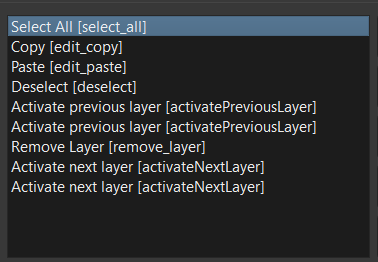
Here is the small video how it works with Actuator:
The sequence also could be tweaked. Instead of copying and pasting things you might just duplicate current layer and remove the layer below the two.