I think it would be very helpful if there was a way to see a diagram of the keyboard with all the shortcuts pointing to each key, or even as a mouseover for each key. I’ve setup a large amount of shortcuts. But after I’ve not used krita for some time, when I come back to it, I’ve forgotten all my shortcuts. It would help a lot if I could see my keyboard (diagram) at a glance and see what keys do what. Like a shortcut cheat sheet that updates dynamically. This will also be helpful to see which keys are not used (for you), that you could potentially use for other shortcuts.
Maybe this helps? It is made by @EyeOdin long time ago, I can’t even remember where I’ve found it. Because of its age, it can be that not everything is correct these days.

Michelist
1 Like
Those are my custom keyboard shortcuts. they are different from the default ones a bit.
At least it is a beginning. And one can use it as a base and fill in one’s own shortcuts.
Michelist
Yes, maybe if there was a script to output the active shortcuts in a jpeg like this!
At least, I don’t know of such a script.
And if you’ll print out everything, this could require a very large format. If you print out a text-list of the possible assignments, then you get over 70 pages in DIN A4, there is by far not every shortcut assigned, but it is already quite a lot, even if it is of course divided on the number of keys.
Michelist
This would be quite helpful. My DAW recently added a [Find Command] function that can be invoked via hotkey. It presents a small dialog that you start typing words/letters that are in the command name and it presents a list of matches that can be selected for execution. Something similar for Krita, that also displays assigned shortcuts, would be an excellent alternative to simply display/print of maps or lists. One could be productive while learning shortcuts.
For finding things press ctrl + enter and search by keyword
2 Likes
In Krita do ‘‘Settings’’ >> ‘‘Configure Toolbars…’’ and put ‘‘Search Actions’’ into one of your toolbars. There you can search for many things, mainly actions, but layers work also. With huge layer-stacks it is very handy, at least if you tend to have a properly named layer-stack. I can jump this way very easy to far away layers.
@raghukamath has named the other way to call and use this tool in Krita.
Michelist
2 Likes
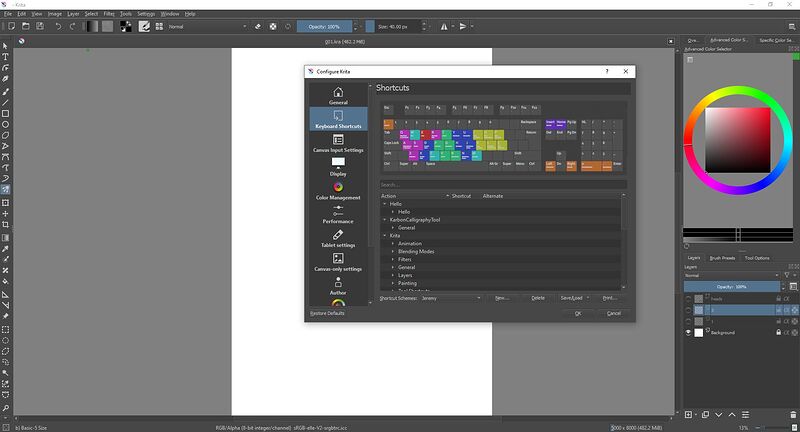
This was the mock-up I did for the keys display a long time ago
The big image is what I use to update my keyboard shortcuts when krita changes the names of the shortcuts. Which is pretty often for what it is.
3 Likes
Yes! Exactly like this! Great mockup!
1 Like