Is it possible for the Krita dev team to add some way to see the audio files we add for animation? I’ll try to add a picture, hopefully it’ll make my question more understandable.
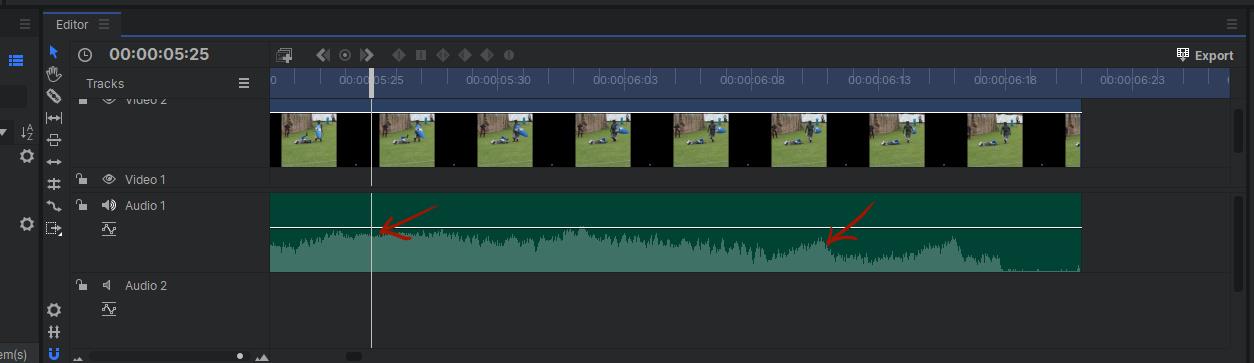
That and other additional audio facilities have been asked for and suggested many times before.
I don’t think it’s going to happen any time soon if at all. I believe that it’s difficult and not the focus of development and fixing effort.
Only a developer could give a definite answer though.
A little workaround you could try is to the animate the waveform in another software and import as an image sequence in Krita. Did a little test in Blender with an half transparent overlay and animating the waveform in x position:


Might be some software out there to automate this already?
It’s something that’s been on the TODO list for ages… Now that @emmetpdx and @eoinoneill have landed the animated transform masks, they have started working on multiframe filters… There’s a lot going on but there’s also always more to do.
For what has been done and is coming in Krita 5, check out Merge Requests · Graphics / Krita · GitLab
(If we implement this, we probably can just nick the audio display from kdenlive – Qt doesn’t offer a default waveform widget.)
Thank you so much for the reply, I was wondering about something like this myself. The audio scrubbing was a bit difficult for me (and for others too, I think). I just wanted to let you developers know that you’re doing a great job. This is the best obtainable art resource on the computer I’ve ever used. Have a wonderful day, and make sure to take care of yourselves!
Well thanks for informing us. When it does get implemented into Krita I will have everything I need to create cartoons and not have to bounce projects between three different kinds of software. I do love an all-in-one package.
not only be able to see, for a real animation workflow we need to be able to hear specifically the sound on each frame, and be connected to the speed scrub we made:

here is a video example on tvpaint 11: Audio Scurb on tvp11
Suppose you could just use the grease pencil in Blender for the lip sync parts. However, I prefer drawing in Krita. It has a smoother feel. Apparently, it’s been almost 2 years since the last reply to this topic. Have there been any updates to this topic somewhere? Or, has anybody invented any new, feasible work arounds.
Just wanted to say I first used an audio import in the animation yesterday and was very confused that there was no visual indication whatsoever that it even worked. You can only tell when the sound starts playing with the animation.
So yeah, I think this is a needed feature.
I’m still working on solutions. I switched to Linux and so I can’t use adobe Character Animator or Animator.
I tried a free program called Papagayo, a lip-syncing program. but it doesn’t work on my system. maybe it will work for you https://www.lostmarble.com/papagayo/.
also there is Lip Sync Animation: How to get smooth and realistic results with Pixbim Animate Photos AI | PixBim ,is interesting (not free but cheap)
i tend to conceive the thing, that is, draw it (the character)in krita as I do a sketch session.
but as for animating the lipsync for free. I think at this time the grease pencil in Blender is the best option. import your drawing from krita then just have one window open with a waveform and one with the grease pencil. here.s a good tutorial. 2D Lipsync animation in Grease Pencil - Tutorials, Tips and Tricks - Blender Artists Community.
As for krita it’s open source, maybe you can come up with something. The question always is, “do you want to spend your day coding or drawing?” As for a development solution/hack, I don’t think it should be too difficult. Even something as simple as a dot marking the peaks of waveforms would be helpful.
You just have to accept krita has limitations and much of it is developed by volunteers.
even with its limitations, krita is my favorite drawing program.
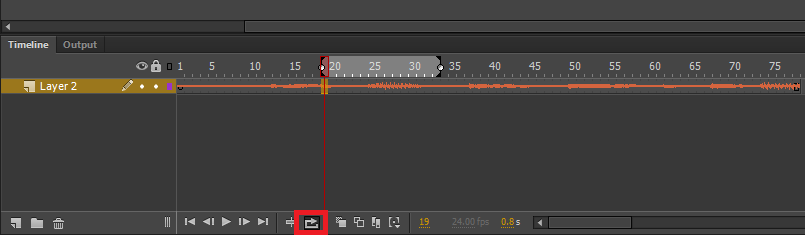
Hello!
i use Krita to animate a lot lately, but i’ve come to an issue that slows down my work; syncing is unnecessarily tedious
I usually check frame by frame to find the moment i want to sync the animation to, which is a hassle due to my slow computer. but even if one had a great computer its still a waste of precious time. my requested feature could help pinpoint the frames which need to be synced and allows the user to instantly make progress by skipping the searching part.
I used a few editing softwares in the past that had a similar feature, i cant remember their names but the feature is simple enough to visualise just from me describing it.
how it would work and look: it would be great to have an option in the animation audio menu to “visualize audiowave” as a toggle. and upon turning it on–two ways to visualize it can be implemented, i will be happy with either–1) audio will be visualized in the background, essentially it will span the background of the timeline and could be highlighted with a high contrast color, or have an inverted effect, it is up to the developers to decide. or 2) audio will be visualized in a separate channel, the new seperate channel is pinned to its spot in the timeline, either above the very top layer, or below the bottom layer, and it could have the option to increase or decrease its vertical size.
i hope i was able to make a good feature request, and hope that the developers take my request into consideration.
thank you for reading through my post
 Hello @TDA, and welcome to the forum!
Unfortunately, this was requested already countless times in different wordings. So, you could have spared yourself a lot of work, and us too.
If you had searched for open feature requests with your topic, before creating your feature request, a thing which you are asked to by one of our many rules and guidelines, you had found numerous closed and a few open requests on this. Please try to be so kind and obey this for future feature requests, it helps to reduce frustration on your side. 
If you are interested in general how we like to see a feature request asked, and to have chances to be successful and accepted, you can read it up in Krita’s manual which has a whole chapter on it:
@raghukamath / @sooz / @Takiro / @tiar / @wolthera: Would you be so kind to close and merge this feature request with the Seeing the audio file in the Timeline? , it at least adds with the toggle (good?) ideas to that request, but does not necessarily deserve to be the next open request on the topic.
Thank you!
Michelist