I have a small layer on top of a big canvas.
I want to edit that small layer without adding unnecessary pixels anywhere else on the canvas. For example, i’d like to be able to use the fill tool on that layer without expanding it and filling the entire canvas.
I’m hoping that there’s some “Select all within layer’s boundaries” option, but i can’t find one anywhere.
Does that option exist? Are there any other ways to do work within a layer?
Locking or inheriting alpha doesn’t work because the layer contains empty spaces.
Alternatively, i’d like to be able to use something like a clone layer that would take an image from one view(open .kra file) and clone it onto another, and then update it in real time while i’m editing the source.
(I don’t think it’s possible, but might as well ask because you never know.)
On the smaller layer, click on the Preserve Alpha icon. This is the last icon to the right of the layer name and looks like a checkerboard (not the same as inherit alpha).
Select the freehand brush tool and the new colour. You can now make broad strokes to fill it in quickly but it will not create any new pixels.
I assume you mean these icons:
For some reason krita also calls them “locked alpha”. I guess it’s related to the lock icon added on top.
Using that option is problematic if i have to add extra details to empty spaces(where the alpha channel is visible)
My current solution to my problem is:
-taking the small layer to another view/instance of krita
-changing the canvas size to the layer’s size
-adding a new layer and filling it with color
-moving that group back to the initial view
-using the contiguous selection tool on the filled layer.
It works, but it’s very tedious, especially for high amounts of small changes, so i’m hoping there’s a more effective solution.
That will work but it’s way too many steps. I’ve never had to move a layer to another instance to get Krita to do what I wanted. It would be easier to help if I could understand what you’re trying to accomplish instead of trying to find a way to “Select all within layer’s boundaries.”
Can you show us your workspace, the whole thing including the layers docker with the smaller layer (the one we’re trying to edit) highlighted in the layers docker?
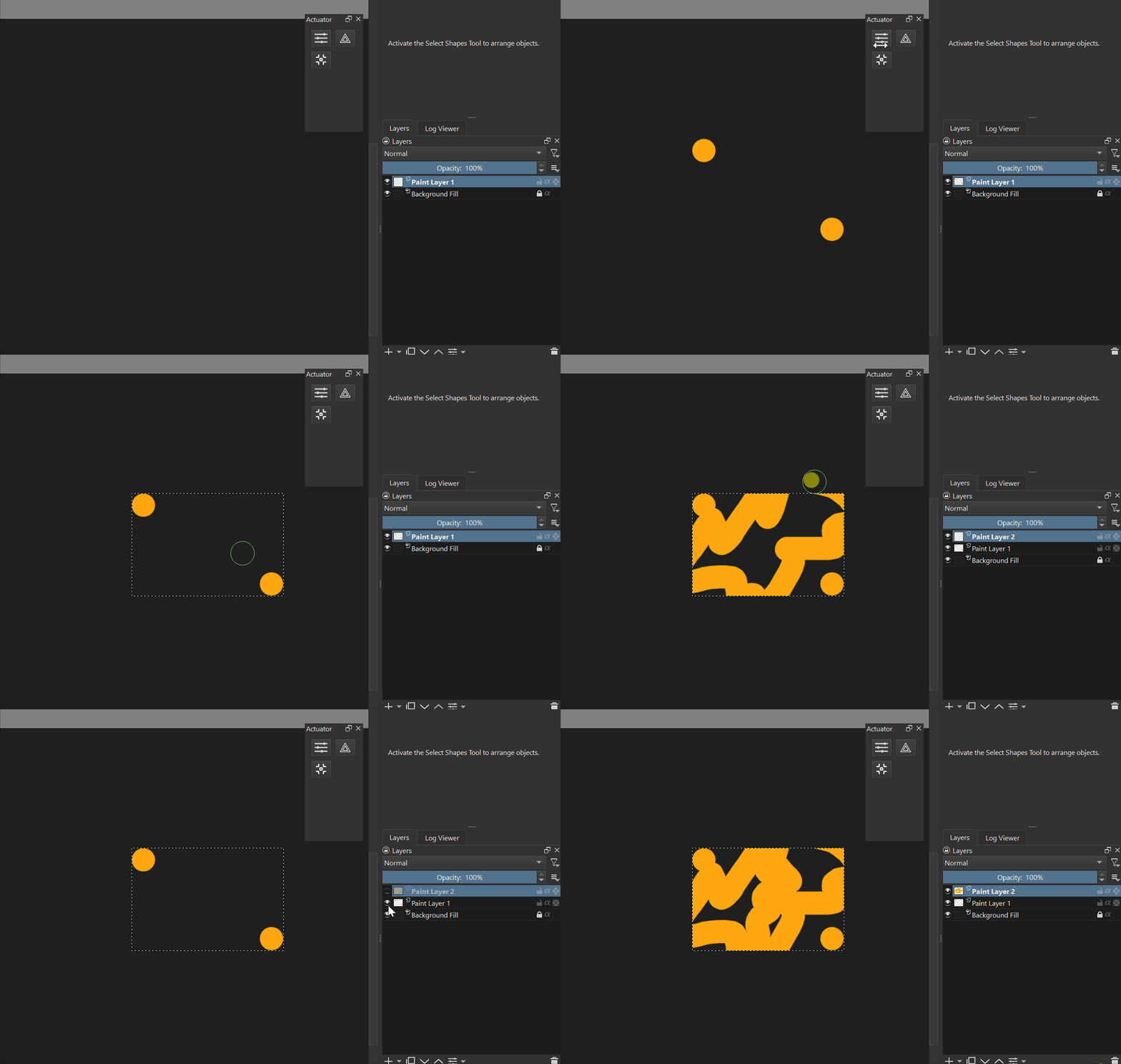
If i don’t apply the selection, the result i get is this(layer increases in size, the whole canvas is filled with color, the whole file takes more space and uses more ram than necessary):
To get the result i need i place the small layer into another view, trim the canvas to its size and add a layer filled with color:
Then i add it to the main view and use it to make the necessary selection:
However, not only this solution is tedious, it also results in losing the initial position of the small layer upon bringing it back to the main view, ending up in it being pasted in corners.
So unless i make the filled layer in advance, i also have to move the result manually until it properly fits within details of the main image again.
I tried to simply work on the smaller layer separately instead, but it’s really hard when i don’t see how it looks on top of the larger layers. I really need some way to work on the small layer while also seeing the whole image(and not affecting it outside of the small layer’s boundaries.)
I assume that you want to have rectangular selection. And it will be probably a command “Select layer content boundary”. Because layer boundaries are selected with Ctrl+A command
In this case it will require a bit of scripting. This should do the trick:
from krita import Krita, Selection


def select_bounds():
    app = Krita.instance()
    doc = app.activeDocument()

    active_node = doc.activeNode()
    bounds = active_node.bounds()

    x, y, w, h = bounds.x(), bounds.y(), bounds.width(), bounds.height()
    selection = Selection()
    selection.select(x, y, w, h, 255)
    doc.setSelection(selection)

    doc.refreshProjection()

select_bounds()
Is a bit trikcy. However, there might be a pretty simple solution. Have looked into FiIle Layers?
One way to approach you problem is to create a document (edit it in view 1) and then use this file as File Layer in another document (edited in view 2). Not sure about real-time though. However, should work after reach save.
Thank you so much, your script does exactly what i needed!
And i had no clue about file layers, they are also exactly what i needed. Once again, thank you.