And what is a context menu? I don’t fully comprehend just by naming it.
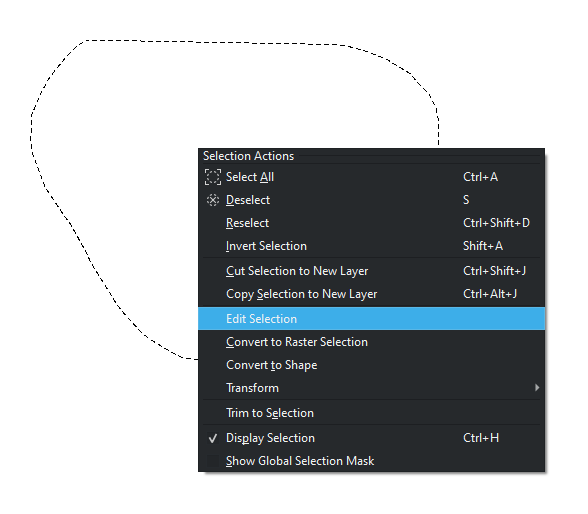
I thought it was a (‘modular’) menu that would appear when a selection were completed, and would go away when used or dismissed, or something like that.
So your suggestions were: the right-click menu and shortcuts. Functions that already are in Krita.
In your opinion an Action Bar would be cumbersome and meddlesome. Then as long one can deactivated in the configuration it should be fine. No?
In the end you didn’t propose anything to enhance the current request, or propose a similar but different solution. Why comment just to say: I don’t like it, don’t implement such feature.
The only valuable nugget from you in this present matter is: Let one deactivate the action bar, as many users wouldn’t like it. Proposal that were already thought out before.
Also, not only we have users that would like such feature (as a concept or because they used it in others app), but it was thought out as a good addition for mobile and people that don’t use many shortcuts.
Yeah I know that and I understood what you meant by context menu the first time 
I did not know there was a context menu for selections. so my suggestion is already in place. as you can read above trying to make a actual alternative. I also have a feature request to more shortcuts for the types of transformations to help with it on another thread.
So I don’t get what is the issue of not just right clicking to have those options to be requested with that menu? Honestly it is a better solution for how I see it, no need for extra clutter.
the “issue” is that it doesn’t suit to all user, the “bar” doesn’t need an action (right click for exemple) to be displayed and can be extend to other features (transformation…)
I did not know there was a context menu for selections. so my suggestion is already in place.
Well, if you weren’t aware of the context menu until this thread, then that kinda hints that it’s not very discoverable.
If you use shortcuts you don’t need UI but now that is just me as you can see on the screen shot. I was not looking for it. I just don’t want stuff on the way with no need.
I agree, I discover this context menu reading this thread.
@EyeOdin does have a point that the action bar could get in the way. But I think this can also be remedied by auto-hiding the bar when the user uses a selection tool and has a mouse button pressed on the canvas (basically when performing a new selection or adds/ removes from the selection). That is a difference compared to the assistant’s action bar, which is always visible.
Sorry then, I thought you knew about the menu when you right-click a selection (I saw it before, so for some reason I thought everybody knew too).
Some people like to have a docker/menu always visible when working? I guess. Just look at the topic ‘CSP features that Krita don’t have’, and you will see people wanting a brush properties docker.
Sounds great.
I think this can be used in conjunction with the 50% opacity show action bar to get better results.
- show the action bar at 50% opacity after the selection has been created so that you can see what’s underneath it.
- not show the action bar when modifying an existing selection, making it less intrusive than just showing the action bar at 50% opacity.
For those who prefer to use keyboard shortcuts and don’t want to see the action bar, you can disable it.
For Android tablet users, or those who don’t like to use keyboard shortcuts (which do exist) this would be more convenient.
You mean 50 percent opacity if the cursor is not on the widget? 
No, I mean nothing to do with the cursor, show the action bar directly at 50% opacity.
Then + what you said before.
Then I would do the opacity based on cursor position. 
Hi everyone,
I wanted to revive this topic because I am a GSoC candidate who will hopefully be able to bring this feature to life!
I wanted to thank everyone so far on your input as it has guided me with ideas to implement.
My goal is to get close enough to a consensus or compromise for users to make this feature useful. So I wanted to ask some questions that will help cement the implementation for this feature. I will keep in mind there will be room for improvement, and that this is the first implementation. As I become more familiar with Krita, I hope to improve this feature with each iteration through your feedback and discussions.
Questions:
-
Given the original list:
‘Move handle for the Selection Mask, Invert Selection Mask, Crop to Selection, Fill Selection with Foreground Color, Copy (or Cut?) Selected Content to new Layer, Transform Selected Content, Deselect Selection, and a move handle for the bar itself.’
Would you agree these are the most frequently used actions? If not, or if you’d like to add an action, please let me know
-
Where do you think this feature should be accessed from?
ie. toolbar, docker…etc.
Navigation — Krita Manual 5.2.0 documentation -
Should this feature be default when you start up Krita?
Meaning, on by default, but you will able to turn off if you do not want to use it
I appreciate any feedback and discussion! Thank you again for the opportunity to work with this community 
Hi there! Good to hear and good luck!
I think it should be enabled by default (otherwise people won’t even know it’s there) and the option to turn it off should be somewhere in the main Krita settings window.
If it’s enabled, the control bar should appear automatically as soon as the selection is complete (you lifted the stylus or released the mouse button).
Howdy!
I’d say to maybe add ‘expand/shrink selection’, it’s always handy from time to time
Personally think that should be at the settings page, maybe at ‘general’? Or the ‘view’ tab, I can’t see it being very concise as a docker (specially since there’s the ‘tool options’ docker)
Def yes, specially since there’s a good amount of people that comes from CSP, for example, it’d feel more like home
And also, thank you very much for that
I agree with @Crimson_Crate about adding the ‘expand/shrink selection’, the rest of the options that you mentioned are okay too it would be very helpful.
Maybe from the tab window for being enable, but i am okay too if they can turn from the toolbar of Krita, more easy to enable or disable.
I agree it should be enabled by default, it like i said before, the button for turn it off should be more easy to acess, but in general it should be enabled by default.