It appears to me that the hotkeys to add/ subtract from selections are hardcoded to Shift and Alt. So, when I have the line tool assigned to Shift (as opposed to V by default), I cannot add to selections with selection tools when I press Shift. Nor does it seem to be possible to change adding selections from Shift to Ctrl if I would like to.
In other words, these:
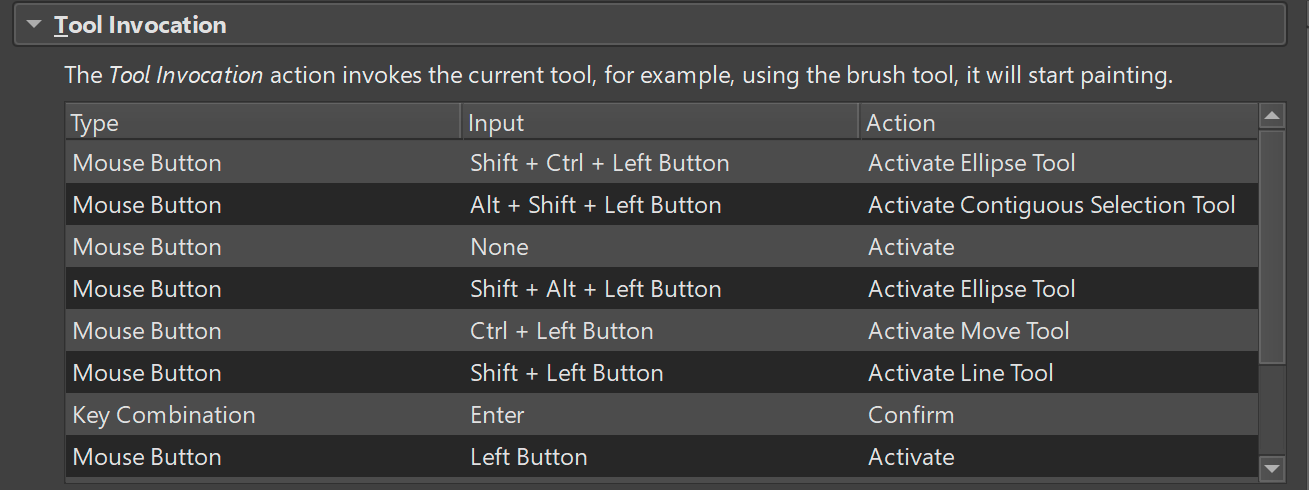
Override the hotkeys for these:

And some of the modes have no modifier keys assigned to them AFAICT.
So I am thinking, perhaps these settings should be exposed in the Canvas Input Settings so users can resolve such conflicts. If these selection settings were to override the modifier keys with a selection tool active, that would effectively solve the problem. That would allow me to draw lines with Shift when I have the brush tool active and add to selections when I have any of the selection tools active.