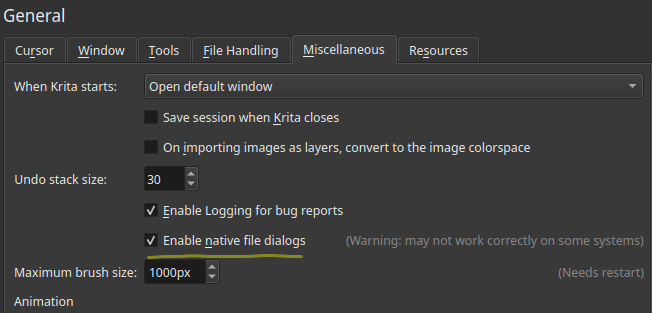
Is it possible to separate Save/Export while using the native system dialog?
In other programs, Save dialog is for the editable file (.kra) and Export is for the final product (.png) In many cases the file dialog remembers the Export folder as well, so I don’t have to clutter my .kra folder with finished files.
This is a very helpful QoL improvement and I’ve been annoyed every time I open a file, export filename as “image.png” only for it to 1) NOT go in my images folder 2) save as “image.png.kra” if it’s a quick edit.
Sorry if I missed a very obvious checkbox in the settings. I don’t see why the Export dialog should let you select editable files in the first place, and if Export/Save is the same function, why separate it in the menu?
Basically
1 I want to use Export, write filename + png and save the image
2 I want the Export function to save content in the “Exported” folder by default
3 I want only the Save function to save .psd, .kra, .ora files, etc. and it should go in the “Krita” folder by default
Note: I use Linux, and have native file dialog enabled.
I have tried using the appimages before, but never stuck to it because something about the UI felt off compared to the native version which meshed better with my (KDE) system settings. For me the appimage font sizes looked oddly small so I never bothered to switch. I use native file dialog because Krita’s file dialog has no meaningful shortcuts and no thumbnails.
@raghukamath
Really? I only separated my export/WIP folder recently (sometime this year.) since then I’ve had to manually select the export folder when exporting, otherwise the png saves in the wrong place.
I have Export mapped to Ctrl+E if that matters.
Yes I tested it just now. For me it remembers the last folder as well as the file format. Even for different documents. I have mapped export to Shift E
One the reasons we recommend the appimage because krita team has many patches for Qt the underlying tool kit that it uses which is not present in upstream Qt. Also krita uses older Qt since newer one has bugs. Krita will probably switch to newer version in future.
if you use the version from the repository you will be missing these patches and fixes. Also You can see the warning besides that option saying it may not work properly.
Regarding your font issue in appimag, can you show a screenshot? you can also set cutsom font and font size from the krita configuration settings to match your needs The version from repository probably uses breeze theme, which also was known to cause issue with krita hance it uses fusion theme by default in appimage.
Nevertheless you can separate or isolate appimage from messing with your system installed krita, and test the appimage.
I happen to have a recent installation of Linux Mint 21 (Vanessa) so I updated it and installed the repo krita 5.0.2.
(The first time I ran it there was a crash when I created a new file. When I ran it again it worked ok. I could repeat this crash by deleting all krita associated files/folders and running krita again. I think this is a Linux Mint problem and I won’t bother investigating it further.)
I tried making a series of painted strokes and doing Save and Export operations after each stroke to a Save-Folder and to an Export-Folder.
The Save operation and the Export operation both remembered which folder destination had been used and only the Export dialogue needed further detailed interaction as it usually does.
This was the case with ‘Enable Native’ enabled or disabled and I did restart after changing it just in case that was needed or had any effect.
@EyeOdin You may not be aware of the use/meaning of the slang word ‘bonk’
@raghukamath
The appimage does work as intended, thank you. Even when I export an unsaved file it properly saves as png and the file picker correctly remembers my extensions. No thumbnails without clicking but that’s less annoying than export not working correctly.
I found the font setting and changed to Noto Sans at 10px, because the default was really thin, looked extra thin on my screen. I’ll just be replacing the Krita menu entry with the Appimage version now.
Is you system font setting custom one? Because krita takes the system font setting by default. Glad to know that appimage works for you. If you are using the nightly appaimagr i have a post here explaining automated way of updating it with a systemd service