This is a offshoot from the wet blending modes thread. It seems that in order to solve the issues of allowing users to utilize wet blending mode mixed with the other blending modes, two solution exists.
Have copies of many existing modes and mix the algorithm with wet alpha blending mode.
Separate the alpha blending mode and color blending modes.
The first one double the blending modes count, and we already have plenty of them. Doubling the modes in this case adds to intrusiveness factor. The second one adds to unfamiliarity problem as there’s virtually zero people that used separate blending modes.
However, two points in favor of the second one is that it does not involve doubling blending mode, and most people are just going to change color blending mode given that painters are the main demographics of Krita.
In the second option, you can have these alpha blending mode:
Normal
Destination In
Destination Atop
Copy
Copy Alpha (Does not exist, but it’s a idea)
Dissolve
Erase
And so forth. Can even have things like xor, and other fancy alpha composition mode found in here:
But, one may ask what if one should switch erase into multiple+normal blending mode. My solution is to automatically switch alpha blending mode to normal when changing color blending mode in case of Erase and Copy. The other blending mode allows for color information to be changed. So, this isn’t a problem.
In addition, you could have arithmetic operation on top of alpha blending mode. Instead of default alpha composition, you can add alpha values together and so for rare cases. And this could actually allow you to mix Dissolve and color blending mode in one single layer which reduce memory usage a bit.
So, I think we should have a voting poll. Count me Yay for second option. 1 Yay / 0 Nay
This may be right, but it is an assumption as I read it, right?
For me, it is like with everything in Krita, I will adapt to what comes, but I really like the old behavior, only my list of favorites would grow. But who knows, maybe I’ll prefer the new mode with two drop-down’s, if it should come? Time may tell, I have not used it yet.
For the “Erase”-Question, because it is only this special one, why not put it in both drop-down’s, in case the separation will come? This one doubled won’t hurt, is my assumption? Am I Right or wrong?
I don’t think this would be a bad idea. Copy is the only other special one. Although Copy uses color information, it copies everything and doesn’t behave like the other blending modes, so it’s special too. My only issue is that what happens if a user select Copy on color, and Erase on alpha, that would be a conflict.
Erase mode had to be exited when any other mode was selected, no matter on which of the two sides. I hope a corresponding toggle logic should not be difficult to implement.
What I think is important to get right here is making this deviation from a well-established convention as little intrusive as possible. Someone who might be familiar with another software will come in, get served too many options front-and-center, and go “I just want to change the layer mode to Multiply, what’s with all this other stuff? Do I have to worry about it or not?? [Other art software] does what I need and is much simpler!”
There’s also mentions of some Color Blend modes being incompatible I with certain Alpha modes. That also adds complexity that has to be handled carefully. Otherwise you might confuse users when they change something about the layer and suddenly the Blend modes feature don’t work like it normally does.
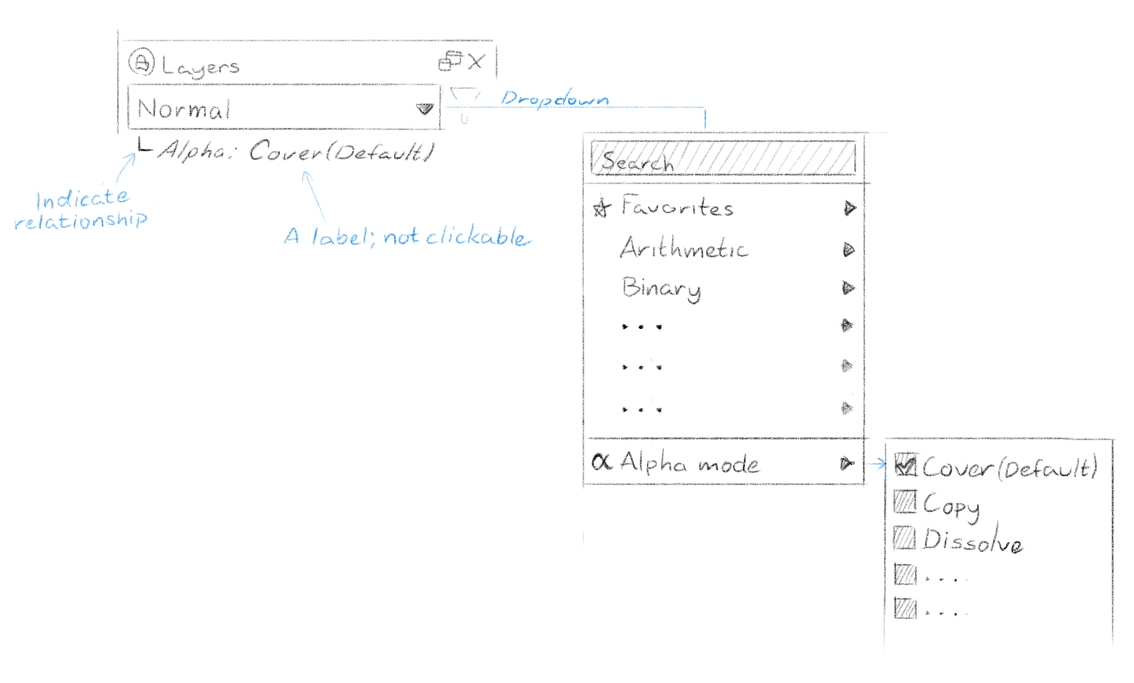
For what it’s worth though, here’s a suggestion for how this could work in the Layer docker:
Side note: I use the word “Alpha” here partially because it’s a lot shorter than “Transparency” but also because it has a very technical implication in this context. If someone doesn’t know what the A in RGBA stands for then perhaps they’re not ready to play with this feature. There’s also the possibility of newer users getting confused by having options for both “Transparency” and “Opacity” next to each other.
I do like that suggestion, but my complaint is that it’s not as flexible. However, as a customizable setting, I think that would work out. Another solution I can see is to move Alpha Mode as a small icon with dropdown next to blending mode as a compromise between the two.