I’m making a plugin and my shortcut to invoke the plugin works or doesn’t work depending on which layer is currently active (but my plugin’s code has nothing to do with what layers are there).
Since it works on some layers I guess the python code isn’t the problem here. So maybe my action file, or desktop?
Just to be clear I noticed some krita built-in shortcuts don’t work either so I’m not sure if this is related just to my plugin or not.
Win 10, latest Krita version (4.4.1)
Here’s an example of my problem:
If active layer is a regular paint layer everything works just fine.
If active layer is group layer my plugin doesn’t get triggered at all (changing brush to erase mode also doesn’t work, …).
If active layer is vector layer my plugin doesn’t get triggered at all (changing brush to erase mode also doesn’t work, …).
As mentioned above, the plugin works just fine if the paint layer is active so I don’t think the python code is the culprit (I tested it on different plugins or empty templates and all the same).
My action is set as this in python (I simplified it so hopefully there are no typoos - as mentioned above the script itself works on paint layer):
class TestExtension(Extension):
  def __init__(self,parent):
    super(TestExtension, self).__init__(parent)

  def setup(self):
    pass

  def testDialog(self):
    Dialog("test")

  def createActions(self, window):
    self.testAction= window.createAction("testAction", "Test Action", "tools/scripts")
    self.testAction.setAutoRepeat(False)
    self.testAction.triggered.connect(self.testDialog)
Dialog is just a class I use to check if things work or not.
class Dialog(QDialog):
  def __init__(self, text, parent=None):
      super(Dialog, self).__init__(parent)
      self.setLayout(QVBoxLayout())
      self.label = QLabel(str(text))
      self.layout().addWidget(self.label)
      self.resize(200, 50)
      self.exec_()
My action file:
<?xml version="1.0" encoding="UTF-8"?>
<ActionCollection version="2" name="Scripts">
    <Actions category="Scripts">

        <text>Test Action</text>
        <Action name="testAction">
        <icon></icon>
        <text>Test Action</text>
        <whatsThis></whatsThis>
        <toolTip></toolTip>
        <iconText></iconText>
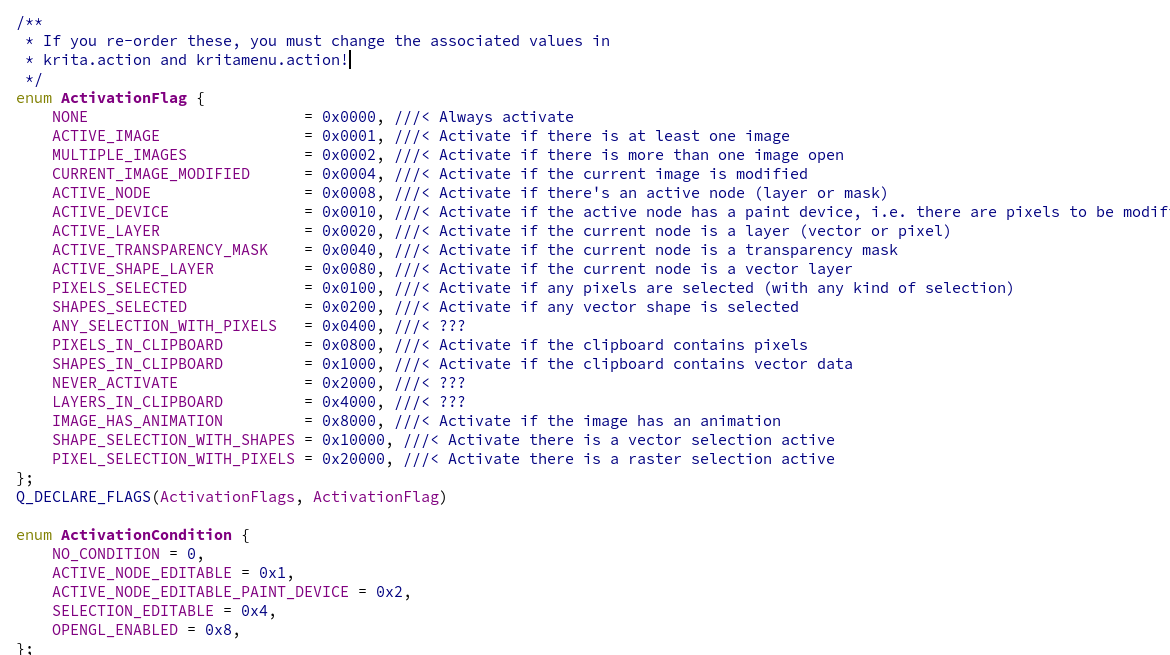
        <activationFlags>10000</activationFlags>
        <activationConditions>0</activationConditions>
        <shortcut>`</shortcut>
        <isCheckable>false</isCheckable>
        <statusTip></statusTip>
        </Action>
    </Actions>
</ActionCollection>
I tried changing activationFlags to 0 just in case but nothing (I don’t really know what I set here and I can’t find it).
I would really appreciate some help with this, I’m completely out of any ideas how to deal with this and I can’t find much information about .action files.
Also I don’t know maybe it’s just a problem that my Dialog doesn’t work but since it works with paint layer, fill layer, … I still doubt it.
To be clear, nothing happens, no dialog pops up. I also tried setting up a separate window (prepared in advance) with a label inside so I could just change the labels text to see but no change again. It seems that my shortcut doesn’t get triggered at all either that or my action doesn’t get triggered with some layers for some reason.
(to be clear my code itself has nothing to do with layers so there’s also no code for that, the example extension above also doesn’t work for me.)
Thank you very much I’m really at my wit’s end at this point.
EDIT:
I can catch key+mouse events with a separate object so it really looks like the shortcut itself is disabled in Krita depending on which layer you are currently on. I really don’t know how to enable it everywhere :?