Shortcut Composer v1.6.0 - Plugin for Pie menus, Multiple key assignment, Mouse trackers and more!

Yes and no.

When you scroll isolated layers, krita has to display layers one by one, but all of them are ready for display in RAM. So krita just shows then, which is very fast.

Changes to layer stack on the other hand require redrawing the canvas - on each change krita has to merge all those images together, considering their blending modes, opacity etc. Depending on the layers size, their amount and your gear specs, this can take enough time not to feel instant.

1 Like

Is it possible to put Python scripts into a pie menu? Like the built-in Ten Scripts plugin, but instead of setting a shortcut for each script, I’d like to have a pie menu for all the little scripts.

1 Like

Yes, I’ve checked it and it works.

The fast way is to use the Ten Scripts plugin itself:

  1. Define the path to your python script in it (so that it can be triggered with a keyboard shortcut)

  2. Use one of the three Activate krita action pie menus. In pie settings search for one of the 10 Execute Script actions defined by the Ten Scripts plugin.

This way you can have up to 10 python scripts on 3 pie menus. Unluckily these actions do not have any icons, so all of them are displayed as ā€œEXEā€ (three first letters of the action name)


The clear/correct way is to convert scripts into a single krita extension (with your scripts rewritten as krita actions). Then you are not limited to 10 scripts with predefined names, as you can define any amount of these with any names and any krita icons (Shortcut composer does just that - many of my actions reuse existing ones).

Then you only need to modify the Settings > Manage resources > Open Resource Folder > pykrita/shortcut_composer/api_krita/enums/action.py file by adding actions from your extension, so that they become available for the action pie menus.

3 Likes

Works like a charm. But I think there is a potential issue: pykrita/shortcut_composer/api_krita/enums/action.py is a script inside Shortcut Composer itself. Doesn’t that mean if I upgrade Shortcut Composer, I might override it?

Yes, upgrading Shortcut Composer will overwrite all your changes. Then you’d have to do it again, so it makes sense to have a backup of that file with your changes (I believe you can even have it in the same folder as the original file).

On the other hand, I haven’t been working on the plugin for a while and don’t have any plans for the near future, so the updates are not likely any time soon.

Understandable. Thank you for the reply.

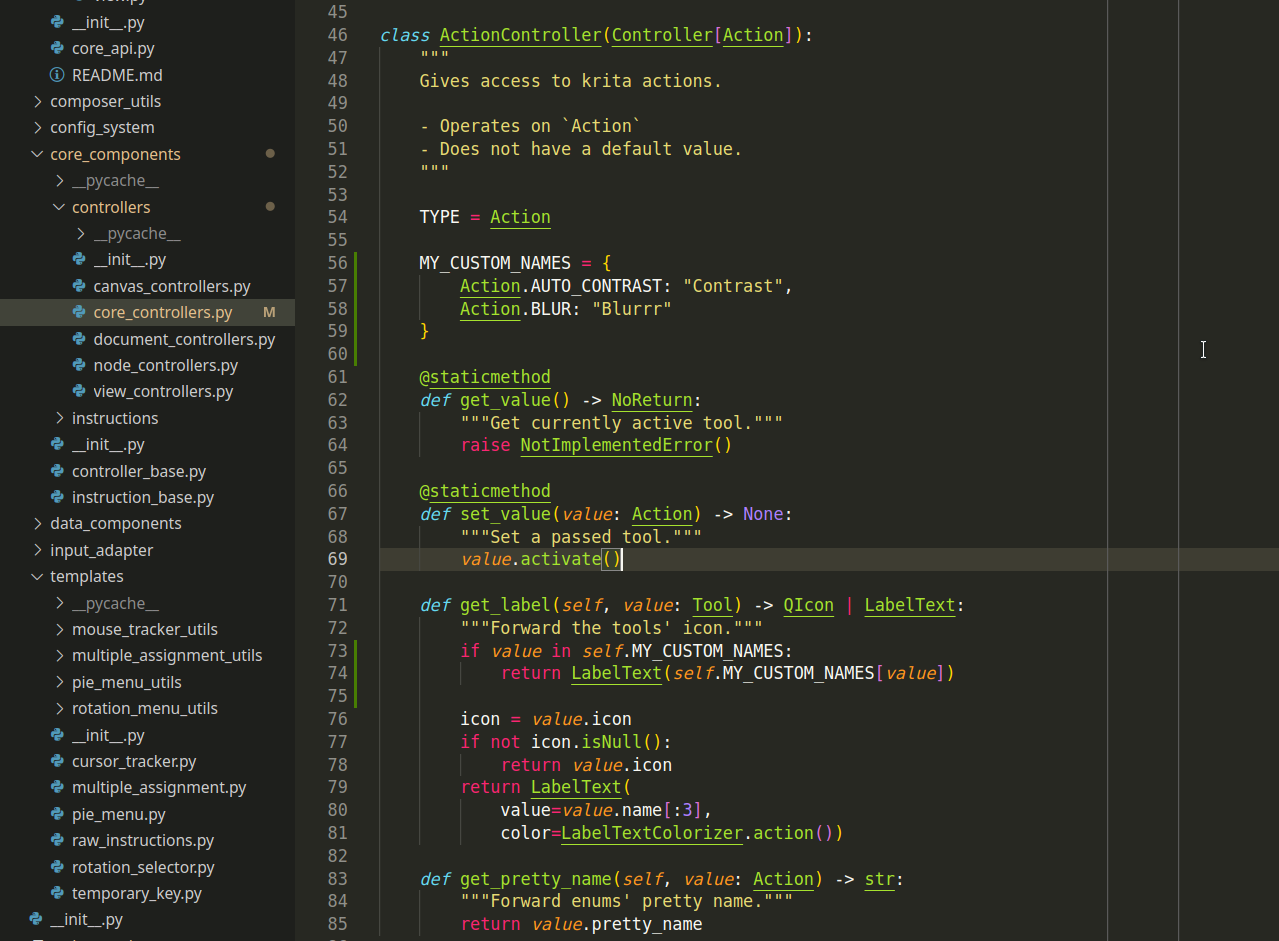
By the way, is it possible to set a custom text label for an action? After all there are only that many built-in icons, and sometimes it’s quite hard to convey what an action does with a built-in icon…

I guess,

You can modify the core_components/controllers/core_controllers.py file. Add a dictionary with your custom names somewhere, and then return it, when given action is in the dictionary:

Hey wojtryb, I’m not sure what your plans for supporting Qt6 are, but I wanted to report that the plugin has compatibility issues with Krita Qt6 build. At first glance, PyQt5 does not exist (obviously), but neither does krita.qApp, for example.

I’m not asking for support, but flagging it just in case it wasn’t on your radar yet. I don’t know when Qt6 will become really relevant, the development is still ongoing.

Given how immensely helpful this plugin is, I’m happy to help with porting if needed, too!

4 Likes

Krita 6 won’t be out any time soon, but if you want to get a head start on porting to PyQt6, check out the MR description from when I updated all the built-in plugins for some porting tips: Qt6: Let Krita build with PyQt6 and port plugins (!2347) Ā· Merge requests Ā· Graphics / Krita Ā· GitLab

It should be pretty straightforward, just tedious because this is a large plugin. I wouldn’t mind helping either, though I’m not familiar enough with this plugin to test it.

3 Likes

Thank you for letting me know.

As there’s still a lot of time left, it’s probably better to have a good porting plan before jumping straight into development. But of course I want Shortcut Composer to be compatibile with krita 6 at day one, with version for testing available earlier.

Here are my initial thoughts:

  1. First thing that needs to be ported to Qt6 is input_adapter. This is a part of code that detects events of releasing keyboard keys and is critical for basically all of the plugin actions (pie menus need to be closed on key release, temporary keys need to distinguish short and long pressess etc). I’ll probably have to port and test it soon on krita6-prealpha just to make sure those key release events are still detectable this way or another, and the plugin as a whole is possible to port.

    Already checked that - input_adapter works fine on krita6-prealpha, so the plugin should be possible to port :slight_smile:

  2. I’d want to avoid try/except statements in imports. With the plugin scope I probably can’t afford supporting different versions of Qt at once. Upgrading to krita 6 will require upgrading the plugin, and the new plugin version will not be compatible with krita 5. That happened before each time krita Api was extended, so I think this is ok to do it that way.

  3. This is probably a good oportunity to call this plugin version a 2.0.0, which I thought about many times before. Shortcut Composer still has a few hacks and bugs that couldn’t be fixed/removed without removing some of its features. Those features will be missed, but supporting them was problematic in the past and I don’t want to rewrite bad, breakable code once again into another bad and breakable code.
    Those problematic features are:

    • krita actions for transform modes

      Shortcut Composer can activate transform tool at any mode and tell which mode is on. It does that by finding buttons in tool options, clicking them in the script and checking which one is on.

      This solution is not acceptable and has known, probably unfixable issues. Sadly it means Pick transform tool modes pie menu has to be removed.

    • tool controllers

      While krita tools can be activated by calling corresponding actions, it’s not possible to tell from the script which tool is currently active. Once again this is done by iterating over buttons in the bar on the left.

      While Pie Menus can work without knowing which tool is active, Mulitple Assignment depend on it. Maybe there is a way to keep those Multiple Assignment actions, but there may be a slight change in how they react to switching tools outside the plugin.

    If somebody wants to preserve those actions, it would be a massive help if any of those properties were exposed to Api and made officially available for plugins to use. To sum up, missing things are:

    • method which returns active tool (as string or action handle)
    • 6 krita actions for activating transform mode with a specific mode turned on
    • method which returns active transform mode (would be welcome but is not really required for Shortcut Composer in its current form, as I use a pie menu for those instead of mulitple assignment or temporary key)

    Having those in Api should allow to keep all plugin actions intact, and probably remove the need for 2.0.0, making it a usual feature update.

  4. If somebody have any suggestions about changes in default plugin actions (adding more actions of given type, changing default values in them), please feel free to share them as 2.0.0 release may be the only opportunity to change them. All those default values are in fact done by me, and may not reflect how an avarage krita user needs them to be.

  5. Thank you for offering help with porting the plugin. I hope I’ll be able to do it on my own, but I’ll ask for help if I need it. Still, if somebody has experience with extending krita Api, that would be the most profitable for the plugin, as currently I can’t do it on my own.

2 Likes

I’ve gone ahead and made a quick patch so it can run on both PyQt5 and PyQt6: Patch to port wojtryb's Krita plugin Shortcut Composer to PyQt6 ($3419) Ā· Snippets Ā· GitLab
Plugin loads without errors but I can’t guarantee it works well since I didn’t really test it. (If it’s horribly broken feel free to complain.)

There might be a better way to support both PyQt5 and PyQt6 than the try/except imports, I don’t know. But from the perspective of a developer testing both versions of Krita it’s more convenient to have plugins support both (for now), especially if it’s trivial to do so.

5 Likes

Thanks! I agree it will be cleaner to branch out a 2.0 version for Qt6, especially if there’s additional cleanup to do. If need be, fixes and additions can be ported back to Qt5.

For now I will test this patch and provide feedback!

Thanks for doing most of the work! That was fast :smiley:

I made a few tweaks:

  • new Qt seems to prefer QPointF instead of QPoint
  • exec_ was changed to exec
  • mouse events have position() instead of pos()
  • I fixed fetching tags from database. There must have been a change in krita database as preset tags now have type of 6 instead of 5.

From a quick test all types of actions seem to work.

If somebody wants to test it further, here is the corrected file:

1 Like
  • QPainterPath.addEllipse always took QPointF according to the docs, PyQt might’ve been doing some kind of behind-the-scenes conversion before.
  • Forgot to check that one. exec() should work fine on PyQt5 as well.
  • You can if-def that incompatible change with if QLibraryInfo.version().majorVersion() == 6:, might be clearer to read. (QLibraryInfo is in QtCore.)
  • That might be to match the Krita version, I’m not sure.
2 Likes

Alright, happy to report that the v2 patch is working perfectly with my Krita 6.0 build! I only use 5% of the plugin’s power, but all my usual stuff is working just fine.

Forgot to add: the same code still works in 5.3, so I can run both versions seamlessly.

2 Likes

Thanks everybody for participating. Here is what I’ve done:

  1. On github there’s a new branch qt6-port. It should work both on Qt5 and Qt6. That’s the version for everybody who switches between different versions of krita and tests things.

  2. This support for both versions for now will not be available as a main release. Those try/excepts are tricky (I already had a few problems with them and had to change import order) and they confuse the syntax autocompletion making development harder.

  3. development branch now has all the new flags as those seem to work well on both versions, and are a more future-proof solution. They will become part of main release on the next bugfix. This way I can continue developing the plugin and when the time comes, porting the plugin will only require changing imports, leaving the rest of the code intact.

  4. When krita 6 reaches beta period I’ll have to decide whether to release this transitional version which supports both Qts, or release on the same day as krita 6. There’s still a lot time before that.

  5. Version 2.0.0 is probably not needed, as the port was way smoother than expected.

5 Likes

Everything still working nicely with the qt6-port branch. Tested 6.0 and 5.3 builds. Thanks! :blush:

1 Like

What’s new in 1.6.0

This release contains several new features, many of which were requested by the community. It also fixes a many issues and prepares the plugin for krita 6 release in following years. Many of the core features were massively rewritten, hopefully making them faster, less bug-prone and easier to maintain in the future.

Before updating, remember that any custom changes in plugin code will be overwritten.

This update introduces a breaking change: order of presets in tag mode will be lost. After updating, it will have to be recreated. I apologize for the inconveniance.

Added

Current value icon

In settings mode, Pie menus now feature a small icon with currently selected value. It allows to quickly drag this value to the pie, without searching for it in the tray.

Screenshot_20250703_151633

It was designed with presets in mind, but this icon is available in every pie which property specifies a current value.

New action: Pick foreground color

Changing foreground color with pie menus was one of the more requested features. While I still do not want to compete with color selectors in vanilla krita and dedicated plugins such as Pigment.O, implementation of the current value icon made the idea of selecting color with a pie possible.

New PieMenu for color allows to create a color palette of frequently used colors for each krita document. Current color can only be dragged from this icon to the pie.

Screenshot_20250703_151229

By default, colors are held inside the krita document, so they can be different for each painting. This, and initial color values can be changed with from the PieMenu settings with existing GUI.

This feature cannot be integrated with krita palettes system, as it is not exposed to Python plugins.

New settings for MultipleAssignment action

Configuration of MultipleAssignment actions was introduced back in v1.1.0. It was meant to be a temporary solution, before a proper system using PieMenus is written. Then it became a low-priority task to merge those two systems, as the feature was functional after all.

Finally, this old relict was replaced with a window, which reuses PieMenus and its ScrollArea, allowing to change the values to cycle with more intuitive drag&drop.

Screenshot_20250703_150834

This unification also comes with some new possibilities:

  • Long-key-press value can now be edited without changing the plugin code
  • Cycle painting opacity action can now be edited without changing the plugin code

New action: Cycle brush presets

Another big change that is a direct result of new settings for MultipleAssignment, is the new ability to change brush presets in this action. While it was possible to achieve this effect before by editing the action definition and hardcoding preset names, now one can use GUI to specify the presets or tag to cycle.

Screenshot_20250703_151435

While PieMenus are still considered the main way to quickly switch brush presets, I hope this new possibility will find some creative usage in your workflows.

Support for longer text in labels

Another highly requested feature is the new system for displaying text inside the labels. Existing system was designed with the most frequently used blending modes in mind. Three letter names proved to be insufficent for other blending modes and especially for other types of values, like krita actions.

Screenshot_20250703_151902

New system attempts to fit more text into the labels, while still allowing to achieve the original look for those who prefer it. Labels in the tray have fixed number of lines and signs, but those in PieMenu can be configured from the PieSettings.

Size of text can be configured in Tools > Scripts > Configure Shortcut Composer > Text label global scale. Use if if the text inside the labels appears too small, or does not fit into the labels.

As text size can be dependent on the OS, and system-wide text scaling, determining the text size fully automatically proved to be unreliable. Default value should work on most workspaces.

Exponential CursorTrackers

Existing CursorTracker actions allowed only to change the values linearly. While it worked well with most of the properties, some required different scale to make work as expected.

This update affects the Canvas zoom level and Brush size trackers.

Unification of PieSettings types

Previously PieSettings used different code for presets and enums (ex. tools, actions). New version unifies the code, making it easier to maintain.

As a result, tool and actions PieMenus now can also operate in tag mode (which was renamed to group mode).

Screenshot_20250703_152051

Sadly, previously stored order of groups will be lost, and will have to be recreated after updating the plugin

Safely quitting the plugin on krita 6

Krita 6 will introduce Qt6. While this brings many new opportunities, it will also break the plugins that did not prepare for this change.

Plugins shipped with krita will be using universal builds, that work on both versions at the same time. I want to avoid this solution, as supporting two versions of Qt at once can be problematic for a plugin that can still change before krita 6 release.

When trying to open krita 6 with this version of plugin, instead of crashing, it will display a message, and safely quit. The message box contains the links to unofficial universal build and to the main plugin repository, where dedicated release will be available for download once krita 6 releases.

Screenshot_20250703_152202

Modified

  • #97 MultipleAssignment logic was changed to prevent unintuitive behavior:
    • After manually changing to value from a list, the action will continue cycling from that value instead of starting from the beginning
    • Long-press-value can now be in a list, without causing any disruptions
  • PieWidget now remembers previously selected label between sessions
  • SpinBoxes in all types of settings can now have minimal values. Value limits were adjusted
  • Button for accessing PieSettings now scales with the pie configured size
  • Reset buttons in every settings window were replaced with safe-confirm button known from PieSettings
  • Creation of PieLabels should be faster
  • PieLabels are now cached to prevent creating the same label multiple time
  • Text displayed on the bottom of ScrollArea, now clears when leaving the whole tray, to prevent blinking
  • Animation no longer stops abruptly when going into edit mode

Fixed

  • #96 Action pie menu does not close properly when the action involves opening a new window
  • #100 Implementation of PickLayerStrategies enum was changed to make plugin work under python 3.13+
  • #101 Preset tags created with krita 6 are not recognised by PieMenu settings
  • PieMenu blinks when changing labels
  • PieMenu widget changes size and position size of its labels changes due to their amount
  • PieSettings slightly changes size when hovering over it for the first time
  • PieWidget fade-in-animation stumbles when the pie is empty
  • PieWidget fade-in-animation is using hardcoded interval instead of configurable FPS_LIMIT
  • Empty PieWidget accepts labels of any type, which could result in a crash
  • Default config value can be changed by editing a list returned by ListField
  • PieMenu is not hidden when global size config changes resulting in messed up pie
  • Global pie opacity is not working
9 Likes

Thank you very much for this massive update!

Michelist

1 Like

Woah that’s awesome. Thanks for putting so much work into the plugin <3

1 Like