Wow – Current value icon is super!!! Thank you!
1 Like
Thank you for your continued dedication!
2 Likes
Looks amazing. Sadly I am on a Mac and this is plugin did not work properly in earlier versions. Do you have any updates on possible Mac compatibility?
1 Like
Nothing new I’m afraid.
I don’t have any Mac device to test and develop the plugin.
It may work just fine, but it’s not something I can guarantee.
I received only a few reports from Mac users years ago, some saying it works, some saying it doesn’t. No precise information that could specify what breaks and on what OS versions.
You can check for yourself. The code is OS independent after all, and maybe you’ll get lucky.
Christmas came early this year. Wow!  I will need some time to unpack this…
EDIT: OK, I seriously didn’t know I can edit “Cycle Selection Tools”. This is great. I can replace the magic wand that I never really used! 
2 Likes
I have not gotten it to work right. Activating it seems to mess with my CMD-D shortcut to deselect. I don’t know if other shortcuts are influenced.
1 Like
Frilking love the update.. great job!!
I have just mapped my huion and is using several parts of SC’s features and funktions including the action-pies and cursor tracker.. awsome!! 
Might explore the code-thing aswell..
1 Like
Amazing update. Thank you very much for this plugin!
1 Like
Is the “current value” thing not working for brush blend mode?
It works for brush preset for me. However, when it comes to brush blend mode:
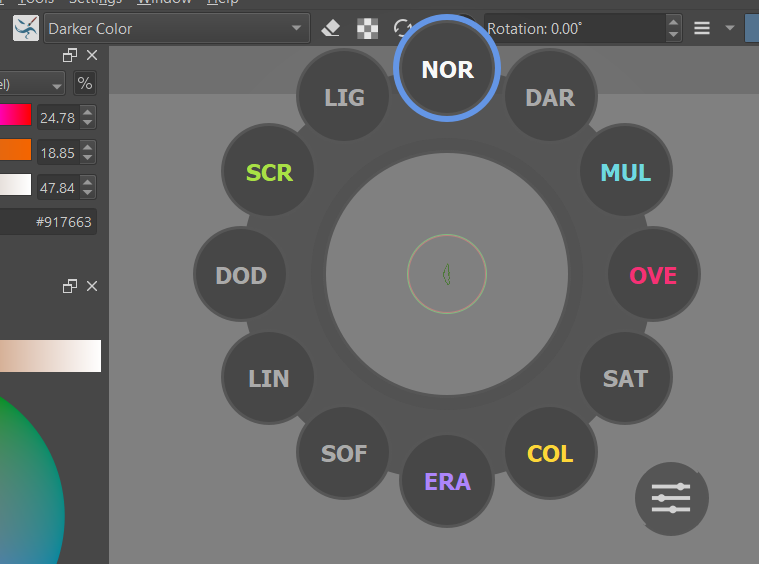
Like this. Even the brush blend mode is “Darker Color”, “NOR” is still high lightened.
Hi, this is not “current value” indicator, but a preview of what will be picked if you close the pie in deadzone. In the settings of this pie you can select between picking the top-most label or the previously selected one.
The “current value” is displayed after you enter the pie settings in place of the settings button.
Anyway - that’s on me as the plugin wiki is kind of a mess right now and requires a big rewrite.
1 Like