When designing stuff (e.g. buildings, magic sigils) in Krita, I often need to draw lines/shapes and make selections at specific angles. The Line Tool and Assistant Tool allow snapping to multiples of 15 degrees with a modifier, which helps when the angle I need is one of those, but I often want different angles. The Line Tool currently displays the length, which is helpful, but there is no such display when making polygonal selections, creating Assistants, etc.
I’d like to see all the tools that involve drawing lines (Line, Assistant, Polygon, Polyline, Polygonal Selection, and Comic Panel Editing tools) include a display similar to that of the Measure Tool, showing the length and angle of the current line segment:
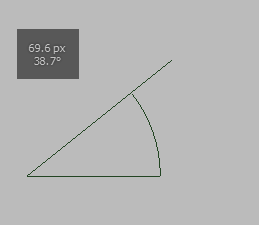
(Just the overlay part; the actual display of the tools can stay as is. Angles may need to be displayed out of 360° rather than 90°, since there would be no visual quadrant indicator. Perhaps the angle display should display both in all cases, including in the Measure Tool, e.g.
161.6° (18.4°).)
Currently, to draw a line (or define a poly segment, etc) at a specific angle, I usually have to draw an axis-aligned line on a new layer, use the Transform Tool to rotate it to the desired angle, position it as needed, and then use the result as a guide for my actual line/selection/ruler. These extra steps would be unnecessary if these tools displayed their angle and length.