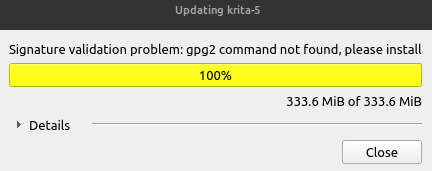
"Signature validation problem: gpg2 command not found, please install" when updating from Krita software's homepage

Hello everyone,

I have a proposition to update to 5.1.0 on krita’s home screen.
image

But when i’ click on “update now !” i have a little window
displaying the donwload, once it’s at 100% it reload, and then i have this error message.

Do you have an idea on how should i approach this ?

I’m on Linux Mint, does that mean that i need to install the gpg key of Krita inside of my Linux
so that the computer will be able to check if the GPG Key i have in my repertoire will match with the GPG Key of Krita’s appimage update’s file ?

1 Like

Only if you absolutely want to check the key, I would say.
So far I could download every AppImage without mandatory verification, why it is now apparently a condition for you is a mystery to me. You could try using a different browser, you might get around the mandatory verification that way.

Michelist

1 Like

I think that @Wilfried123 may be using the appimage update method, which I’ve never used.
On my Debian system, there is no gpg2 but there is gnupg2.
The history of those two is convoluted and I won’t try to understand it.
I always trust appimages that are downloaded from the official KDE websites and I don’t bother doing signature verification.

1 Like

I had the same issue on fedora, I forgot what I did to solve this. Let me search my bash history and get back.

CAn you install gnupg2 package and try it again?

sudo apt install gnupg2

Also check if you have gpg2 binary in the system by running

which gpg2

According to the issue / pull request here - use gpg instead of gpg2 by codifryed · Pull Request #190 · AppImage/AppImageUpdate · GitHub
this happens on distros who have not transitioned or are transitioning to recent version of gpg.

It worked !

At least there is progression let’s say :smiling_face_with_tear:

So now it says to me “Update successful!”

Then i have the image in Krita Appimage Homepage saying i need to restart Krita, when i restart it it still loads 5.0.6.

For the command yo ugave me it installed gnupg2, and here is the result i get for
which gpg2

/usr/bin/gpg2

You installed the gpg2 right? and then it worked?
Any how now just go to the place where you store the appimage and use the new appimage by making it executable.

1 Like

Oh ok !

I have a shortcut on my shortcut bar and the shortcut was still launching the 5.0.6 appimage instead of the 5.1.0.

Thanks a lot ! have a wonderfull weekend !

@Michelist @AhabGreybeard

A solution have been found, thanx a lot for your quick reply (as always) !

1 Like

Perhaps the appimage build should bundle gnupg if it’s needed for automatic updates

1 Like

If downloaded software is to be verified by the public key method (or any method), the software that performs the verification must be independent and under the control of the user.
If the downloded software has been compromised then any included verification software will also have been compromised.

4 Likes

This topic was automatically closed 3 days after the last reply. New replies are no longer allowed.