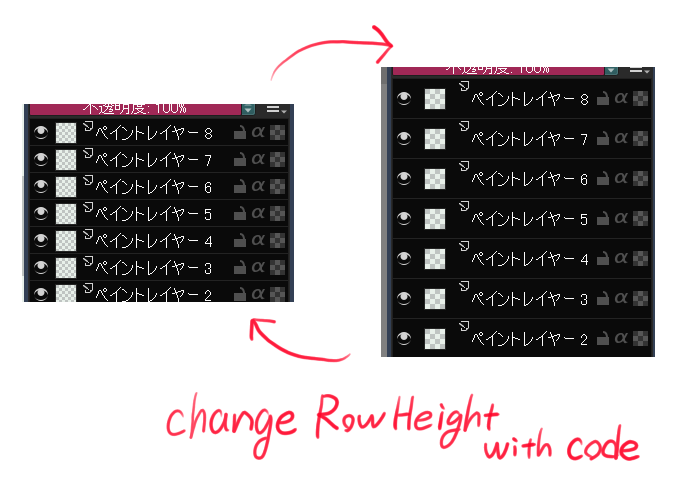
Hi
Sorry, didn’t had the time to answer before 
It won’t be easy.
In theory you have to override the sizeHint() method of QItemDelegate object of QTreeView.
Then the sizeHint() is called internally (you don’t call it by yourself) and methods from QItemDelegate are called with this size.
In Krita, the QItemDelegate object is called here.
You can see the delegate property is an instance of NodeDelegate class which extend a QAbstractItemDelegate.
This class is not available in Krita Python API so you can’t use it neither override it.
The solution here is to create your own class to extend QAbstractItemDelegate.
As it’s an abstract method, you have to implement all abstract method like it’s made in Krita.
The trick here to not have to re-implement everything in Python is provide the item delegate from the QTreeView and then call the methods from original QTreeView item delegate.
The most important here is to override the sizeHint method.
Here an example:
from krita import *
from PyQt5.Qt import QAbstractItemDelegate

class ItemDelegate(QAbstractItemDelegate):
    # create a new class that will replace the one defined by Krita

    def __init__(self, originDelegate, parent=None):
        # the `originDelegate` is QItemDelegate (NodeDelegate) object from QTreeView
        super(ItemDelegate, self).__init__(parent)
        self.__isBig = False
        self.__originDelegate = originDelegate

    def sizeHint(self, option, index):
        # option: QStyleOptionViewItem
        # index: QModelIndex
        size = self.__originDelegate.sizeHint(option, index)
        if self.__isBig:
            size.setHeight(size.height() * 2)
        return size

    def paint(self, painter, option, index):
        # we need to reimplement paint; just use the original one from QTreeView
        self.__originDelegate.paint(painter, option, index)

    def editorEvent(self, event, model, option, index):
        # we need to reimplement editorEvent; just use the original one from QTreeView
        return self.__originDelegate.editorEvent(event, model, option, index)

    def createEditor(self, parent, option, index):
        # we need to reimplement createEditor; just use the original one from QTreeView
        return self.__originDelegate.createEditor(parent, option, index)

    def setModelData(self, editor, model, index):
        # we need to reimplement setModelData; just use the original one from QTreeView
        self.__originDelegate.setModelData(editor, model, index)

    def updateEditorGeometry(self, editor, option, index):
        # we need to reimplement updateEditorGeometry; just use the original one from QTreeView
        self.__originDelegate.updateEditorGeometry(editor, option, index)

    def setBig(self, isBig):
        self.__isBig = isBig
        self.sizeHintChanged.emit(QModelIndex())


class TestLayers:

    def __init__(self):
        # search layers's QTreeView in dockers
        self.__qdock = next((w for w in Krita.instance().dockers() if w.objectName() == 'KisLayerBox'), None)
        self.__tvLayers = self.__qdock.findChild(QTreeView,'listLayers')

        # get QItemDelegate from QTreeView
        self.__oldItemDelegate = self.__tvLayers.itemDelegate()

        # created a new QItemDelegate from our own ItemDelegate class; provide the original QItemDelegate object
        self.__newItemDelegate = ItemDelegate(self.__oldItemDelegate)

    def ui(self):
        def toggleBig(isBig):
            self.__newItemDelegate.setBig(isBig)

        def close(r):
            # restore original QItemDelegate
            self.__tvLayers.setItemDelegate(self.__oldItemDelegate)


        dlg=QDialog(Application.activeWindow().qwindow())
        dlg.setModal(False)
        dlgLayout=QVBoxLayout()
        dlgLayout.setSpacing(2)
        dlgLayout.setContentsMargins(0, 0, 0, 0)


        cbBig=QCheckBox("Big rows")
        cbBig.setSizePolicy(QSizePolicy.Expanding, QSizePolicy.Maximum)
        cbBig.toggled.connect(toggleBig)

        btnClose=QPushButton("Close")
        btnClose.setSizePolicy(QSizePolicy.Expanding, QSizePolicy.Maximum)
        btnClose.clicked.connect(dlg.accept)

        dlgLayout.addWidget(cbBig)
        dlgLayout.addWidget(btnClose)

        dlg.setLayout(dlgLayout)
        dlg.resize(640, 480)
        dlg.finished.connect(close)

        self.__tvLayers.setItemDelegate(self.__newItemDelegate)
        dlg.show()


tl=TestLayers()
tl.ui()
If you execute it in scripter, you’ll see the height of rows in layer docker to be resized when checkbox is active.
But unfortunately, all drawn content is not drawn using the expected size: instead of using size returned by sizeHint (then using value option.rect.height()) there’s some part of code that use the internal d->rowHeight value to render content…
For that, we can’t do anything except fix Krita’s internal source code and replace d->rowHeight by option.rect.height()
You can find here a very quick “fixed” source code of Krita, but I don’t know how to execute build from my repository to provide testing executable.
Video on Krita:
Video on modified Krita:
Grum999