krita 5.0.2
krita 5.1 prealpha Jan 29 and 30** nightly.
Windows 10, AMD 3700x ,64gb ram [PC] .
Issue : there’s a little but noticeable pause/freeze [about a second] when switching brushes by brush preset window or popup pallet.
So this was the first painting i spent hours on my newish PC. This been present to some of previous krita be it on my Laptop [windows 10 16gb] but I have more patience before thinking its my hardware, my laptop is kranky.
Now that i get to sit with this PC i was in assumption that - the switch lag would have been reduced. I tried it without my toggler plugin and some other plugin and its still noticeable. Its a minor annoyance.
Is this something i should expect? despite the considerable upgrade in hardware. Or there might be something messing with Krita in my system? Its fairly new and have barely anything in it software wise.
When I first heard about this, shortly after the 5.0.2 release, I made an extra video to see if I just have a bad sense of time and therefore don’t notice it (or don’t want to notice it as a Krita addict), but I don’t have these delays.
And as you can see, there are a few file managers and browsers, 2 more instances of Krita, OBS, Handbrake, a Linux VM with 16 GB RAM and some small stuff idling along in Windows at the time.
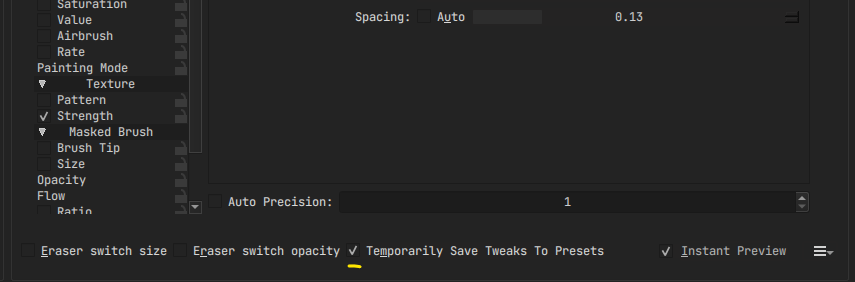
What I didn’t know that day was that I was obviously using the right brush setting
i just tested this in 5.0.2 and i can confirm it does fixes the lag, but this is kinda terrible for me lol as i draw expecting the brushes to be reset as i change them, so i always had that option disabled.
But thanks for sharing this workaround. I am marking @tiar maybe this info helps with fixing this issue for people who dont like using the temporary tweeks
Im kinda use not having it on / or turning it on depending if I feel need it. Ill guess ill leave it check since it doesnt affect my workflow.
Yeah there are times you want the brush to reset as you switch, Which i was doing yesterday.
Its still worth looking at if this lag is related to the one in Resource Manager. It seems it has something to do with resetting the setting. If once that is merge hopefully this as well get resolved.
I’m more forgiving with my laptop and my old pc, compare to this one.
I did what jaivu suggested and its quick now, Ill look into my laptop and see if it works. Even though its kranky its still more than adequate for Krita.
Also a note on this workaround, clicking the reset preset button still causes the lag, as it loads the original settings for the preset. So its not a complete “fix”
Yeah not really a fix since the underlying issue is still there. Its more a workaround for now while we wait the result of the resource manager optimization from the linked thread. The root might be the same. Reset calls to resource manager .
Cause if it lags in my pc - theres an optimization issue. Considering my goto brushes are pretty simple brush.