Smudge bug

I smudge in krita by using wet knife by enabling only smudge length option in brush settings but the problem is whenever I try to make the smudge brush size bigger it became so lagging and take more time to smudge an area so please fix it .

I have 8 GB ram
And 512 gb SSD
Windows 11 home

How large do you say “bigger”?
I would consider it as a performance issue rather than a bug :thinking:

Smudge brush require more performance than pixel brush, if you think it is too slow, maybe try:

  • Decrease brush size
  • Increase brush spacing
  • Enable instant preview (may have some canvas glitch if you quickly press undo before the background operation finish; press Esc to cancel the stroke operation instead)
  • Enable Use new smudge algorithm in the smudge length sensor page (a bit faster, but looks different compare to old algorithm)

Hardware side, the performance depends on your CPU power if not hitting RAM limit.

3 Likes

I’m using for 500 px large on a 4k canvas

Have you tried any of the suggestions? Does it get any better?

PS:

To be more precise, it currently rely on single core performance.

3 Likes

No it doesn’t work, is it a bug ? Can you please see it if anbody facing this issue or not .

@GamerX_PSG I don’t understand why you’re demanding a fix when you don’t know yet if it’s your device that is causing the problem.

How much memory is your project using? You can find that in the bottom status line. If you’ve got lots of layers and/or filters you may be pushing your device to its limits which will cause lagging, especially with increased brush sizes.

4 Likes

What if you Increased brush spacing a bit as @Lesqwe56 suggested? That fixes lag issues for me a lot of the time.

2 Likes

My device contains 8gb ram where it’s enough for editing in after effects , whereas the krita contains a brush bug , i don’t know what to expect but as you asked my device meets all requirements for krita and it causes lag at the starting of to draw something ( like painting a sky or etc . ) So it will acquire a few mega bytes as my project file . As far i think it be a bug on the colour smudge engine. Thus the smudge brush works on painting a small area that smudging the whole canvas. I think you get it …

No i did exactly as mentioned but won’t fix …

That’s not what I asked you.

EDIT: Add - It doesn’t matter how much RAM you start with, a project can get so big that it overwhelms the available RAM and begins swapping which slows things down considerably. By informing yourself of the memory size of the document, you can tell if this is causing the problem or not - just by taking a quick look at the stats.

Im working on a 4k canvas it shows 10 mb in bottom status line . I had increased my bush size to 500 px where it lags so much actually the lags start after 400 px of brush increased size. No i didn’t apply any filter and I’m using single layer

I have an arthritic old desktop computer and with a 4K canvas at RGB/A 8-bit default, I have no problem using a wet knife brush preset at 800px size for ‘local’ smudging.
With long fast sweeping strokes along a canvas diagonal, there is a delay of about a second but that is to be expected.
Instant Preview doesn’t improve that much if at all.

1 Like

On my potato laptop (more than 10 years old, 6 GB RAM) I get a slight lag (less than 1 second) if I push the knife bigger than 600 and make a series of quick, long strokes. That is to be expected. I’m using a 4000 x 4000 px canvas to match yours.

If ever you want to check how your system is doing, hover over the size indicator on the bottom and you will see details about your memory usage and it will tell you if your system is swapping.

At the bottom it shows a progress bar of freehand brush stroke at a when I release my pen from tablet …

What processor do you have?
Sudden and dramatic performance degradation over a certain brush size with smooth performance below that size is commonly related to L3 Cache size in other software. I haven’t experienced it exactly in Krita that way, as Krita tends to run into CPU time limits before then, but if it’s a fast processor with very little cache, I could see this happening.

I do see this happening with long/fast brush strokes over a lot of canvas at 4961x7016, but the line it’s self is drawing very quickly, at over 100fps. I would say this isn’t a bug; your computer is likely just struggling to keep up with the brush. If you make a long stroke, the brush needs to update a lot of pixels in sequence, including ones it just updated, in order to accurately create the correct color of the resulting pixel. It adds up quickly, and should linearly relate to the total brush size. If you make a larger canvas and try this with 300px brush, does it have the same type of delay, but more quickly catches up, or is there a sudden change when going from 350px to 400px?

4 Likes

I have i3 processor. I also tried it in Photoshop but there is no time delay , Yes it’s right as you say it happens during the stage of 350 to 400 px of size.

You didn’t happen to select the “i)Wet Knife Plus (mypaint)”, instead of the “i) Wet Knife”, because this would explain everything, as the mypaint brushes tend to lag heavily at large sizes, but this is well known and due to the engine of the mypaint brushes.

My Stone Age PC, at least with the wet knife smudge brush you refer to, has no lag when I have a 4k x 4k canvas filled with strips of paint about 500 pixels wide and make a 1000 pixel size stroke across the entire canvas with this wet knife. If I use my standard canvas with a combination of 3 texture layers and a fill layer adjusted by level filter plus the paint layers, the Wet Knife starts stuttering slightly at about 450 pixels, but I consider it as expectable because of the then needed computation.
With the Wet Knife in the mypaint variant, a brush stroke stutters heavily from about 300 pixels.


How about you finally give specifics on your processor, maybe we can narrow the issue down this way?
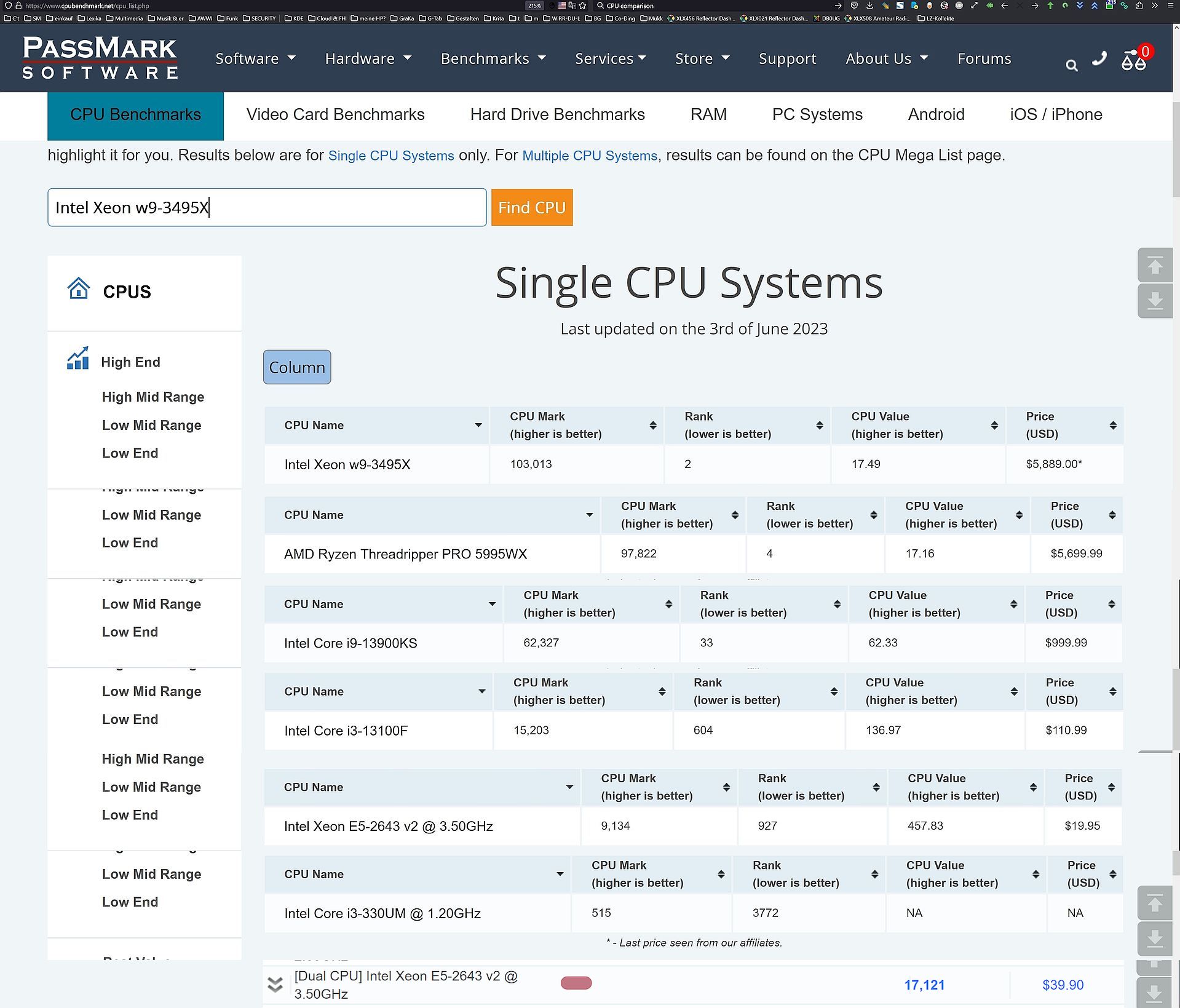
Well, at least we already know that it’s an “i3,” which says - nothing. i3 CPUs, however, range from pocket-calculator level to reasonably powerful. They are definitely not the most powerful CPUs, when I look at comparatively current i9, Threadripper or XEON CPUs :upside_down_face: this becomes clear. My 11-year-old “XEON E5-2643 v2” CPU looks not so bad in comparison, because my PC has two of them and achieves 17.121 Passmark points, :wink: which leaves even the best i3 CPU (from 2023) clearly behind. So, it has not to be the issue, but it can.

I have created a little collage for this, and here hides >> a benchmark comparison of the 4 i3 CPUs and the i9 CPU << from the collage.

As you can see in this collage, only i3 as information does tell nothing, which model is important:

You say:

On a one layer, no filter, 4k by 4k canvas with a 500 pixel smudge brush?
This can be interpreted as an indication of not so much computational-power, one could think, because mine does this only when I push it to the limits, a 1000 pixel smudge with the wet knife seems to be managed in real-time.
Okay, that is a little mean, it is very probable that my PC has more reserves than yours, but to answer our questions only in part, or to compare Krita with Photoshop, or even After Effects a somewhat different application, isn’t fair either. Krita does not state to compete with their kind of code-optimization, but with a halfway capable PC it works well, because if everyone would experience the issues you state to have, the forum would break apart because of the user-masses asking for support.


So, things you can try are to close all programs you don’t need for painting, a tip many users benefitted from. You won’t die if you check your mail and chat and whatnot after your Krita-Session, or? Don’t forget all the little thieves in the notification area, they “eat” your CPU, but don’t work for you. :wink:
Think, do you want to paint, or do you want to be entertained?

You could probably optimize your Krita settings, maybe allow Krita to use 5 or a max 6 GB of your RAM instead of the 4 GB standard, but definitely not more than 6 GB. But with 5 GB, you should be on the safe side, if you have closed any unneeded software. If your system gets unstable, reduce it back to 4 GB.

You can set the size of Krita’s swap-file up to the maximum of 64 GB, if you have enough free space on your SSD, and in case it lies on your System-SSD you should have at least 100 GB free while Krita is running and has loaded a not empty project.
If you have two SSD’s, you should consider putting the swap-file on the non-system-SSD, this way Windows won’t collide swapping with Krita swapping¹ (therefore the hint to have at least 100 GB free, when it is on your System-SSD), but you have to have the space free you allow Krita to allocate on the second SSD. If Krita tries to assign nonexistent space on your SSD, it will crash.


But I think I understand, for you Krita is the cause. The issues you don’t seem to acknowledge are at first you should not compare Krita and Photoshop for this, it is well known that Krita loves a little more computational power², and second you should acknowledge that your system seems to be the only one having this issue using Krita.

It doesn’t look like you are looking for support, whether for a solution to your problem on your side, it seems you are looking for a culprit that is found elsewhere. You don’t answer the questions asked. It’s clear to you that the problem can’t be on your side, although other users don’t seem to have this problem, even with outdated hardware. So you neither achieve an improvement nor a solution to the situation. This can only be done, if at all, by proactively cooperating, not by refusing, this is not how anyone who is looking for a solution acts.

Michelist

¹ They don’t really ‘collide’, but if both need to swap out memory at the same moment, and this is not uncommon, they don’t have to wait for the other to finish their task, both can write to their allocated disk at the same time.

² Whether it’s because of the small development team and the scarce financial resources Krita has compared to the products of billion-dollar companies like Adobe, I can’t say, but there’s probably a connection between these facts. PS may be better optimized codewise, because of that. This is also something to keep in mind when reporting problems of your kind with software provided for free. So what? But it does not help with your issue.

1 Like

Photoshop uses a completely different kind of processing for these things, and doesn’t require as much resources as Krita for a lot of it’s operations. It’s a very old program that’s very optimized for performing on low-end hardware. It’s more comparable to Paint Tool Sai or Clip Studio Paint as contemporaries.
On the flipside, Krita tends to scale more smoothly to more cores, threads, cache, GPU, and RAM, and swap. However, it expects more of these things to perform well in the first place, especially with higher resolution and bit depth.

Depending which Core i3(2100? 3200? 4020Y?) you could have an extremely low amount of cache, as low as 3MB of L3, compared to modern CPUs with 10, 12, or more MB, even going up to 128MB in modern premium mainstream parts. When you run out of cache, the operation must be performed out of system memory, which will rely on memory bandwidth, latency, and availability. You can use something like Aida64 to look at what your numbers are for memory bandwidth; it will benchmark the cache speed and memory speed, as well as latency, and capacity.
If you manage to run out of RAM as well, the program needs to store that data somewhere, and will put it on your SSD in a swap-file. It’ll take whatever the least used data is, put that in swap, and then perform the operation you’re trying to do out of memory, before freeing up that memory, and then swapping back in the data from the swap-file as needed.

You may simply have to avoid larger smudge brushes in Krita on that hardware, or switch to Photoshop to do those effects, or just get used to a bit of delay.
You can reduce the brush load as well, as suggested earlier in this topic. It will change the look and feel of the brush, but if it’s calculating less stuff in the same distance of line, it won’t take as long to complete the line.

The delay you see, you absolutely can experience in any other drawing software, however. It’s just a matter of using a large enough brush on a large enough canvas, and is fundamental to the process of digital drawing.

4 Likes

That’s why I love my old, big and fat workstation so much! 12 cores, 24 threads, 2x 25 MB cache, 96 GB RAM to have fun with, only my RX580 8 GB GPU could use a replacement while it is more than enough for Krita.

Michelist

As far as I’m understand about code optimization of krita . Yeah it could be a logical reason for where i tried the same thing in Photoshop it works whereas in krita it doesn’t. I don’t know who to blame but definitely not so much my pc . It’s about the DSP Algorithm.