I happen to be in need of one specific type of selection on the layer. I don’t know if Krita supports something like that or if there is a workaround, but this is what I need:
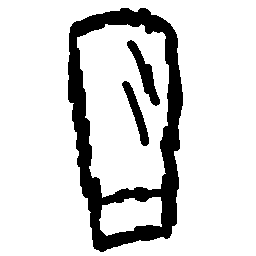
This is, lets say, a messy line art. As you can see lines are uneven and everything. Black lines.
However there is obvious pattern through these lines, through the middle of them and along their length. The red line.
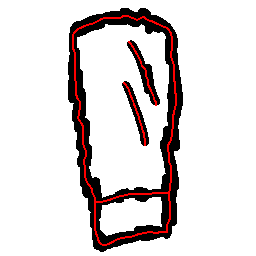
My question is, can I somehow do a sort of selection that is going to “select” this messy line art in a way where selection is going to be approximately along this red line path? This is important to me as I could then just “stroke selection” and get a clean line art in an instant. Manually tracing through messy line art is WAY too time consuming and exhausting when doing it carefully and correct.
By the way, this has nothing to do with pixel art. For some stuff that I work on, I use pixel perfect brush (on a large canvases of like 2048x2048 or 4096x4096) as I want to avoid fuzzy lines on a base version of an image. Then often I realize that some major detail on my big image really has to be smaller or bigger and then I am forced to up/downscale some line art that previously was drawn with pixel-clean lines. I am looking into a way to rebuild that clean line art as fast as possible after scale (“nearest neighbor” scale algorithm is no go since it deforms line art too much) with exact line thickness. The way I see it, one such fast way would be a selection that goes through the middle of that scaled fuzzy line art and then simple stroke selection that is using pixel perfect brush as a base. Manual tracing through scaled line art turned out to be a complete nightmare.