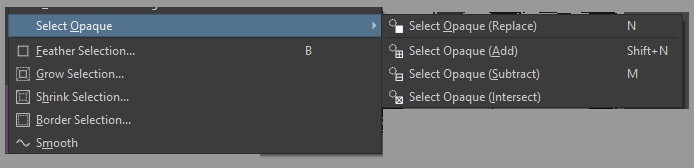
In the Select menu try these actions, you want to first do select opaque (replace), and then do combinations of shrink/smooth. You can also select all the pixels with no alpha, then invert (similar color selector tool + invert selection.
Here is a plugin that puts all these into UI, it does not track undo history so use with caution. Save/backup your work frequently. Written by Gemini. Today added the threshold selection, it will select all pixels with alpha above the amount indicated. Threshold selection is currently extremely sharp, so you may be able to use a Gmic anti alias filter to make it less sharp… 
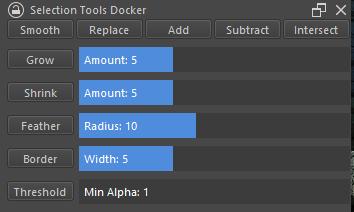
To install: Tools>Scripts>Import Plugin from File locate the plugin, restart Krita, click enable, restart, and you should be able to find the docker in the list of dockers settings>dockers
You could also experiment with this script that converts the current selection into a assistant (the .paintingassistant file is saved to temp, has to be manually loaded using the assistant tool load assistant button in tool options). I’ve wanted a way of making a stroke selection with opacity or brush strength or whatever, this is the closest I’ve gotten. 