Hi there,
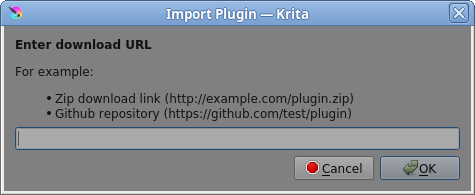
When I try to import a krita plugin via a github url, I get an error that states <urlopen error [SSL: CERTIFICATE_VERIFY_FAILED] certificate verify failed: unable to get local issuer certificate (_ssl.c:1108)>
I encountered this issue and wasn’t sure if it’s a documented bug or something more commonly misconfigured by the end-user. I searched on the forums and found this post which had one reply. I did not find anything on the kde bug tracker about this, nor did I find anything relevant in the docs.
This is purely conjecture on my part but I am guessing since AppImage is supposed to be self-contained, SSL should work out of the box, correct?
os: arch linux, 6.1.12arch1-1 kernel
krita: latest stable 5.1.5 appimage
i have openssl installed but i don’t know if that affects things in the long run
Can you please tell us the full URL that is not working as expected?
Can you import other plugins this way without difficulties, or do you have the same problems there?
Does it work to download the plugin and import it locally?
Michelist
I didn’t know it did this:
Of course! the original url I was trying to import was krita pie plugin
I have the same problems with all the urls I have tried. All of them were https://github... urls as that’s all I know how to find for the moment.
Importing plugins work when downloading a zip file and importing the zip directly from the tools menu.
Using the link given, I get Error during import: HTTP Error 404: Not Found
yes, I actually got the same thing when trying out the community-maintained flatpak but didn’t mention it here since it wasn’t officially packaged by krita.
I thought to try downloading it from my package manager to see if the same error(s) came up but that wasn’t an official krita package either.
I used the 5.1.5 appimage and as with you, the downloaded .zip imported fine and seems to work.
I get the same error with the 23 February 5.2.0 prealpha nightly build.
The SSL part of this is beyond my experience and understanding but there does seem to be a problem.
If nobody gets back with something in the near future, I suggest that you file a formal bug report at https://bugs.kde.org/ (Sign up and login are needed.)
I have made a submission to the kde bug tracker. I hope I did it correctly! Fingers crossed that it’ll get looked at in the future.