ah sorry. well for 100px if you vectorize it wont be a big speed increase though, it is a normal size for a brush. And yes it would be turnning the tip into a vector file.
Is it correct if I say that the lag with those brush tips is mostly at the beginning of the stroke? It looks like it does something, and only later starts following the brush? It looks like so in my experience (I checked with other high quality brush tip, I haven’t had time to check your specific ones yet, but it looked like that was the problem you were having).
Looks like it.
Another observation is while changing the option curves in the brush settings/modifiers.
There’s also lag on that side.
By the way, @EyeOdin.
I wouldn’t say that Krita 4 has reached Photoshop levels of performance yet.
The correct phrase to me would be “Krita is reaching current gen Photoshop levels of performance”.
It’s not far from PS levels right now, but it still is not there.
Photoshop in contrast to Krita, even though it’s only available on MacOS and Windows only, relies more on the GPU for graphic data computation. It uses both the CPU and GPU, but a lot of things in the app are impossible to do when you don’t have a GPU.
Liquify is an example.
And I once said that while CPU cores are faster than GPU cores and may offer better rendering quality, GPU cores are insanely numerous, especially nowadays.(less than a dozen of CPU cores on average vs hundreds to thousands of GPU cores on average…)
You would not get away with heavy data computation without a GPU, unless you have a divine algorithm or source code which consumes a tiny amount of resources to perform impossible things. That… is a fact.
From my experience, both apps have great brush engines. And Krita delivers a higher fps rendering by default. In terms of performance and speed with brush engines, both are very similar.
But with everything else, like the selection tool, magic wand tool, cropping tool, image scaling, liquify tool, transform tool, layer styles and whatnot, Photoshop is faster right now.
And I believe you agree to that as well.
Yeah I know but krita exists for all platforms as it starts from Linux. And that probably the reason why it does not use the graphical card as much, that and Qt too probably.
Graphical cards are proprietary and each system has it own API for it. I don’t know the dependencies but I can’t see you coding in Linux to use Windows and Mac APIs exclusively as your standard usage, or it is fully free to be in Linux too or you probably will not be able to use it to port it everywhere. You can ask all you want but considering how krita is made it will probably never happen. If it does not happen with Qt6 it is a no go for sure.
And Photoshop as a company is big enough to have windows and Mac versions in parallel because they have the man power to do it. Krita has to pay a full time programmer just to give compatibility to Mac because they made a stupid system or else it would not even exist there so many issues they create. In my mind it is a bad investment as Mac wants to be isolated and they should be left alone.
Crap!
So that’s where lies the BIG difficulty !
Man ! If the developers had a solution long ago, they would have implemented it.
Just, crap ! A miracle is our only hope. 
@novames00 I reported the trouble with brush tips here: 436731 – Huge brush tip images unnecessarily slow down Krita on every start of the stroke - sounds like something fixable, but I have other things to do right now so it needs to wait on the bugzilla.
Regarding GPU, again, it’s not only one per system, there is also one per graphics card manufacturer… Nvidia has CUDA and over that thrust, I used it actually; it’s fine, but Nvidia only. There are some others for other graphics card manufacturers. There is also OpenCL which was an attempt to make one that would work on all, but there are some weirdness with specification, it turned out eevery graphics card is different and it’s difficult to find common stuff to put into OpenCL, I won’t bore you with details but even Blender gives up on OpenCL recently, and they have much more financial support than us (I guess they’ll use more dedicated APIs?).
And then, there is this eternal issue that it’s not like GPU is magic. GPU usually doesn’t share the memory with CPU, which means you need to copy it one way and back; and GPU has much less own memory than RAM (which is used by CPU), so there will be plenty of this copying if you have plenty of memory used (which is common for documents in programs like Krita, which can consists of lots and lots of layers). There are tasks that could improve from this, but there are tasks that won’t. And Krita is already vectorizing computations whereever it can, using the fast computation CPU commands that makes the CPU work a bit like GPU (though not exactly, of course), so the difference might or might not be noticeable - it would have to be checked for every implemented operation.
You seem to have heard some things about CPU and GPU but without deep understanding, unfortunately. I feel like “GPU computing” became in those circles a buzzword just like “AI” or “neural networks” can be, sounds all so advanced and modern and smart, but doesn’t necessarily fit the purpose (AI and NN are powerful, but there are cases to use them and there are cases where it’s better not to… like in that taxes company that claimed to use “AI” to make taxes, but (1) why would you want AI there, (2) it was “Human Intelligence” after all (real human accountants writing things in instead of the algorithm), and the whole thing was a scam). You said:
You’re not wrong about cores on GPU, but “better rendering quality”, where does it come from?
Actually, it depends on what computation. GPU is only good if you perform the exact same computation on at least hundreds or thousands of those cores. And then there are those memory constraints. GPU is not magic, as I said. It’s good for some things, like 3D, where with simple Phong lighting it performs the exact same operations for all 1920*1080 pixels of the screen. It might not be good for other things. It’s good for neural networks, since the computations are quite heavy (multiple layers of even more kernels to compute with), while the amount of data not so much (even for the graphics usages, the input images are usually samples of the actual input image, something like 256x256 or 512x512, plus kernels that can stay in GPU memory if possible, so no copying). It’s good for matrix computations. It might not be as good, or worth the time implementing, for, let’s say, alpha blending of two layers 9000x9000, because the amount of data is huge and the operation very simple (so CPU can handle it before you copy all the data to GPU and back and compute on GPU). Or when you have an algorithm that you need to calculate only once (you have only one input data point) and there is no way to parallelize it. Running it on GPU would be a waste of all those thousands of precious cores. Oh, and regressive algorithms. And even simple things like sorting have special algorithms for GPU because the normal ones wouldn’t be good there.
There are good and hopefully even awesome possibilities in GPU world for Krita, and I would love Krita to use it more sometimes, but then, go back to the first paragraph, there is no safe choice of API to start implementing all of this on GPU. We might want to see whether Vc (library Krita uses for vectorization, that is, speed) starts using GPU, because there were some plans. But for now, I’m not going to address it any more time, until we have some concrete plans or experiments.
(Especially since you expect Krita to perform while you choke it on RAM… At least once close all other applications, those that steal all this RAM and probably CPU as well, and then test Krita properly, really… 2GB of RAM sounds like a horror story, unless you’re really careful on the canvas size and the amount of layers and content on them, and don’t use any big reference images etc…).
3 Likes
First, thanks for opening the bug report. Always good seeing Krita ironing out minor bugs. Do you think this bug is related to the freeze/slow curves on the Brush Editor when using big textures? Just to clarify here a step by step to reproduce this:
- Brush: Basic-2 Opacity
- Change the brush tip to a predefined one, preferable bigger than 800 px²
- Activate Pattern
- Select a big pattern, above 1000 x 1000
On my old CPU, an AMD FX-8350, some 512 x 512 textures would trigger this slowdown - Try moving the curve’s handle of any tab in the Brush Editor.
- Result: You should see a freeze, stutter or slowdown of the curve’s handle. Sometimes Krita freezes entirely.
On my current Ryzen 5 2400g CPU I can see this bug using the brush tip: Circle Hard Eroded and the texture wojtryb6_perlinNoise.pat (1024 x 1024) from the wojtryb Bundle.
Second, I would like to help enlighten which operation a GPU would benefit a drawing program like Krita. For this is best to point out real world cases of GPU Acceleration, and what better candidate than Adobe’s Photoshop.
Adobe provide a fairly decent and clear list of which tools and operations Photoshop uses the GPU. The link is here.
Bellow I also uploaded a screenshot of the list.
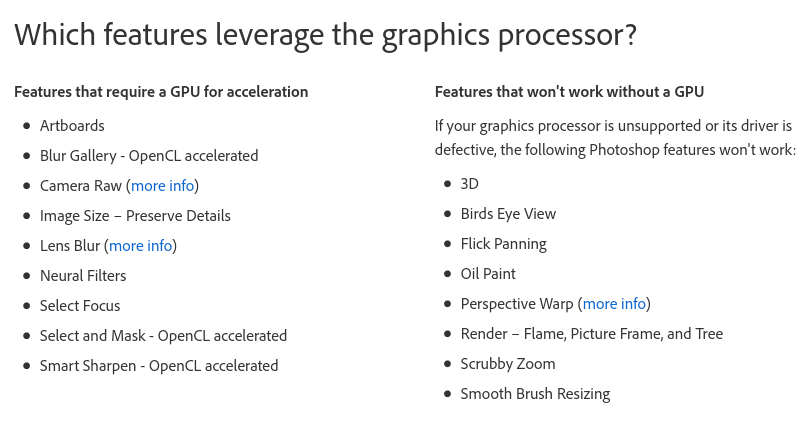
As a rule of thumb you can say that features using GPU are filters and transform tools (Transform, warp, liquify), so most likely regular painting wouldn’t benefit much from using a Graphic Card.
I say all this for when people ask for Graphic acceleration, they would know what part of Krita will have a uplift in performance. Conversely they can set their expectations accordingly to what it can be achieved.
As Tiar said OpenCL was a good candidate for GPU compute (you can see even Photoshop using it), but it is complicated and hard to develop and mantain, Adobe can afford the cost, but even Blender is dropping support for it.
However, now that Blender is going to use another API to render on AMD and Intel GPUs (maybe Vulkan?), we can hope it is an easier, more stable and, still, open source implementation so it becomes a viable candidate for Krita as well. This is only a speculation from my part, don’t take seriously.
Obviously I can’t talk for the Devs, but I bet they are eager as any of us to see Krita even better and faster, using everything the current technology has to offer, including your Graphic Card.
1 Like
@tiar
It seems the .pat files are responsibles for slowing down brush performance, and also stutters while editing curves in the brush parameters. I’m not sure.
But just right now, I tried to select a .pat file as pattern. It was a simple 512x512 texture, and it was slow. When I selected a png pattern however, speed was normal, there were no stutter or performance issues…
To clarify, was the .png file just as big as .pat file? 512x512? If not, can you please check with 512x512 .png file?
Yes, the png was 512x512. Same resolution as the .pat file.
1 Like
Is it because the *.PAT files are usually much larger than the *.PNG files they are based on?
Michelist
@tiar Could this be related to the problem I described here when I was testing the charcoal brush wips? It seemed to cause the RAM usage to keep creeping up. I forgot about it, so not sure if I’ve encountered it again. 
@tiar
Uhmm… if you try to save a png texture and Krita forcefully converts it to pat file, is it normal ?
This topic was automatically closed 30 days after the last reply. New replies are no longer allowed.