Type of device: Drawing tablet, PC (AMD Ryzen 7 7700)
Brand and version of the device: Wacom Intuos CTL-490
System: Debian 12
Recently I’ve been having a strange problem where Krita will freeze up. It will take like 30 seconds to respond to any interaction with the program. If I do too much while it is frozen, it will show up as unresponsive.
I was suspicious this may be some issue with my drawing tablet, as it happens less frequently when using a mouse, but it doesn’t have this behavior in xournal++.
Turning off graphics acceleration didn’t help.
This behavior happens in Krita 5.2.6 and 5.2.9 (I downloaded the new version to see if it was some sort of weird bug).
Has anyone else had this issue? It’s really bizarre!
What does Krita show for your memory usage in the bottom status bar, when this happens?
When the project is very large, it could also be the auto-save that is preventing you to do something while it is saving, when it takes very long.
I’ll check the autosave when that happens. I was suspicious it was the large number of reference images I had in the image, but I deleted most of them and the problem still persisted. Bottom says 2800x3500 (1.2 GiB).
I checked the RAM and performance generally when it freezes and it’s no where near my system limits or the Krita resource limits. It’s using a little under 3 GB total RAM.
I hoped it would be that because that is a common thing that happens and an easy solution.
Does it happen when you use other tools too or just specifically when using the freehand brush tool. Does it happen with other brush presets too? (like basic round or something) or only with specific brush presets?
So I have enabled all the logging options on Krita. There’s no output to the log folder though?
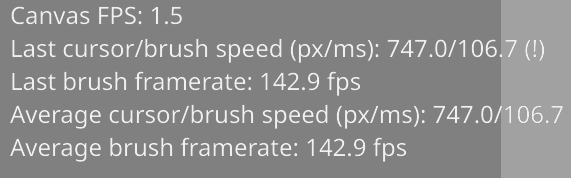
I did notice when this behavior happens the FPS becomes saturated. The only other reference to this I’ve seen is in relation to enabling / disabling vector optimizations. I currently have these on, but I tried turning them off and had no difference in this behavior