Hello, I am new here and looking for some help defining strokes etc. I am opening svgs and trying to apply a stroke. I see under the edit tab that I can apply a stroke to the main svg file and that another layer is added after the stroke is applied. However, the applied stroke is an inch thick and I just cannot find the place to decrease the stroke width… I also see under the edit tab - ‘Stroke Selected Shapes’ while the ‘Stroke Selection’ is greyed out.
Can any member direct me to the stroke controls for decreasing and colouring the outlines of my strokes.
You don’t apply a stroke to the .svg file. You apply a stroke to the selected vector shapes in whichever vector layer is active that you’ve selected shapes in, using the Select Shapes tool.
The stroke is made with the Freehand Brush tool and it’s made into a paint (raster) layer as you’ve noticed.
It’s made by tracing/stroking all selected vector objects on the active vector layer.
So you need to select a suitable brush preset from the Brush Presets docker, a colour you like from the Advanced Colour Selector and adjust the brush Size and Opacity with the sliders on the Toolbar.
‘Stroke Selection’ will stroke the outline of a selection that is made with the Selection tools which are in the Toolbox. With the Selection tools, you can make a variety of multiple shapes of all kinds, as a selection.
If you haven’t made a selection then that option is greyed out.
The tracing/stroking is done in whichever paint layer has been selected.
This is a completely different thing from a selected vector shape.
thank you all for the reply but I am not understanding the concept here in Krita…
I find that in order to make a selection to stroke I have to choose the main svg file using the ‘Select shapes Tool.’ After I do that I see another layer has been added and it is at this point that I get completely lost. I can see by ‘right clicking’ the new shapes layer that there are a number of choices in the properties but nothing to control the stroke itself. It is here that I am lost.
I can see the opacity and size at the top menu become active but when I move the sliders nothing happens and at this stage I find no where to go…I should be able to know where the controls are to manage the colour of the stroke which is red and I want black, also I want to be able to change the size of the stroke on the shape selected in the layers panel but nothing changes.
I think I need a step by step to get this right, This can be a paid project if it is allowed… I’m dying here.
I am experienced dealing with svgs files using Vector Magic, Affinity Designer / Photo and many more apps but Krita has me completely stumped. I am only able to make selections to stroke in the main svgs file. I must be missing a step. Can I use snapshots on this forum, maybe it will help get me to see what step I am missing. Than you!
It’s just occured to me that the Edit → Stroke selected shapes capability may not be what you actually want or need to use.
As I explained before, that is a painting (raster) operation which gives a painted (raster image) result in a paint (raster) layer.
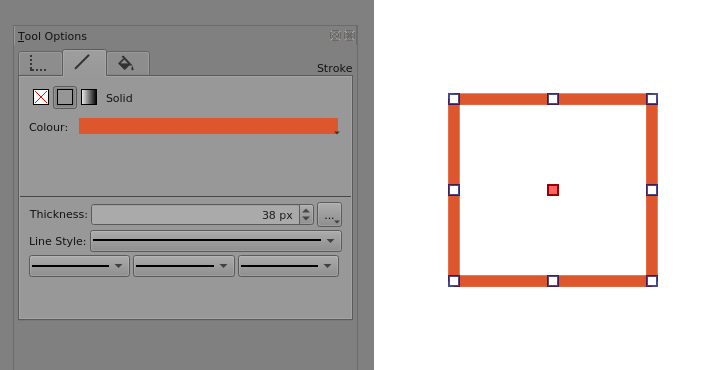
If you want to change the vector stroke properties of a vector object then you need to look in the Tool Options docker when you’re using the Select Shapes tool to select vector objects.
Here is an example of a selected vector object and the Tool Options docker shows its properties, on three tabs. Geometry, Stroke and Fill.
The types and values of those properties can be changed as you can tell from the controls there:
Is that what you actually want to do?
Please upload full screen screenshots showing what you have and explain in more detail what you actually want to do.
This has nothing to do with a ‘main .svg file’. You may have got those vector shapes by Importing the contents of an .svg file into a vector layer in krita. After that, you’re working with a vector layer in krita.
You’re selecting a vector layer in krita (in the Layers docker) and then using the Select Shapes tool to select one or more of the vector shapes on that layer. These are operations within a krita document.
I’m sure you have lots of experience dealing with vectors in other applications but krita is not a vector application. It is a raster painting application with some useful vector additions and capabilites.