Stylus shortcut button mapping not recognized by krita after update

Type of device :graphic tablet

Brand and version of the device:One By Wacom (2017)/ CTL-673

System:

Version: 5.2.14 (git 31056c6)
Installation type: installer / portable package
Hidpi: true

Qt

Version (compiled): 5.15.7
Version (loaded): 5.15.7

OS Information

Build ABI: x86_64-little_endian-llp64
Build CPU: x86_64
CPU: x86_64
Kernel Type: winnt
Kernel Version: 10.0.26100
Pretty Productname: Windows 10 Version 2009
Product Type: windows
Product Version: 10


i updated my krita from version 5.2.3 to 5.2.14, everything was preserved after the update just fine and worked like it usually did including my stylus shortcut button.
it was after i closed it and opened it later, that Krita no longer recognized that i mapped my stylus shortcut as space key in the tablet’s driver, and instead resorted to recognizing it as a right click like the default mapping
i thought that was the new update’s quirk, so i uninstalled and reinstalled the previous version but the problem presisted there too..
i know it’s not my tablet’s fault because i tried Drawpile and it works fine.

screenshots:
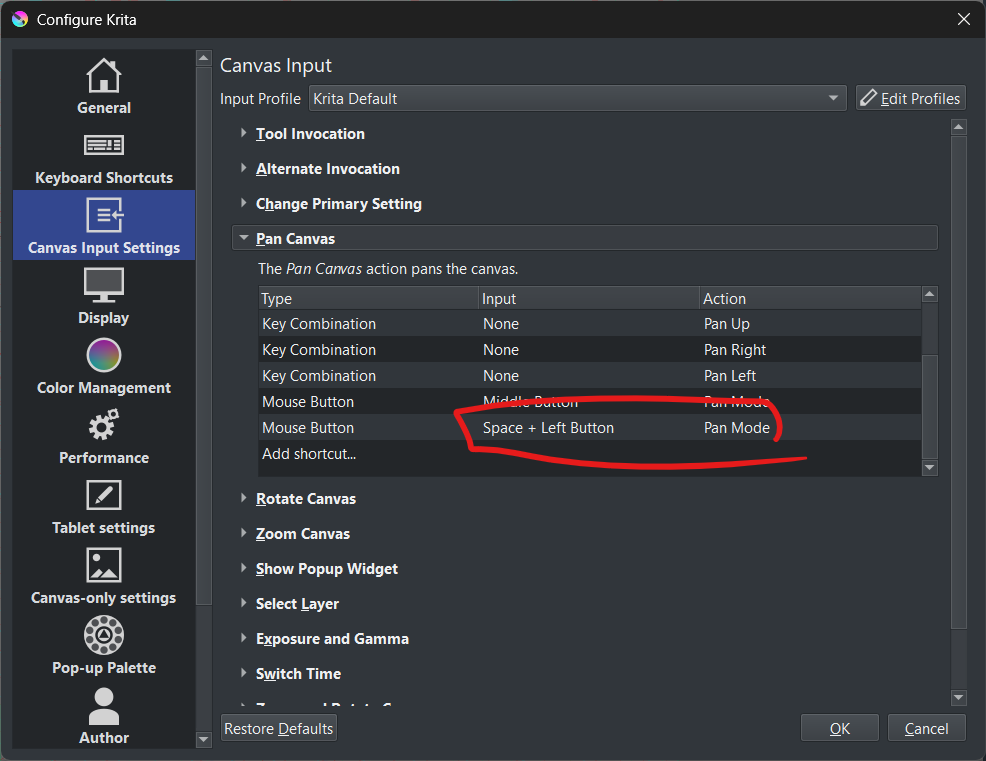
default canvas input, i’ve never changed them
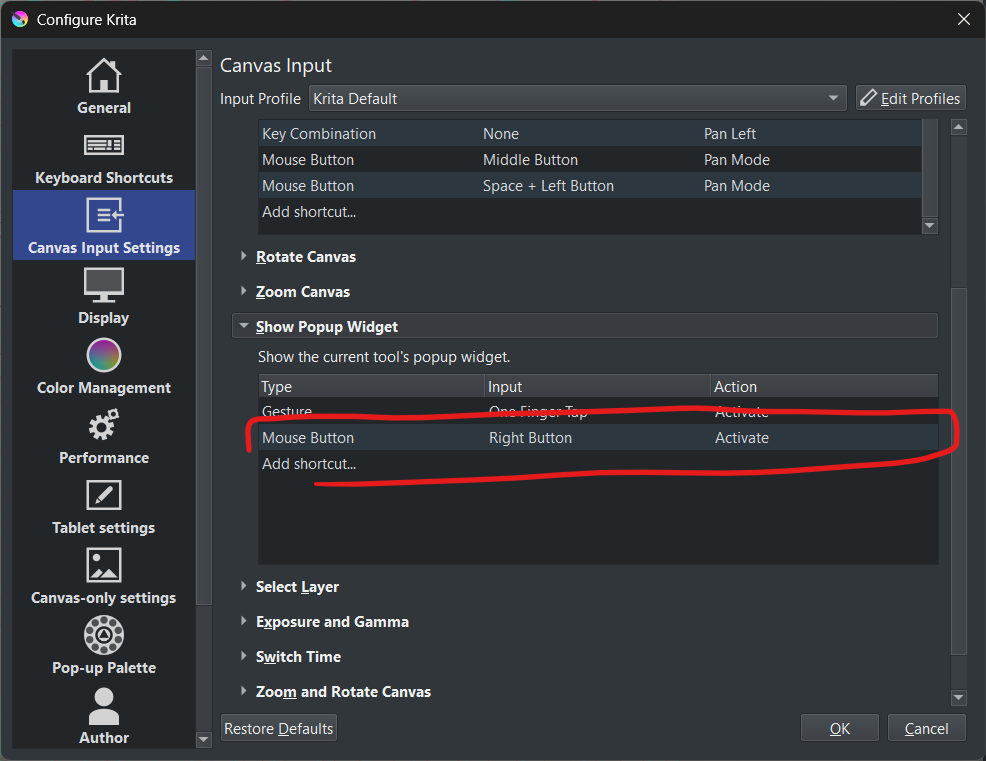
widget’s default input
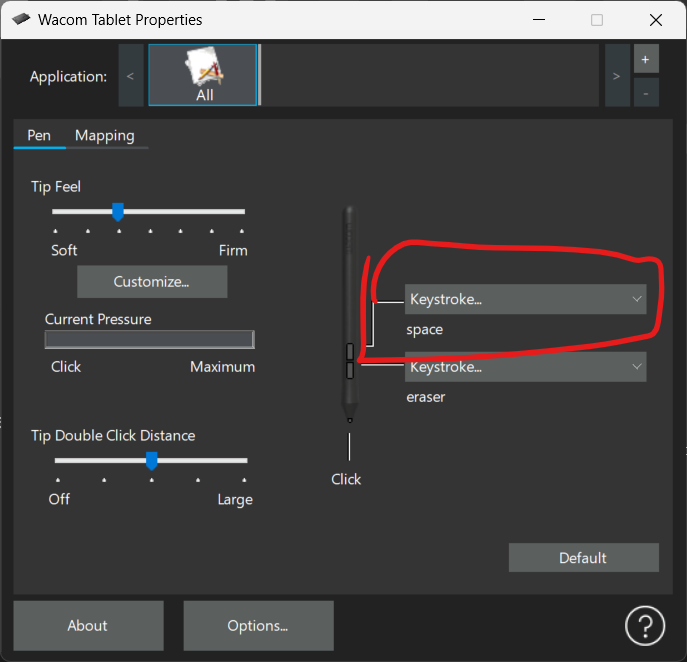
how my stylus butttons are mapped in driver
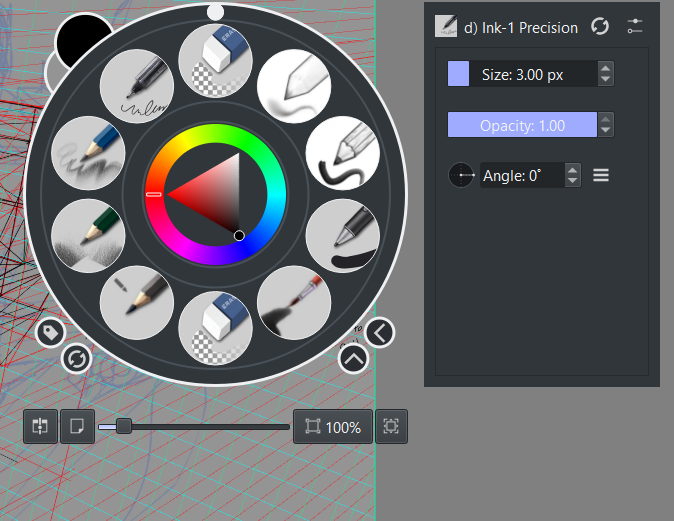
what happens in krita when i click the stylus shortcut button (krita doesn’t respect the driver’s mapping amd recognizes it as a right click anyway)
You must not reinstall Krita, you can re-assign the shortcuts in Krita. Simply double-click on the shortcut you want to change to get the options to do so.

Michelist

i already did that and the settings menu does recognize the shortcut’s input as a space key, it’s when i click the shortcut while on canvas that it first shows the widget pop-up, then recognizes the button as a space key. it’s the first time it behaves like this, usually, i would’ve gotten the pan icon on my cursor without the widget disrupting it

Oh, I see. Then you can try if deletion of the Show Popup Widget shortcuts will solve your issue with the PUP showing up, therefore do a RMB click at the shortcuts you want to delete and select to delete them.

By the way, Krita does not know what your driver defines as “Eraser”, this is a setting to comfort Adobe software and all others sticking in their back doing it like them. Therefore, it is better to set it to the shortcut that is defined as Eraser in Krita, which is usually the E-Button. So, staying with the E-Button example, you should assign E in your driver.

Michelist

Does that mean that you get the popup widget and the pan (hand) icon appears if you hold the stylus button down?
If so, that suggests some kind of initial ‘glitch’ that causes a right click to be output by the tablet then followed by a Space signal.

You only have the ‘All’ profile available on the Applications list of the Wacom driver utility.
It’s good practice to create an Application profile for krita (and any other application you use) that will then be auto-selected when the krita window is active.
Do that by having krita running and press the ‘+’ icon at the right of the Application strip. That should offer krita as a selection option. If it doesn’t, you can specify the krita.exe file in the Program Files folder.
Then press OK (or whatever) and close the driver utility.
On opening the driver utility, you should see that the krita application profile has been auto-selected (if krita is running). Then you can check/adjust the stylus buttons and other settings.

It would be interesting to find out what the ‘Eraser’ button setting actually does by:
a) Using the Tablet Tester and drawing on the tester grid with that button not-pressed, then again pressed to check for differences in the tablet event log listing. It may be that pressing and holding that button causes the stylus to identify itself as an ‘eraser tip’.
b) Using that button as a canvas input shortcut while editing a canvas input setting to see what is output. Also try as a keyboard shortcut input if results are inconclusive.

Remember to set back any changes that happen to the original setting.

It will (should) but that would mean that you can then no longer use the popup widget with other tools to get the various right-click options that they have.

i did unmap the widget and the problem is still there, but now there’s a lag on my cursor and the pan icon doesn’t appear nor functio.
i should’ve clarified that the eraser button is actually just the e key mapped and named as eraser and not some adobe compatibility setting

Does that mean that you get the popup widget and the pan (hand) icon appears if you hold the stylus button down?

Yes, the lag of the widget pop carry over the cursor and i have to wait until the widget disappears by itself to use the pan button.

If so, that suggests some kind of initial ‘glitch’ that causes a right click to be output by the table then followed by a Space signal

that seems to be it.

You only have the ‘All’ profile available on the Applications list of the Wacom driver utility.
It’s good practice to create an Application profile for krita (and any other application you use) that will then be auto-selected when the krita window is active.
Do that by having krita running and press the ‘+’ icon at the right of the Application strip. That should offer krita as a selection option. If it doesn’t, you can specify the krita.exe file in the Program Files folder.
Then press OK (or whatever) and close the driver utility.
On opening the driver utility, you should see that the krita application profile has been auto-selected (if krita is running). Then you can check/adjust the stylus buttons and other settings

I did that, nothing changed..

It would be interesting to find out what the ‘Eraser’ button setting actually does by:
a) Using the Tablet Tester and drawing on the tester grid with that button not-pressed, then again pressed to check for differences in the tablet event log listing.

where can i find a tablet tester?

It may be that pressing and holding that button causes the stylus to identify itself as an ‘eraser tip’.

hmm, i don’t know, my stylus doesn’t have any eraser functionallity, the eraser macro is just the e key binded to the shortcut btw.

b) Using that button as a canvas input shortcut while editing a canvas input setting to see what is output. Also try as a keyboard shortcut input if results are inconclusive.
Remember to set back any changes that happen to the original setting

the keyboard shortcuts work just fine, it’s only the stylus that’s working like this.

[quote=“Michelist, post:4, topic:154934”]
Then you can try if deletion of the Show Popup Widget shortcuts will solve your issue with the PUP showing up,
[/quote]
It will (should) but that would mean that you can then no longer use the popup widget with other tools to get the various right-click options that they have

i did unmap the widget to right click but now neither it nor the map function work, almost like both space and right click got pressed at the same time.

i tried updating my driver but that also never changed anything

OH ACTUALLY NVM.
i changed the tablet’s API in Krita’s settings from WinTab to Windows Ink, now it works.
I think i changed to Windows Ink a long time ago but maybe it switched back to WinTab after the update?

Anyway, sorry for the inconvenience.

2 Likes

I’m glad it’s working now. Less work for everyone involved :slight_smile:

The tablet tester is at Settings → Configure Krita → Tablet Settings → Open Tablet Tester.
Drag/Resize the tester window to make it conveniently large then draw with a mouse or stylus on the left grid area. The right side will show the ‘signal events’ received by krita.
They are different for mouse, drawing stylus, erasing stylus as will be seen if you try it.

If it generates an ‘e’ keypress when you press that stylus button then that’s simple enough and will work to toggle eraser mode.
Sometimes it makes the stylus report itself as an ‘eraser tip’ (as can be observed in the tablet tester) which is then treated as a separate and independent stylus by krita and can be used as such for a different brush preset.

This topic was automatically closed 4 days after the last reply. New replies are no longer allowed.