
Hello, everyone.
Most of the time, more than 90% of the time, my illustration files contain a huge number of layers, and the only layer panel is not enough, so I need to drag the scroll bar of the panel layer frequently to manage the layers, which is very inconvenient.
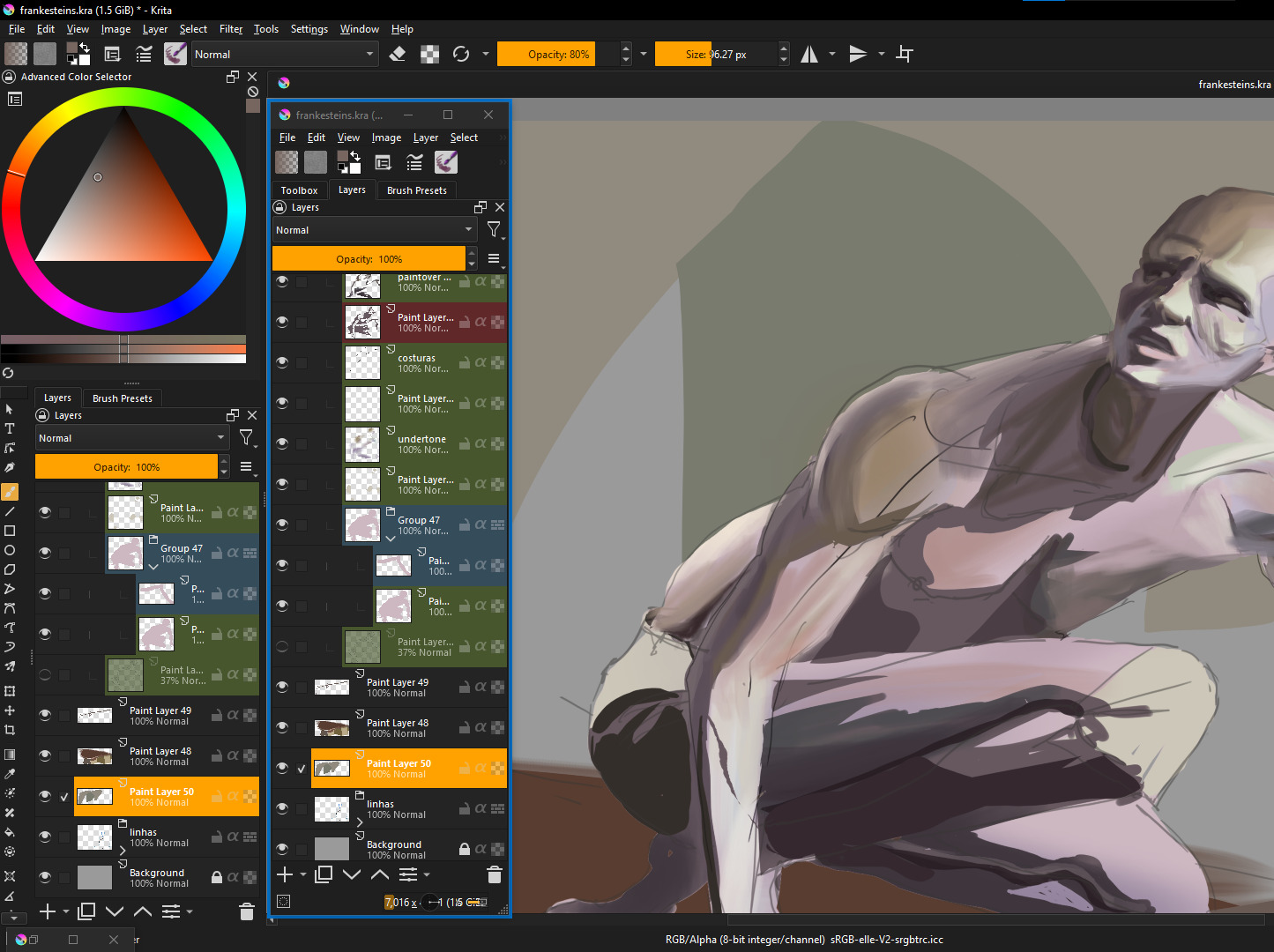
Is it possible to support multiple layer panels like in the picture above?
And the layers between different panels can be dragged across the panel.
Thanks to the developer!
7 Likes
Is grouping not an option? 
I’m a happy user of a mouse with free spinning wheel, it is unbelievable how fast I can navigate to my current 400+ layer-stack Maybe such a mouse would be an idea? Logitech G502 Lightspeed if one wants to know this.
Michelist
3 Likes
Yes my friend, it can be grouped into folders.
But there is a problem, many times each folder contains very many layers, at this point it would be very cumbersome to make adjustments to different layers in different folders.
For example, if you’re in folder A, and you’ve processed layer 67, then you need to drag the scroll bar to find folder B, and then continue in folder B, and process layer 92.
During the whole process, the folder will be expanded and collapsed frequently, which is actually very inconvenient.
I do not mean to offend, I have been working with related drawing software for many years, this pain point has long plagued me, in accordance with my personal experience, I ultimately feel that the panel layer if you can use a multi-panel mode, will greatly improve the efficiency of the drawing.
Thank you friend.
2 Likes
For this and perhaps other situations, it would be useful to be able to have more than one instance of the Layers docker open.
Maybe an icon on the Layers docker that opened another Layers docker. These could then be manually arranged and then saved as a Workspace.
@kritababy Remember to vote for your own Feature Request topic 
1 Like
The mouse wheel is a solution, but it still requires a lot of scrolling. The underlying focus of this problem is two key points:
1, the user needs to quickly locate the layer they want to adjust, and quickly determine where the layer is in the Layers panel by looking at it with the naked eye.
Of course, you can use the “Layer Selection” tool to locate the layer, but the following key point, the “Layer Selection” tool can not do, but also the most critical part of the problem:
2, multi-layer panel, will be able to achieve a clear layer structure visible to the naked eye. Many times in order to make adjustments to the relevant layers, you have to frequently expand and close the layer groups, which is actually very inconvenient.
Keeping the expanded layer group, will lead to the panel window space is not enough, close the layer group, and will lead to the inability to visualize the layer order structure. It’s a contradiction in terms.
1 Like
Thanks for the heads up friend. This feature is what I wanted and really needed it very much. I hope the developers will provide this option and add relevant buttons to allow users to enable this feature on their own if it’s not too difficult to implement.
1 Like
I’m just estimating how many panels I would need for my 400+ layers … 
… and whether there will be any space left for drawing …
Michelist
1 Like
haha man,for me ,just maybe 3 layer panel can be enough
No way I’d be offended by that!  But you’re right. I don’t draw on that many layers, so it’s not a problem I’d face. You’ve got my vote!
1 Like
You can show same document in multiple Krita Main Windows, and then tear off docker from each window, and put all dockers side by side.
From Krita menu:
Windows→New WindowWidnows→New View→my document- tear off Layout docker of new window
/AkiR
2 Likes
You can also filter layers by name, assuming you’re naming your layers in a useful way.
1 Like
What are you doing with 400+ layers?! That’s a monstrous amount! 
2 Likes
Also, depending on your workflow perhaps using file layers can be of help. It’s something I used a lot when working on comics. Nowadays I simply merge as early as possible to never have more than a few active layers.
3 Likes
Although I have never understood using so many layers I think the suggestion of multiple layer panels is a good one for those who need it. I would have voted for it but for the fact my votes are limited so I am saving them for things that I have a use for.
2 Likes
Haha friend, you’re a genius!
I never thought there was such an operation! It’s like finding a bug in a game haha!
Until this is actually added, your way is the only solution left haha.
this is so great! i imagine by layout docker you mean layer docker? I only managed to make this work with windows always on top powertoys feature, making the isolated layer docker from the second windows appear on top of the first one, but its a great workaround.
great topic and great ideia! heres a screenshot of me doing it using AkiR’s ideia from their comment on this topic, + windows always on top from power toys to have both layer dockers at the same time. It would be an amazing addition to next krita versions. i will use it the workaround for a while to see if it fits me
When I see something like that, I think, that there is someone afraid of commitment 
On that note, what about tabs instead of a scrollbar?
I am thinking about a big picture with many objects, and for each object, you have a tab. It would be like groups, but separated. It would make to usability an navigation easier than 3 columns of layers. And you would have more canvas to draw on.
As a user of so many layers, I also need this but my vote is limited now  I will revisit and vote when my votes are released.
Another plus point in having this feature is that you can drag your layer and drop it in the second making drag and drop ordering easier. Right now you have to hold and drag to scroll and it becomes a hassle if the list so big.
1 Like