Krita 5.2.11 on Windows 11(x64).
First, I created a 500px square document and drew a circle on a vector layer.

The following text is the result of exporting the layer in svg format in this state.
<?xml version="1.0" standalone="no"?>
<!DOCTYPE svg PUBLIC "-//W3C//DTD SVG 20010904//EN" "http://www.w3.org/TR/2001/REC-SVG-20010904/DTD/svg10.dtd">
<!-- Created using Krita: https://krita.org -->
<svg xmlns="http://www.w3.org/2000/svg"
    xmlns:xlink="http://www.w3.org/1999/xlink"
    xmlns:krita="http://krita.org/namespaces/svg/krita"
    xmlns:sodipodi="http://sodipodi.sourceforge.net/DTD/sodipodi-0.dtd"
    width="120pt"
    height="120pt"
    viewBox="0 0 120 120">
<defs/>
<circle id="shape0" transform="translate(22.8000024706004, 18.9599972272398)" r="39.12" cx="39.12" cy="39.12" fill="none" stroke="#000000" stroke-width="0.47999952" stroke-linecap="square" stroke-linejoin="bevel"/>
</svg>
Next, change the canvas size to any size.
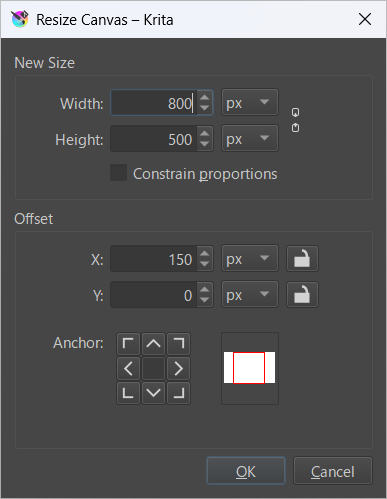
The text below was resized and exported in svg format.
<?xml version="1.0" standalone="no"?>
<!DOCTYPE svg PUBLIC "-//W3C//DTD SVG 20010904//EN" "http://www.w3.org/TR/2001/REC-SVG-20010904/DTD/svg10.dtd">
<!-- Created using Krita: https://krita.org -->
<svg xmlns="http://www.w3.org/2000/svg"
    xmlns:xlink="http://www.w3.org/1999/xlink"
    xmlns:krita="http://krita.org/namespaces/svg/krita"
    xmlns:sodipodi="http://sodipodi.sourceforge.net/DTD/sodipodi-0.dtd"
    width="192pt"
    height="120pt"
    viewBox="0 0 192 120">
<defs/>
<circle id="shape0" transform="translate(22.8000024706004, 18.9599972272398)" r="39.12" cx="39.12" cy="39.12" fill="none" stroke="#000000" stroke-width="0.47999952" stroke-linecap="square" stroke-linejoin="bevel"/>
</svg>
The canvas size (viewBox) has been extended, but the position of the circle has not changed. This means that although the circle is centered in Krita, it is drawn shifted to the left in the exported SVG.
If I save this document as .kri and reopen it, and export it as *.svg again, the values are correct, as shown below.
<?xml version="1.0" standalone="no"?>
<!DOCTYPE svg PUBLIC "-//W3C//DTD SVG 20010904//EN" "http://www.w3.org/TR/2001/REC-SVG-20010904/DTD/svg10.dtd">
<!-- Created using Krita: https://krita.org -->
<svg xmlns="http://www.w3.org/2000/svg"
    xmlns:xlink="http://www.w3.org/1999/xlink"
    xmlns:krita="http://krita.org/namespaces/svg/krita"
    xmlns:sodipodi="http://sodipodi.sourceforge.net/DTD/sodipodi-0.dtd"
    width="192pt"
    height="120pt"
    viewBox="0 0 192 120">
<defs/>
<circle id="shape0" transform="translate(58.8000024706004, 18.9599972272398)" r="39.12" cx="39.12" cy="39.12" fill="none" stroke="#000000" stroke-width="0.47999952" stroke-linecap="square" stroke-linejoin="bevel"/>
</svg>
Should I consider this behavior a program bug?