If two file are open and I switch from A to B, coming back to A get always the same Layer, but not the last active I leave. So I often paint on the false Layer  because I forget to check which one is activ.
Perhaps is it a wrong setting by me or is it really a bug ? I hope it’s understandable.
Checking on 6.1.0, I can’t reproduce this behavior. What OS & Krita version are you on?
Windows 11 and Krita 5.3.2
I think it come from layer order when I create new layer and change their order
Using Krita 5.3.2.1 on Windows 10 Pro I can’t confirm it happening to me.
Is it possible that you are working at the edge of your PCs abilities? So, does Krita’s memory widget in the status bar show up colored? → I once described it on the following screenshot from a different user who had other resource related issues:
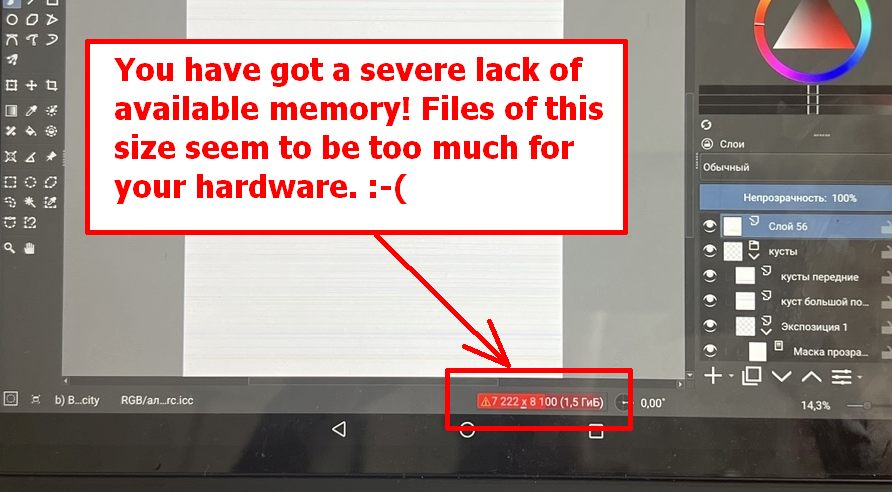
I can imagine that, when Krita is low on resources, it will drop (“forget”) the not so important information of a session to be cautious with the resources available. But that is only a guess.
By the way, that colored bar has a spectrum beginning with dark green, if I remember it correctly, and goes over yellow into red and then into deep purple, and deep purple is the absolute warning to make a lot of in between saves of your work and to push down the amount of memory your picture uses.
If that is the case for you, you can try to lower the amount of used resources, for instance, you can merge groups of your picture which you consider ready, you could save finished layers or groups out of your picture to disk to then re-embed them as file-layers into your picture. If you have off canvas content that you don’t need for your work, you can drop it via Image > Trim to Current Layer or Image > Trim to Image Size, but be aware that it will delete anything you moved outside your canvas (I’ll sometimes do it with parts to get them out of my way instead of disabling a layer), for animation it is often essential to work with off canvas content, so be aware!
Michelist
Thank you, Michelist. I think it’s not a Problem of Memory. Krita show no warning at all and they are also quite small Picture. Has I say, I think this issue appears when you vreate new layer and change the order of them. Perhaps even the last created layer will be alway the activ one by switching back.
Thank you also wakocima
As often as I change the order of my layers and groups, delete layers or groups, copy them from other documents into the one I’m currently working on, I believe that probability will be low.
But I have to admit, currently I’m clueless on a possible cause for your issue.
Michelist
Thank you. It will be perhaps resolved in newer version. This also not a dramatical problem.
Hey there.
This is a bug I have been noticing to randomly happen to me all of a sudden.
When I have multiple documents open and I swap between them the active layer will always be the topmost one, no matter which one I last edited. This is incredibly frustrating and caused me to accidentally draw on the wrong layer so many times already, only noticing it way too late. I am absolutely sure this was not always a thing and I have not changed any of my settings lately.
I am using Krita on Windows 10 and the version I am on is 5.3.2
Here is a small video showcasing the issue.
That sounds similar to this issue reported earlier:
Is this the same case for you?
Yeah that seems to basically describing the same issue. Has there been a solution found to this yet? I am sure its not a memory issue on my end either. Krita is giving me no warning and has been working without that issue on my pc for months.
I have to assume it’s a bug in the newest ver, then. My only rec is just going to report the issue; if you don’t wanna make the report yourself, I’ll still need more details about this.
Have you seen anything in the logs, by the by? Although I doubt there’d be much about a non-crashing issue… I still don’t have a Windows machine so unfortunately I can’t help circumvent this, maybe besides trying a portable older/newer/Krita Next version for now.
This sounds like bug 520718, which was reported on 5.3.2 and fixed on 5.3.2.1. Try updating.
Thank you, Snorr, Freyalupen and Wakocima. I am not sure to know exactly to report this bug. I see that the status of the one you linked is “fixed”, but it seems to be exactly the same as our Issue.
…and now, I updated yesterday and I can not reproduce the issue. So perhaps, it’s really fixed. Thank you for all, guys. I will report if it append again. 
It appears to also have fixed it for me. I appreciate all your answers and sorry for causing trouble when the fix was so easy.