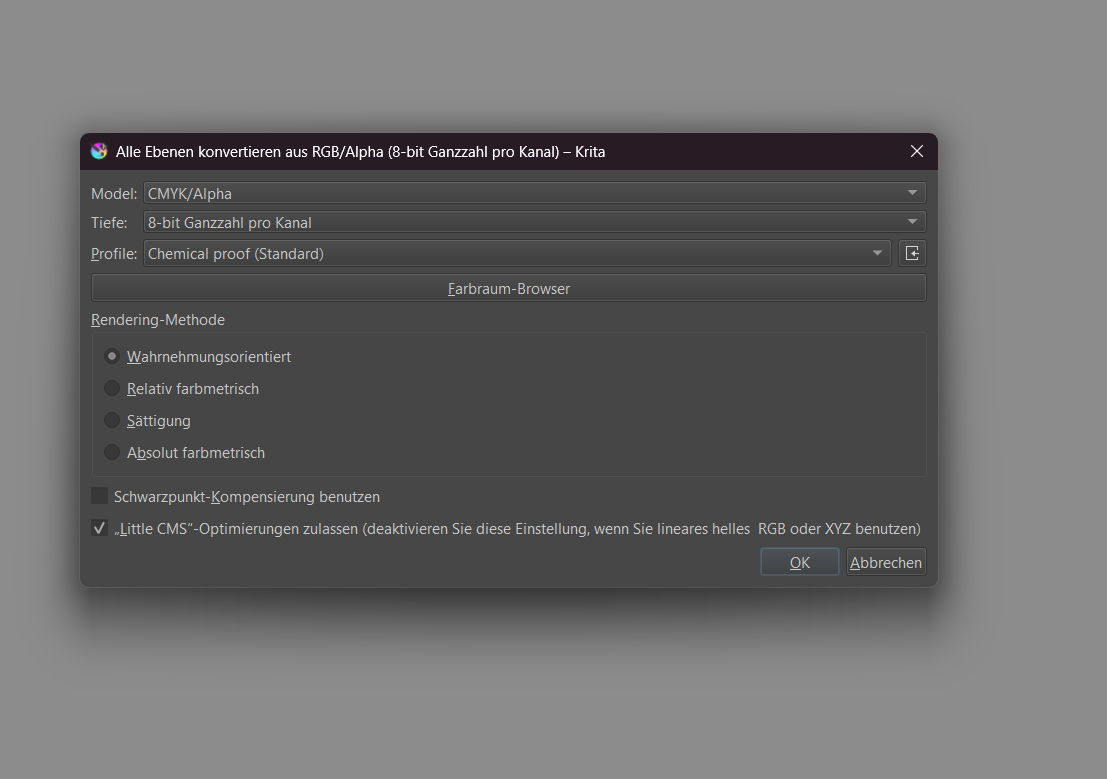
Hello =)
I thought I would make a design in Krita with the CYMK settings for T-shirt printing.
However, a window opens in Krita and I wonder what the correct settings are? Can someone help me?
Kind regards
DAB
Hello =)
I thought I would make a design in Krita with the CYMK settings for T-shirt printing.
However, a window opens in Krita and I wonder what the correct settings are? Can someone help me?
Kind regards
DAB
The best idea is probably not to work in CMYK at all. CMYK is for the office grade printer you have at home or work.
What the correct settings are really depends on you. But the default settings are good enough. Better make a copy of your original kra file before doing color profile conversion, so you don’t accidentally mess up your original because it will change the colors.
We have many topics about this here on the forums like these:
Printing on shirts, probably using offset printing, is another can of worms.
Long story short, let the print shop handle the conversation but you can use soft proofing to make sure it doesn’t look completely off. Best case is you can get the print shops color profile to import into Krita, but CMYK is probably close enough if you cant get your hands on their icc profile.
CMYK is good for printing, right?
No, color is good for printing 
CMYK is just a color model that is usually not used today, in a time in which print color management, the optimization for printing, is usually done by the printers, i.e. print stores and print shops, it is an unnecessary workload.
Only in the highly professional area do many people who are more familiar with it than I am, consider color management with special color profiles (CMYK is probably more or less obsolete and outdated and if at all, profiles based on it are used, a friend who is a printer by profession told me), still necessary. For our hobby and semi-professional use, the recommendation today is to use sRGB.
But CMYK is still propagated by many would-be insiders/professionals as a necessity, often with reference to reference books that have since been overtaken by a different reality. Today, you only need it at best if the service provider printing for you requires it. The last time I used it was before the turn of the millennium. On my last print job in 2006, I was explicitly asked not to use it - and the result was top class.
Michelist
Is an an oven good for making lunch? Sure, but sometimes need a stove a grill or a dutch oven for better results. So basically It’s a lot more complicated than just CMYK is good for printing.
So basically there are a few color models that have different use cases for different things. CMYK is the color profile most consumer grade printers use, the thing you maybe have at home for example. The kind of printers that don’t cost you a years worth of income to buy. Do you have to convert your image to CMYK just to print on it good? No. The printer can do a color conversion just fine, they’ve been doing this for decades. The image won’t look like on your screen (because the way the colors are created are physically different) but it would look just as bad as when you converted the colors in Krita first, only that your file now also looks bad. So, what people usually do, they use Soft Proofing to get an approximation on how the colors look when printed and maybe change the design in a way that it looks at least close in sRGB and whatever profile they’re proofing against. Soft proofing is analogues to (hard) proofing, in that when normal proofing the printer (the person not the machine) prints out a test file on their machine and sends a sample to you to look at the differences, perhaps even calibrate your software against it.
So back to CMYK for printing. Like cooking is not simply cooking, printing also depends a lot on the machine and what you print on (shirt, canvas, photo paper, glass, metal and so on) and the printing method (the type of machine). So standard CMYK is not automatically good for every printing. Some machines can do more colors and some can less. Some printing methods even only support a fixed set of colors and no gradients.
So what happens when you convert your RGB file, which can do more colors than CMYK, you already cut down on the possible colors to be printed beforehand, and perhaps that means the print will look more dull and less colorful than it needs to be.
So unless the print shop absolutely want’s you to give them a prepared CMYK file (or something different), give them a normal RGB file.
many thanks
To throw a minor spanner in the work Max Chroma offers many online or downloadable free tools (+some paid) for you to convert images, whether to halftones, transparencies, colour-separation.
I don’t know what file your shop will need but you might gain/enjoy checking out some of his app tools/browser tools anyway - or another user passing the here 
the stitch code is good
This topic was automatically closed 30 days after the last reply. New replies are no longer allowed.