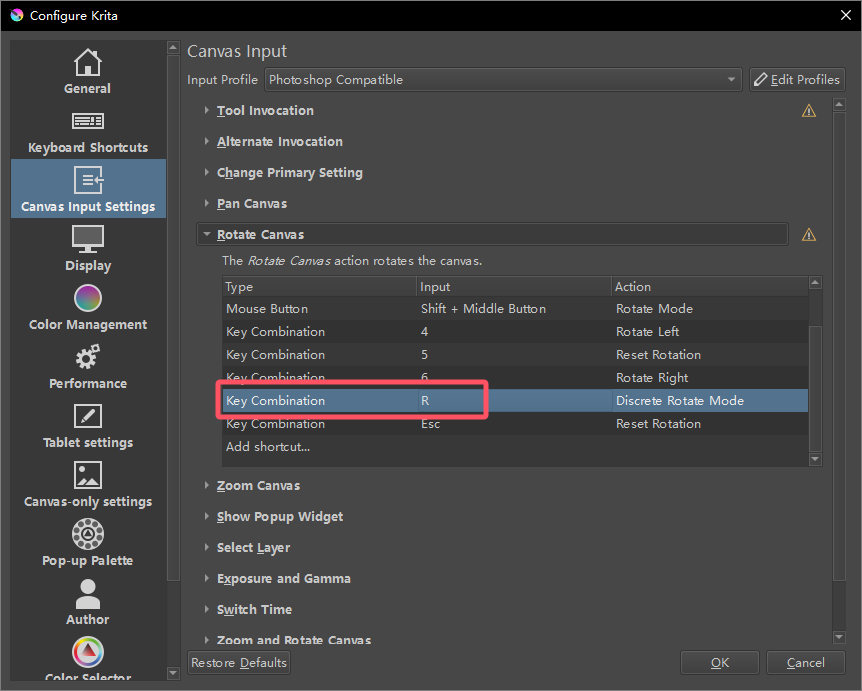
I tried setting it to Shift+R, but it also didn’t work.
Maybe you have a conflicting key setting.
In
Canvas Input - Select Layer
there is
R + Left Click
set by default.
Maybe that is causing your issue.
No, I am using “Photoshop Compatible” as the Input Profile, and it does not have this setting, as shown in the image below.

For this to work, it must be set up as a Mouse Button:

3 Likes
The key issue here is why the Rotate mode cannot be set to R. Of course, I understand that using the default method can achieve the rotation function, but if that’s the case, what is the point of customization?
You can customize it to be the R key instead of Space, but you cannot remove the mouse button (pen down). You can’t rotate just be hovering the pen, at least not without a plugin or something.
Are there any Krita developers here? Or are there only regular users here? I know this is definitely a bug.
Thanks for your replies, I’m just here to report back to the developers and don’t want to get involved in a discussion like ‘how to get around this in a different way’.
There is no claim to developer support here, but there are established ways to report bugs, so the developers will definitely know:
If you want, then you can report it as a bug via the KDE-Bugtracking System at https://bugs.kde.org/.
To report a bug, you must register at https://bugs.kde.org/ to gain access to the “KDE bug tracking system”, i.e. “KDE’s bug tracker”. Keep in mind that the e-mail address you use there must firstly be existing / valid and secondly that it can be viewed by any visitor to the site. But the likelihood of your address falling into the hands of spammers there seems to be very low, because the address I used to register with them, I’m using exclusively for access to the KDE bug tracking system and have not had a single spam mail in my mailbox in the years I have been registered there.
You can read what a bug report should look like under Reporting Bugs in the Krita manual (the input mask looks slightly different today), or the User Guide on KDE.ORG, which I like less. Please use the drop-down menus to select the software, i.e. Krita, the version number, the operating system and try to narrow everything down as much as possible using the drop-down menus available there.
After you have created your account with them and are logged in into that account, you’ll find the mask to report bugs in Krita here:
https://bugs.kde.org/enter_bug.cgi?product=krita
It is usually a good idea to include the link to this topic in your bug report so that the developers can read your findings here.
And after completing the bug report, i.e. after you have sent it, please publish the link to the bug report here in this topic.
Michelist
3 Likes
It would be helpful if you could describe your desired behavior. You press the “R” key and what is supposed to happen? Do you need to hold it down, or release immediately? Etc.
To me this is not a bug, just a mismatch in the expectations. If you describe precisely what behavior you want to see, there’s a higher chance it can be addressed.
As for the developers taking notice, yes, it is possible as they do monitor this forum from time to time. However, they are busy folk and the core team is just a handful of people, so it’s not possible for them to react to all feedback immediately. If you posted a bug report, it will get looked at in the future, but it may take a while.
Also you may get attention from independent contributors such as myself (i.e. not affiliated with the core team), but I would not act on your report as it is now, because to me it is not a bug. That’s why I am suggesting to better explain your expectations in the report. Thanks.
4 Likes
Nothing happens, it’s like the R key doesn’t exist, you can try it.
This is normal and expected. Rotation requires multiple inputs to work. If you press down R, it doesn’t know which direction you want to rotate in.
That’s why I suggested you need to use it as a mouse shortcut, where the R key starts the rotation, and the mouse determines the direction and magnitude of rotation.
2 Likes
Interesting, the default shortcut for rotate mode is Shift+Middle Button, it does know which direction I want to rotate in.
So according to you, why doesn’t R know which direction I want to rotate in?
It’s an easy one to try out, so why won’t you guys test it out for yourselves before offering your opinion to others?
That’s why I suggested you need to have used the program before answering questions instead of wasting my time with wrong answers all the time, I’m surprised more than one person actually likes you.
The default is Mouse Button which is Shift(keyboard) + Middle Button (Mouse Button), of course it will know which direction you rotate because of your additional mouse/stylus input.
If you want R to work, assign to mouse button and use R + mouse button like YRH said.
1 Like
The program determines the direction of rotation by subtracting the mouse coordinates at the time of the trigger from the current mouse, and does not require additional keystrokes.
Photoshop, for example, can set the rotated canvas to R and not require a mouse press.
That should be the different behavior between programs…
Photoshop Compatible doesn’t make the keypress behavior 1:1 clone of photoshop.
Since your initial question seems to questioning about R key doesn’t work as krita’s default Shift + Middle mouse, then the setting example is the answer: R + left button to hold R and drag your stylus (not hovering)
2 Likes
This is just basic math. If Krita cannot implement a single hotkey for rotating the canvas, it indicates a fundamental design flaw. However, I am more inclined to believe that this is a bug. Since I have already submitted a bug report, I would appreciate it if everyone refrains from interpreting the issue in their own way. Please do not reply to this thread anymore.
Look, don’t be frustrated, we are just explaining how this works currently. It is not a bug, just a design choice where the mouse button is required for the action to initialize in addition to the other keys like Shift or R.
The reason is for consistency with the pen handling, where putting the pen tip down acts like the mouse button press.
Implementing it to work on hover is probably possible too, so your bug report is fine, but it would be better if you added a more explicit description of the behavior you want in that bug report. That will reduce the change of any misunderstanding when someone looks at it later.
2 Likes
This topic was automatically closed 4 days after the last reply. New replies are no longer allowed.