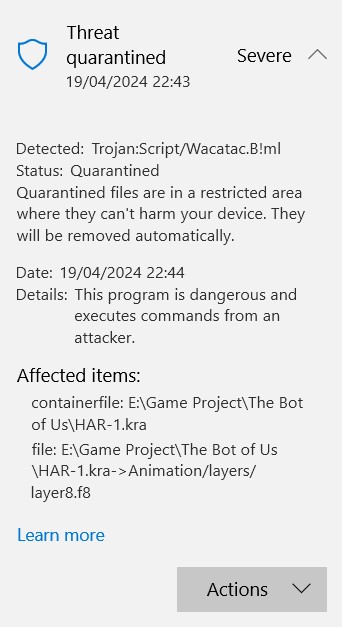

My windows defender detected trojan in kra file both in pc and flashdrive. It happen when I do full scan on pc & custom scan for flash drive, but it didn’t detect anything on quick scan.
Is this false positive?
This is not a Krita system file, it’s one of your working files.
Did you download this file from someone?
No, that file has been around early 2023 and never been opened again to this day
If that’s one of your drawings it’s safe to say it’s probably a false positive as wacatac usually is.
If you downloaded it or were given it I’d toss it out to be safe though.
If you really do need it and were given it, upload it to a virus scanning site or use something like Malwarebytes to get a second opinion but I doubt it’s harmful.
@Cyborgnekosica, I’ll send you a forum DM giving you an email address that can be used to contact me.
If you like, you can use that to send me a file sharing link to download the file.
I’d be interested to have a look at it.
Hi
You can have virus literally anywhere.
Even in a simple .png file.
What’s a virus
There’s different type of virus: virus, worm, trojan, …
A virus is basically a sequence of bytes in a file.
And the execution of code (the sequence of bytes here) activate the virus.
So how the virus is activated?
It will depend of the virus, but from non-executable files like .png and .kra files, it is usually based on a memory buffer overflow vulnerability.
Generate corrupted data, that includes the sequence of bytes, and put them in an image.
When loaded/interpreted by a software, the data can’t be interpreted properly; in this case there’s often 2 possibilities:
- the code check everything, cancelling load/interpretation of data if something is not understood
- the code try to interpret the data anyway, and it can occurs to load the data in memory outside the expected memory area and execute it
So taking example .png file again.
Krita use libpng to load/write png files.
You can see here all CVE related to this library:
https://www.cvedetails.com/vulnerability-list/vendor_id-7294/Libpng.html
It’s technical, but it’s just to illustrate how a virus can be propagated and activated.
How virus are detected?
Antivirus use different methods to detect viruses.
One of them is to scan files, looking for virus signature.
A virus signature is a typical known sequence of bytes that define the virus and that is searched in files.
This sequence of bytes is normally short because is easier and faster to detect in a file.
What’s a .kra file?
A .kra file is just a zip file.
You can see there’s a lot of vulnerabilities related to zip files, according to software/library used to unzip a file
https://www.cvedetails.com/google-search-results.php?q=quazip#gsc.tab=0&gsc.q=zip&gsc.sort=
But here it’s not the file itself that is considered as corrupted by a virus, but a file in the archive.
Especially this one: Animation/layers/layer8.f8
This is the 8th frame of the “layer8” (your kra file is an animation then…)
A layer (and a frame in a layer) is basically made of:
- a header (version, size of tiles, pixel format, number of tiles)
- tiles
Each tile is a 64x64 pixels square from you layer’s content.
It can be raw or compressed (LZF) data.
So at this point, there’s different possibilities.
- There’s a real vulnerabilities in Krita’s file loader, may based on data or compressed data (uncompressed by a third party library that have the vulnerabilities)
- Or it’s just the sequence of stored data match to a virus signature
If you trust the file (you’ve created them, not downloaded them, not get them from someone else) so you’re probably in the second case
I’ve tried to check what the Script/Wacatac.B!ml is exactly, but there’s a lot of useless information from Google.
My point of view is the probability that a virus explicitly target .kra file is low: it can only have an impact on a Krita users.
Krita’s file format is probaby not popular enough (in comparison to PSD or PNG for example) to be targeted by hackers looking for a vulnerability into Krita 
It’s probably more a random situation, where some data generated by animation and saved in a really specific format generate a sequence of bytes that match a virus signature..
Grum999
1 Like
I’ve had a quick look at the file.
When opened as a .kra file by krita, it reports:
Could not load pixel data: Animation/layers/layer8.f8.
Press OK then the animation opens and apparently works fine. I assume that the particular frame (f8) is missing.
Opening it as a .zip file, layer8.f8 doesn’t appear so I assume the archive unpacker is not capable of recovering the contents of layer8.f8.
I used Engrampa on Linux but it did not report any errors though.
It sounds like file data corruption.
I’ll try running ZipRepair on it later.
1 Like
The antivirus said the file has been put in quarantine
So the antivirus removed the file layer8.f8 from kra archive.
That’s why you don’t see it (and then can’t load it)
The thing is to get to original file, not the one that has been modified by antivirus
Grum999
1 Like
Can you do that?
Then, to get the original file, there has to be created an exception for this file that it will not be caught directly after the next step, releasing it from Defender’s Quarantine.
But I’m somewhat puzzled, because defender does not try to repair files, defender just quarantines or deletes them, depending on user-action or settings. So it must have been already released from quarantine, and that without that defender manipulated the file.
Michelist
1 Like
I don’t think I can since I already quarantined both the files in pc and flash drive… But I can try send another different file that had been detected too from flash drive but haven’t detected on pc (haven’t done full scan again).
1 Like
I don’t know how defender works
But for me the message is explicit:
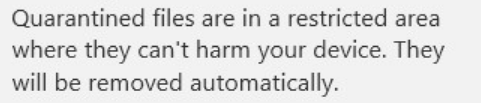
→ File has been put in quarantine
And to be more precise:
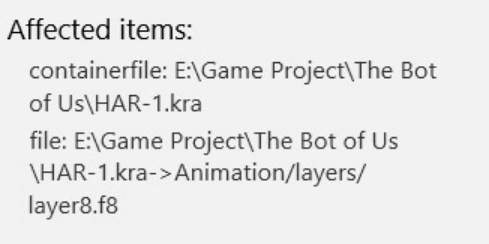
→ File layer8.f8 of archive HAR-1.kra has been put in quarantine
But I maybe wrong.
@Cyborgnekosica all the kra file has been put in quarantine?
Grum999
For me, defender had never extracted the infected subject out of an archive, and I had quite some archives quarantined. On that I based my answer.
It gets interesting here, but unfortunately I’m out for some time.
Michelist
Using ZipRepair reports repairing many internal files. That breaks it even more then krita reports a damaged filter 
Yes, only the animation file. There’s another file that had been detected & quarantined on flash drive (not animation one) but have not yet detected on pc. I already sent those files to Ahab
I don’t use antivirus 
But if I understand, if you have a 5.00GB archive with hundred of thousands files, if only one file in archive is considered as dangerous, then the antivirus put the entire archive in quarantine and you potentially lost everything… the solution sounds worst to me than the initial problem 
Grum999
1 Like
It is very beneficial to be a user with background knowledge and common sense.
Many will tend to act out of panic after such hits, causing even greater damage. I have already had a friend who formatted his hard disk in response to a fake blackmailer email.
Michelist
@Cyborgnekosica made another two files available to me.
Both the same but one had been ‘quarantined’ by Windows Defender on their system
On my updated Windows 10 system, Windows Defender scanned it with no error reported.
The non-quarantined file opened ok.
The quarantined file had an image layer missing and by having both files open I could switch between them and see the difference.
On opening, krita told me which layer number was missing and the maindoc.xml file told me the layer name to help identify it.
I don’t understand why @Cyborgnekosica has been having .kra files quarantined and having a layer content file stripped out of them.
1 Like
Wow, I never noticed that. It also contradicts the purpose of a restore from quarantine if the restored file has been mutilated. Then the scanner does not need to move anything to the quarantine, if it is unusable afterward, it can also delete it directly.
Tough stuff, so to speak.
Michelist
My analysis was right then, the archive has been modified by Defender…
@AhabGreybeard can you check file with an alternate antivirus?(VirusTotal for example)
@Cyborgnekosica are you working on Windows 10, Windows 11?
It’s probably a False positive.
If non-modified file open properly in Krita, and frame 8 from Layer8 is not corrupted, this means the data are understandable legacy data not corrupted by a virus.
Grum999