hey guys. please help me, I cannot see the thumbnails of the images and therefore it is very difficult for me to find the illustration I need. does anyone know how to fix this?
Hello @hello_imKate and welcome to the forum 
This invites some questions so here they are:
Which version of krita are you using and where did you get it from?
Which operating system are you using?
Do you mean the thumbnail images that you expect to see in the File Manager/Explorer or on the desktop, for .kra files?
Or, do you mean the thumbnails on the krita start/welcome screen?
Is this your first time using krita and you’ve immediately noticed this or have you been using it for a while and the problem has just started?
2 Likes
krita-x64-5.0.2, Windows 10. I mean the thumbnails in the Krita when i try to open the file. This problem has been there from the very beginning
Krita 5.0.2 is already quite old, but okay. If you want to stay on the same version, you could try to install Krita 5.0.2 over itself again. This helped me once when I didn’t know about the Krita shell extension.
However, if you are using the portable version of Krita under Windows, there is no other way to solve this than to install Krita’s shell extension. This can be found a little further down on the right on the download page of Krita’s homepage. This should display the thumbnails in Explorer itself.
If these two methods don’t work, you can try installing the latest version 5.2.1, which is a good idea as it contains bug fixes and new features.
If none of this helps, you can try the following workaround:
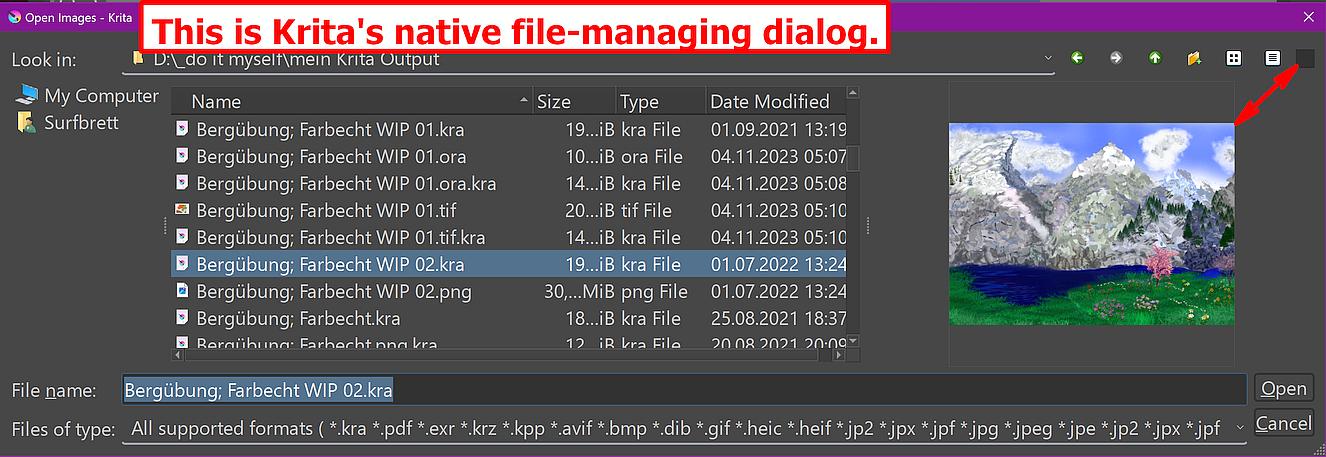
To do this, switch on Krita’s own file dialog and disable the Explorer.
You can do this by deselecting the ‘‘Enable native file dialogs’’ setting in Krita under ‘‘Settings’’ >> ‘‘Configure Krita’’ >> ‘‘General’’ in the ‘‘Miscellaneous’’ tab, then you can preview all Krita files in the Krita file dialog, but not as thumbnails, after you have activated “Toggle Preview” via the button on the right edge of the dialog toolbar.
Krita’s own dialog, which offers a preview while browsing a directory:
Michelist
Edit: Typo
2 Likes
Oh, thanks a lot !! This completely solved my problem
1 Like
I’m happy that you found a solution!
Would you be so kind to tell us what the issue was, or at least what solved your issue? This would probably help users with the same issue searching for help.
Michelist
I didn’t know that I had an old version, so I installed the update and the thumbnails became visible
2 Likes
Thank you very much!
That is the best proof, for those refusing to update, that updating in general is a good idea! 
Michelist
2 Likes
This topic was automatically closed 4 days after the last reply. New replies are no longer allowed.