Krita 5.0.2 is already quite old, but okay. If you want to stay on the same version, you could try to install Krita 5.0.2 over itself again. This helped me once when I didn’t know about the Krita shell extension.
However, if you are using the portable version of Krita under Windows, there is no other way to solve this than to install Krita’s shell extension. This can be found a little further down on the right on the download page of Krita’s homepage. This should display the thumbnails in Explorer itself.
If these two methods don’t work, you can try installing the latest version 5.2.1, which is a good idea as it contains bug fixes and new features.
If none of this helps, you can try the following workaround:
To do this, switch on Krita’s own file dialog and disable the Explorer.
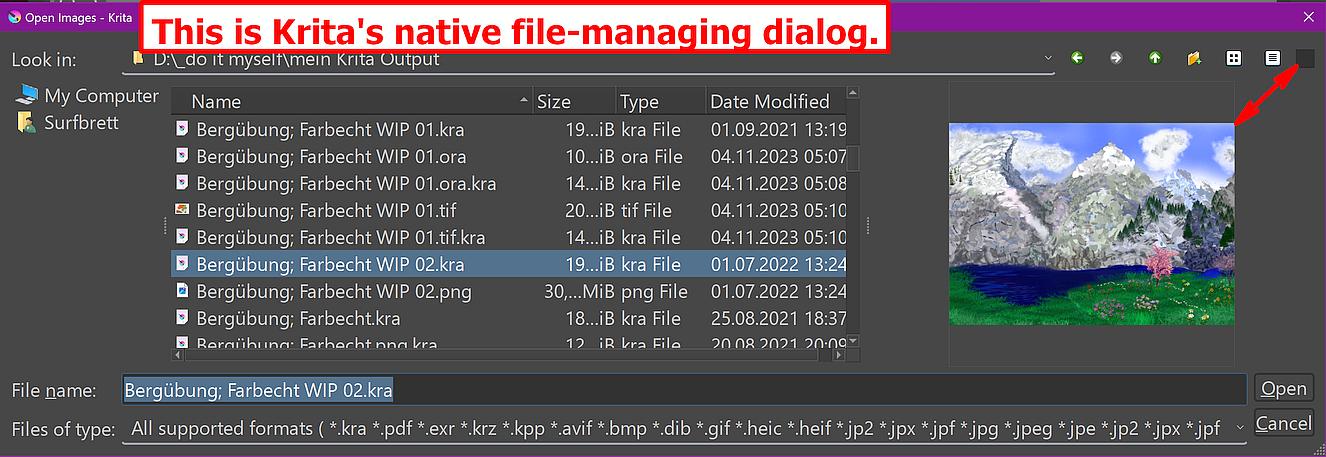
You can do this by deselecting the ‘‘Enable native file dialogs’’ setting in Krita under ‘‘Settings’’ >> ‘‘Configure Krita’’ >> ‘‘General’’ in the ‘‘Miscellaneous’’ tab, then you can preview all Krita files in the Krita file dialog, but not as thumbnails, after you have activated “Toggle Preview” via the button on the right edge of the dialog toolbar.
Krita’s own dialog, which offers a preview while browsing a directory:
Michelist
Edit: Typo