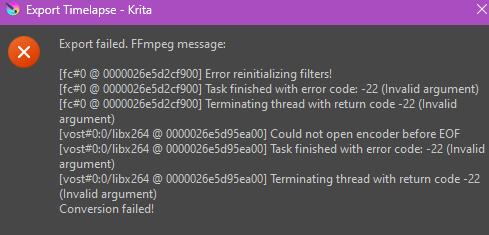
Hey, what operating system are you using? The ffmpeg that comes bundled with Krita is less capable than the one you can install stand alone. Be sure the path to your ffmpeg executable is correct.
Hi! I’m using Microsoft Windows 11. And how do I check if the path is correct? The only stuff I’m basing on as of now is this:

I edited your topic title so that it briefly describes the problem so more people will see it (reddit-like titles don’t work well in this forum).
Which version? From Krita’s homepage, Microsoft Store, Epic Store, Steam? And if from Krita’s homepage the installation or the portable version?
The path with a standard installation would be c:\Program Files\Krita (x64)\bin\ffmpeg.exe.
Michelist
Add/Edit: By the way, You could also grab the edge of the settings window with the mouse and pull it out further so that you and we can see what is written in the input fields on a screenshot.
You can try changing it to h264 but there could also be a problem elsewhere. What is the resolution of the timelapse (the dimensions)?
Hello! The version seems to be Krita 5.1.5, and I downloaded it from Krita’s homepage. I think it’s the installation version


The canvas is 3508 x 4960 and is captured at full resolution with no resizing done for video export. That probably causes all sorts of trouble for ffmpeg.
Set the capture resolution to 25% to see if that gives a better result.
Edit:Add: I’ve just tested what I said and am surprised that ffmpeg can handle a frame size of 3508 x 4960 with no resizing.
(Do you actually need a video with a frame height of 4960?)
I recorded with the same values you’ve shown and had no problrems but I didn’t go as far as recording 4654 frames.
Do you actually have 4654 consecutively numbered fames in the recording folder running from 0000000.jpg to 0004653.jpg ?
I’m using version 6.1.1 of the gyan essentials build with export to .mp4 using the MP4 x264 option. If I use the MP4 openh264 option then ffmpeg crashes but not with the same error messages as you had.
what version of your ffmpeg?
i have same problem, i have 5.2 krita and 7.0 ffmpeg. i downgrade ffmpeg to 6.1 and all works!!!
Here ffmpeg 6.1
https://www.gyan.dev/ffmpeg/builds/packages/ffmpeg-6.1.1-essentials_build.zip
Hello @mamaubear and welcome to the forum 
Is that 5.2.0 or 5.2.1 or 5.2.2 ?
It’s very rare for a gyan ffmpeg build to have a problem but it has happened before.
(I don’t know if it’s an ffmpeg source problem or a problem with gyan’s build.)
Thank you for letting us know about this 
This topic was automatically closed 30 days after the last reply. New replies are no longer allowed.