Today I noticed that there’s a massive delay when I select something to transform. The lag doesn’t only apply to the transform area because once I have an active selected area but try to zoom/move the entire canvas with my fingers, there’s a huge lag suddenly too.
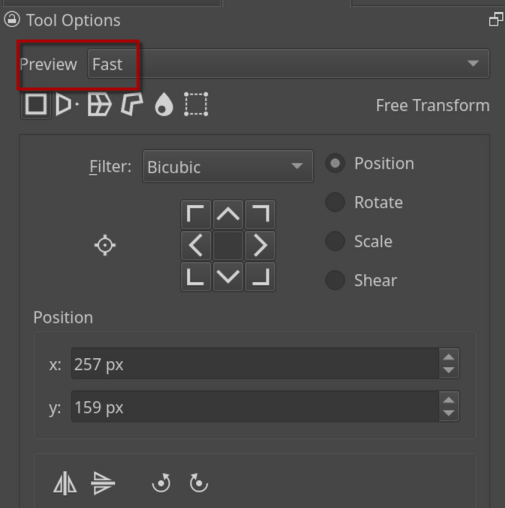
It was all fine a couple days ago. I don’t know what caused this. I already turned on instant preview but it didn’t help (idk if it’s currently on fast or the default )
btw unrelated but I rlly wanna thank everyone who works hard to provide a comprehensive guide to krita! The Krita manual has helped me a lot when I started using this program and it still does! I’m also very glad a forum site exists, I’ve always looked my problems up and got them fixed thanks to similar posts but this time I couldn’t really find a solution
I hope Krita will continue to develop its potential!
Additionally, when all the canvas is feeling sluggish, check if you have canvas graphics acceleration enabled in Krita’s settings and turn it on, if not.
Your video is not loading for me so I don’t know if you already tried that.
Your video shows that your sketch isn’t really something that needs many resources, with its dimensions of roughly 3800 by 1500 pixels and ~460 MB in size it should smoothly transform. Also, I couldn’t recognize anything in the layer stack that would “cost much” of performance.
According to the nearly 8 GB RAM of your Android, it seems to be the not so good equipped model of this series, so it may be a question of the resources your device has to handle such a transformation.
The thing is, that I, with my 2011 built PC don’t experience such a lag, this may be a hint where you can find the issue.
ahh thank you so much! The lag disappeared once I changed instant preview to fast preview I’ve had acceleration turned on too so maybe it was combination of both. Thank uuu
Yes, this should be on if you want the canvas to not lag. It offloads some of the work from the CPU to the GPU, generally making everything a bit smoother, when it comes to canvas movement and such (has no effect on painting though).
 )
)

 Hello
Hello  I’ve had acceleration turned on too so maybe it was combination of both. Thank uuu