Hi. So in the past I distinctly remember using Zoom and Rotate simultaneously in Krita with my stylus. It was extremely helpful to have both those functions on one shortcut. But I can’t seem to activate it after returning to Krita recently.
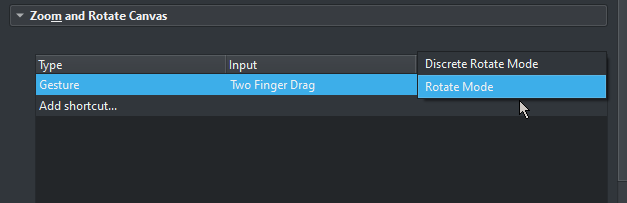
When I attempt to make a Canvas Input for it I’m only able to choose from Discrete Rotate Mode or Rotate Mode. See image:
You must be remember this wrong, you can do both with the stylus but not at the same time and only when you have the middle mouse button (abbreviated MMB for the remainder of rhe post) assigned to a key on the stylus. (Assuming default keyboard shortcut scheme)
hold MMB on canvas, move stylus/mouse = pan
hold shift + MMB on canvas, move stylus/mouse = rotate
hold ctrl + MMB on canvas, move stylus/mouse = zoom
These are the three canvas movements you can do with MMB and a stylus or mouse.
These are either-or, so you can not use ctrl + shift + MMB to get both, zoom and rotate simultaneously. Either you zoom or rotate but not both