@Celes Thank you for creating this. Now my accessory keyboard can co-exist with Krita’s default keybindings, leaving my main keyboard fully functional.
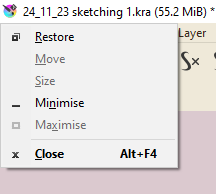
Is it possible to fix alt+space as well, so the zoom out shortcut from the csp compatible canvas output layout would work?
I’m suspecting that’s a harder one and might not be with a plugin.
Thank you for the plugin. It’s a godsend being able to bind alt+letter keys.
I’ll have to look into it, but I’ve very busy these months and haven’t much time at all to do more work on my tiny plugins.
Can you describe what happens when you do alt+space? Is that an OS shortcut?
The unbind alt only works because I’ve disabled the menu entries as elements that respond to alt, I didn’t disable alt as an OS shortcut itself. It’s a hack, the OS alt shortcut is context-sensitive, working for the active window, and when there’s no menu entry that’d respond to it, then it won’t trigger and block regular alt shortcuts.
I believe yes, that it’s an OS shortcut. It opens a drop down menu for many applications. Some games, steam, blender, csp and so on are exceptions. I guess the devs can disable it if they want, tho krita isn’t among them.
I’ve found one reliable workaround to get alt+space to function without issues, to switch alt places with another key and then to rebind the keys in the shortcuts file with a text editor and replace function so it’d be quick. Tho the canvas settings would be a manual task.
I know what to do if I want alt+space to start working, tho getting the letter hotkeys to function has been already good enough already. Thank you again!
 Thank you for the plugin. It’s a godsend being able to bind alt+letter keys.