Hi fellow artists, I have a follow up question to the advice to use the AppImage of Krita. If I understand it correctly, AppImages don’t get installed in the classical way, which means no file directories for brushes, plugins and alike, right? My question would be, if my assumption is true, we’re does this data go to?
It will be in Krita’s resource folder as always with each and every Krita, no matter which OS. It is found via ‘‘Settings’’ >> ‘‘Manage Resources…’’ >> ‘‘Open Resource Folder’’.
But it is a good idea to create a dedicated “home-environment” for your AppImages, this allows using different AppImages “installations” independently.
Like it is described here, for instance:
But the web will offer more information about AppImage home environments, I guess.
Michelist
I have my AppImages all in ~/Applications because that is where AppImage-Launcher puts them but you can put them anywhere you want. Config files are in ~/.config and resources are normally in ~/.local/share/krita no matter if it’s the AppImage or repo install (might be different for Flatpak due to the sandboxing). This should be the same for all modern Linux distributions.
When you install new brushes and other resoruces you should always do this through Krita’s resource manager instead of manually messing with the file system, that way Krita can handle all the importing and it will put everything in the correct directories (and in the correct formats) without you ever having to worry where and how.
1 Like
Thanks for the reply.
The dedicated folder for AppImages seems to make sense, especially if you run different versions of the program.
I found the resource folder but was not sure if this is an artifact of the installation of Krita from the Repo.
Don’t get me wrong, everything works fine in the AppImage, it even picked up all my UI settings and all the brushes are in place.
Thank you for your answer.
I guess, AppImages are frozen versions of the program, right?
As long as I don’t go to the Krita Website and download a newer version, everything stays the way it is. That’s fine with me.
I find it a bit clumsy to search for the AppImages folder, starting the program from there.
Is there a way to create a shortcut for the desktop, this would make things much more convenient.
I did it always manually, but currently, I don’t have a Linux set up.
But there even exists a tool for this, so for creating a shortcut to start your AppImages, but don’t ask me for its name. It was named a few times in the forum, and a search with your preferred search engine should find it too, I guess.
Michelist
Edit/Add: This seems very comfortable:
Edit/Add 2: How to do it manually:
Thank you very much.
I will have a look at it.
1 Like
I have AppImage-Launcher installed, which does all this stuff for you (is preinstalled on many distributions). Creates an entry in the menus (Plasma start menu for me) and also can do updates of AppImages if the AppImage itself supports it (not all of them do). With AppImage-Launcher installed, every time you start an AppImage for the first time it asks you if you want to integrate it and then it “installs” it (or you can just choose to run it without installing).
I have KDE Plasma on my machine(s) and to run Krita I use a shortcut key combo.
All I do is right click on the launcher icon and choose edit appplications. I browse to the graphics folder and add item. Name it whatever, ie: krita5213 and use the browse link to find the appimage. Click the empty box beside the name to choose an icon for it, I just pick one with lots of colours ‘cause it looks pretty.
On the advanced page at the bottom there is an option for a shortcut, I use alt+ctrl+k, and then save the settings. I find I have to doubleclick the appimage in my file browser first, just the first time, before the shortcut works. Don’t know why, and don’t care since the dclick fixes it.
I keep my appimages in /home/me/appimages folder, Krita does the rest when you run it.
Thank you all for commenting.
I finally managed to accomplish creating a shortcut for Krita and added it to the menu and the taskbar.
For the Icon I had to use the editor at the start menu and find me something from the internet.
So far everything works pretty fine.
I rebooted the computer several times to make sure the settings are permanent.
Great community, solid advice and kind reply’s, can’t ask for more.
Greetings from Germany.
1 Like
It’s easy to make a folder link on the desktop to your ‘collection’ of different krita appimages or to make an OS menu item that does that.
I use ‘Isolated’ appimages wherever possible because that enables me to try different configurations and settings without affecting existing ‘usual’ configurations and settings.
With krita, you can easily copy over the entire resources and configuration files from one isolated version to another and all you need to do is edit the kritarc configuration file to change the values of ResourceCacheDbDirectory and ResourceDirectory to the appropriate values for the new appimage, if you’re simply upgrading to the latest version.
Here is my collection:
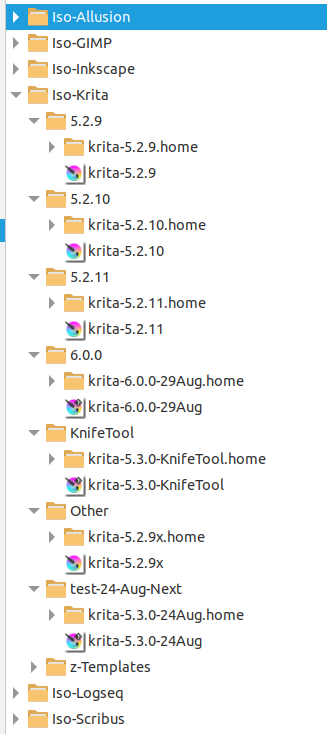
Many application appimages will operate with an isolated home environment.
The Other → krita-5.2.9x appimage was where I wanted to try something ‘weird’ without affecting the usual ‘daily use’ krita 5.2.9 appimage.
You can keep the old version ones or delete their entire ‘Iso-’ folder if you no longer want to use them.
1 Like
This topic was automatically closed 30 days after the last reply. New replies are no longer allowed.