Im also curious what learning resources for the API yall can recommend. I tend to like example based things
creating time loops I do like this currently, triggered during the init:
def Pulse(self):
    # Start Timer and Connect Switch
    if check_timer >= 1:
        self.timer = QtCore.QTimer(self)
        self.timer.timeout.connect(self.Krita_2_Pigment)
        self.timer.start(check_timer)
        ...
        # Stop Timer so it does NOT work without the Docker Present
        self.timer.stop()
I stop it right away so I only use it once the widget is actually being used:
def showEvent(self, event):
    # Start Timer when the Docker is Present
    if check_timer >= 1:
        self.timer.start()
and stop when exiting:
def closeEvent(self, event):
    # Stop QTimer
    if check_timer >= 1:
        self.timer.stop()
1 Like
Is there anything wrong with:
https://scripting.krita.org/lessons/introduction
That is the official api learning resource. Otherwise, you can just look at what other people are doing with their scripts/plugins if you are looking for something specific.
And as mentioned, you can make a timer through QTimer. The other way is through startTimer and timerEvent though before using timers, be sure it makes sense to do so and not to leave the timers idling too much if possible. So what use case do you plan to use it for?
Is the any source code for the KDE website available somewhere? I still kind of would like to have a peak at that documentation somehow
Ive come across quite a lot of screenshots of it that shows some really nice examples there :l

What do you mean by source code for the KDE website? If you are talking about the Krita’s python api documentation that is down, all the stuff there is generated from the h files that are available in kde invent gitlab. They contain all the examples. So if you look at the h files or in the Krita Python Developer Tools, all the examples would be there. The only other examples would be scripting school:
https://scripting.krita.org/lessons/introduction
and krita manual:
At least that is official stuff. There maybe some unofficial tutorials out there too.
Yes, you can access the qmenu bar via
Krita.instance().activeWindow().qwindow().menuBar()
Thanks KnowZero 
@halla is there anything I can do about the PyKrita documentation being down? Is the source code available somewhere (Im thinking if I can I host a temporary server locally to browse the documentation until it comes back up)?
If its on gitlab Im not so sure I can find it, all I find is this one Graphics / Krita · GitLab and this Documentation / Krita.org Documentation Website · GitLab
I remember it already being pointed out thread that was even linked to one of your threads, that the krita api is the libkis folder in the krita source code. If you are trying to find a separate project you won’t find it. If you look up the .h files there that’s what is turned into the documentation.
Though honestly you could just stick with the plugin development tools as is it’s very complete
Thats still source code & not a documentation (and Kritas source code is not what I meant that I wanted access to when pinging halla above, I meant the source code of the documentation website itself and whatever script is generating its html pages). If the documentation really does not provide any whatsoever information beyond the comments under each object in the source .h files I guess I can live without it, but I saw in some YouTube video that the documentation seems to come with some nice introductions & examples - that Im guessing dont live in libkis
For that matter, the source code is not that easy to navigate compared to a documentation in html format, with links pointing to references and so on. And my code editor does not pick up on the way Cmake is setup by default, so I cannot follow references very easily either
And when it comes to KnowZeros extension, although its nice, Im still getting the impression it doesnt quite hold as much information as the documentation thats supposed to be on kde.
Im getting the impression that Im upsetting people by asking the same question over and over (sorry if I do  , its not my intent ) but its kinda hard to ignore that there is a documentation laying around somewhere that probably holds 95% of any questions I might have when using the API but that is currently out of reach


Those examples and introduction are in the .h files as comments on top of the methods. From what I understand the documentation is. 1:1 from the .h files. That’s what know zero plugin shows. The documentation doesn’t have that much more information as you are expecting.
It just feels like you didn’t even tried to look the files.
You might want to check this, however you might notice that it’s not much different from the .h files and know zero plugin.
1 Like
The problem here is a communication one, you keep asking for same thing over and over and get same answer over and over but not addressing what exactly you felt was missing. We aren’t mind readers yet unfortunately  (but there is nothing against you personally, don’t worry)
Now that you have addressed it, we can properly answer your question. Yes, the h files are exactly the same as that. It gets autogenerated into the docs.
That page that is shown it the video is this page:
Which is in the same folder as the h files.
If you want it in html format, as LunarKreatures said I put together a javascript that does just that for the time being.
2 Likes
After creating a layer like:
currentDoc: krita.Document = application.activeDocument()
newLayer = currentDoc.createFileLayer("hello", "C:/myImage.png", "ImageToSize")
root = currentDoc.rootNode()
root.addChildNode(newLayer, None)
How would I rename the layer?
To answer my own question newLayer.setName("hello")
How would I move a layer to right above the “background” layer?
Also I came across some page on docs.krita that listed all actions in krita yesterday. Cant quite seem to find it today . . . Do anyone happen to know where I can find it?
I think you can use actions to move a layer up or down the layer stack.
Yep thats what I ended up doing.
How do I push a new frame? Im having issues with:
krita.Krita.instance().action(‘add_new_paint_layer’).trigger()
and trying to perform actions afterwards, as the currentDoc.activeNode() returns the previously active node rather than whats created by the action.
Also can I prevent this from showing up when saving (as in, when the user saves with ctrl S)?
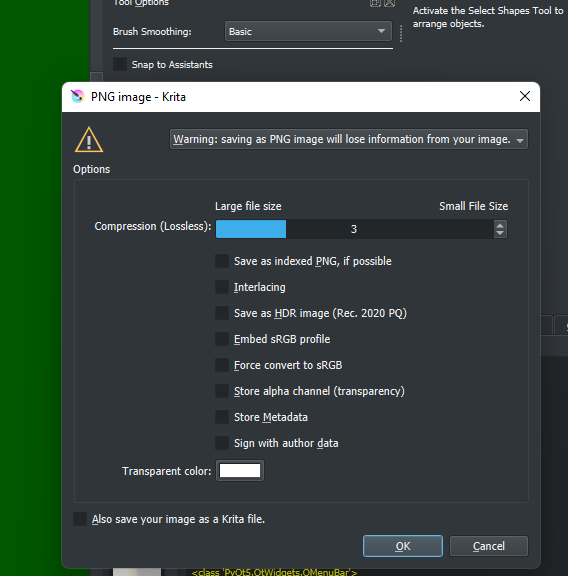
Or should I provide the user with a “fastSave” action instead?
Im modifying the underlying image from an external application constantly, which appears to make this popup show up right after the next time I try to override that file with krita
addChildNode(child: Node, above: Node)
@brief addChildNode adds the given node in the list of children.
@param child the node to be added
@param above the node above which this node will be placed
@return false if adding the node failed
this one? Krita Scripting School
But it isn’t up to date, I suggest using the Python Developer Tools.
Are you trying to make a new layer or a new frame(animation)? There is a big difference. Also, I highly suggest using Krita API first, then using actions as a last resort if no API exists. The reason is action names can change at any time, and they don’t return anything. When creating a new layer, there is a delay in doing so (some operations are non-blocking), so activeNode returns the last layer. This is why you should use createNode instead. If you really need to use an action and wait for results, you need to set a timer.
The API has a way of saving directly, use that. (save and saveAs in Document). There is setBatchMode which limits dialogs, but not all support it. There is a way to block commands and run your own instead but I’d in general avoid modifying core features if possible and add features on top instead (again ,if possible)