Resource URL:
This plugin can:
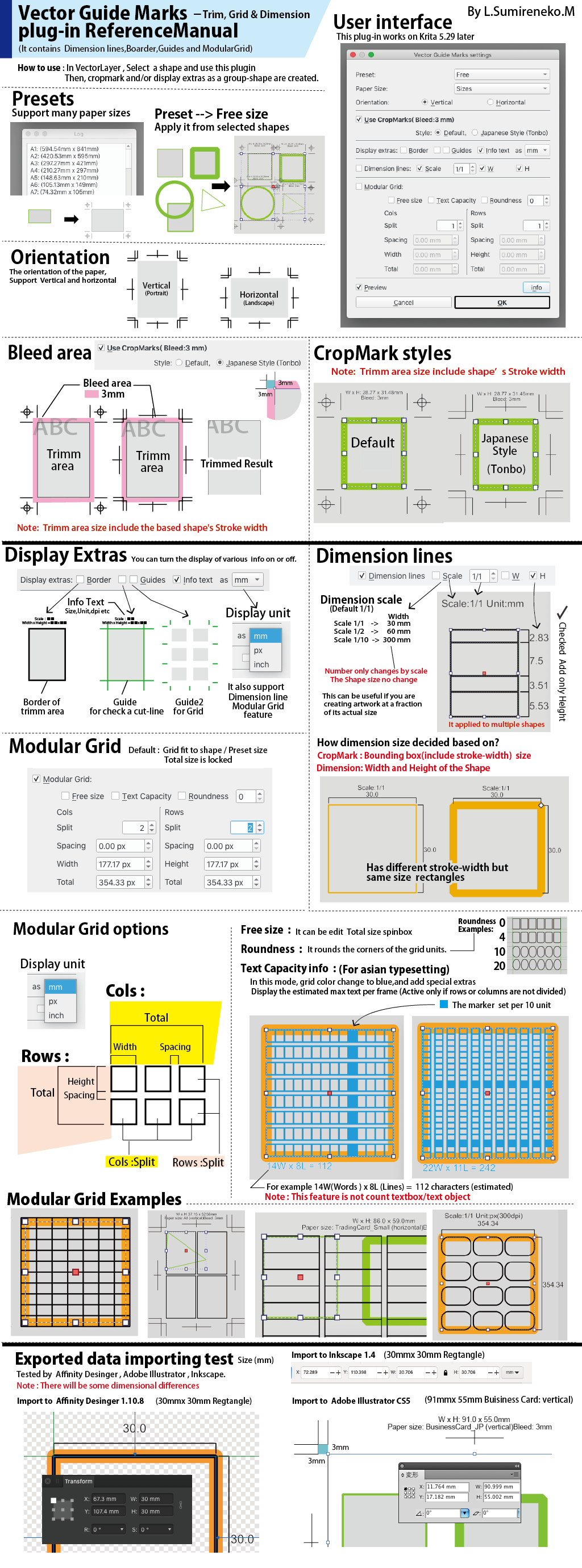
- This plugin create trimmark (crop-marks) on selected Vector shapes
- Also make a grid for a layout, a comic-strip, a chart or text
- It aims to produce output SVG that can be edited in Affinity Designer, InkScape and Adobe Illustrator
- Unit = mm/px/inch
- Bleed size 3mm (Fixed)
- Support Dimension Lines
- Support Modular Grid (Also rounded rectangles)
- Guides ( for Cut , or modular Grid)
- Display Text capacity information(for Asian typesetting, Wide x Lines , Font size: pt )
How to use
- Create a Vector Layer, and create a shape
- Select the shape
- From Menu, Tools > Scripts > Create Cropmarks…
- Choose preset (from many paper sizes) or Free mode (The shape should have no transform)
References
Preset
- All: All Preset
- US
- Europ
- Asia
- Japan
- Card
- Refil
- Photo
- Envelope
- Free: Make the marks on selected shapes
Direction
Vertical (Portrait) , Horizontal (LandScape)
Grid
Create grid for multipurpose feature
It can set numbers of Row and Col, and their spacing
Grid Size Control Behavior
-
When
ignore_shapeis no-checked(default)`:- The shape or preset size becomes the absolute reference for drawing.
- Changing
unitordivisionwill not affect the total size. - Instead,
unitvalues are automatically recalculated to fit within the fixed shape size. - This mode ensures that the layout conforms strictly to the preset dimensions.
-
When
ignore_shapeis checked`:- The user has full control over the grid dimensions.
- Changing
unit,division, ortotalsize directly affects the drawing size. - This mode is ideal for custom layouts or flexible grid configurations.
- The shape size is ignored, allowing free adjustment of all parameters.