This is a collection of tools & filters which use Computer Vision models. Currently the focus is:
Semantic object selection
Background removal
Features
Point Segmentation Selection Tool - click on an object in the image/layer to select it.
Box Segmentation Selection Tool - draw a bounding box around an object to select it. More precise than using a single click.
Smart Fill Tool - similar to “Smart Patch”, but can pick up some patterns in photos better. Not very reliable at the moment (often produces garbage).
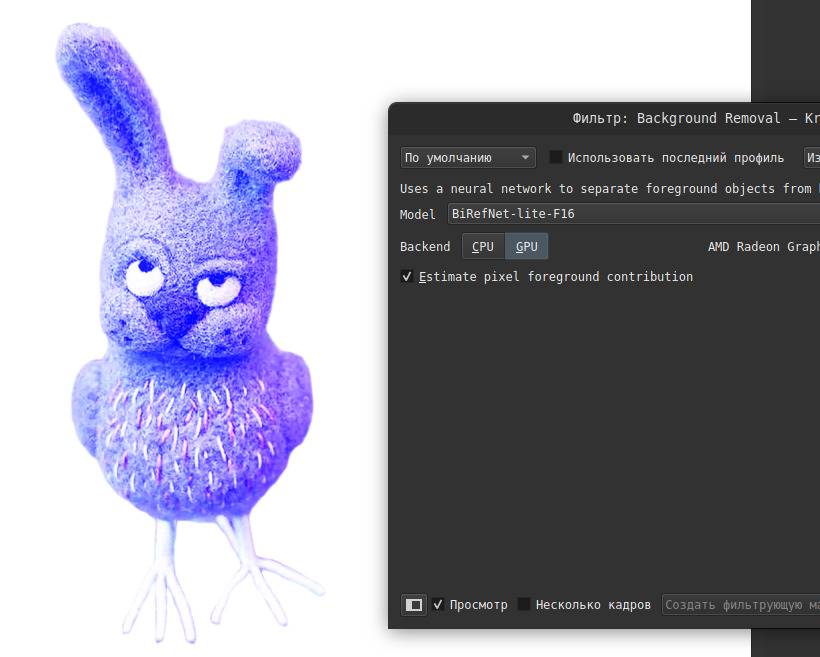
Background Removal Filter - extract foreground objects form an image. Can create high precision masks. Supports foreground/background pixel color separation at boundaries.
GPU Support - all tools and filters can run on GPU for improved performance.
You can find tools in the tool bar, and filters in the menu bar: Filter › Other
Installation
Download the latest version of the plugin from the releases page. Currently Windows and Linux are supported. Please make sure you select a version that matches your OS and Krita version! The plugin may fail to load if there is a mismatch.
In Krita, go to Tools › Scripts › Import Python Plugin from File… and select the .zip file you downloaded. Accept and restart Krita. The plugin should now be active, and the tools appear in the tool bar.
FAQ
Hardware requirements?
CPU: must support AVX2 (any Intel/AMD of the last 12 years support it)
GPU: works on NVIDIA & AMD unless they’re very old. Also modern Intel GPUs.
What is the license?
The plugin is GPLv3 (like Krita). Its dependencies use MIT license. Models are MIT or Apache-2.
The bundled models are leight-weight. You can download more precise models, see Alternative Models. Larger models can be slower and require more memory.
Is this only useful for Photos?
It works for both photos and paintings. Photo editing or photobashing are perhaps the most obvious use, but it also allows workflows where you paint without meticulously managing layers and just separate things later when you need it.
No MacOS support?
Not so far. Unlike pure Python plugins, the tools have to be compiled along-side Krita for each OS/platform. Need someone with experience building Krita on Apple hardware to make it happen.
I’m aware of the rules, but so far there’s been a distinction. The tools here classify to help masking content, they don’t generate images. Unlike diffusion models they’re trained on modest number of public image sets. If Krita’s “Fast Line Art” is ok this should be too?
Note that this has been up in “Plugin development” section for 2 years: Object Selection Tools - there was some discussion back then too.
I decided to make a new topic for version 2 since the old topic is very outdated and it no longer fits “in development” category. See also: Problems using G’MIC-Qt to extract foreground - #3 by Jacquetta and similar topics where people sometimes ask for something like this.
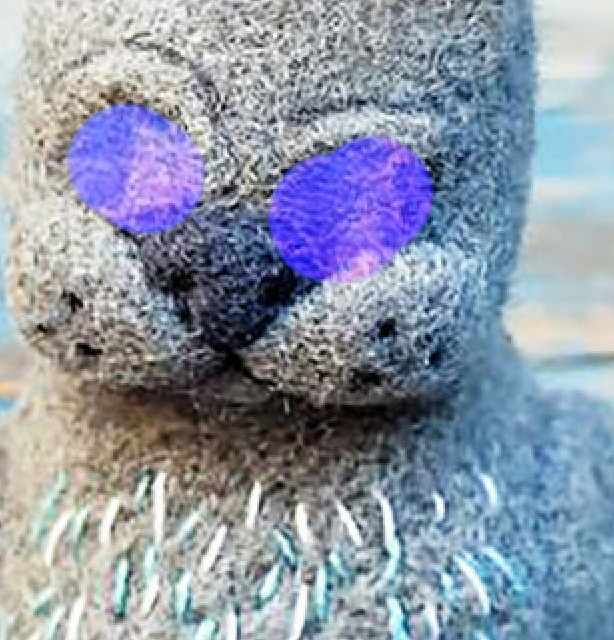
Your plugin is just a miracle! But I still found some bug in it. When trying to cut out the background or paint over an area, it greatly increases the blue channel in the image.
Previous version of the plugin stopped working in Krita 5.2.13 (released a few days ago). The new version is built for Krita 5.2.13, but no longer compatible with older Krita.
New version uses Krita’s color space conversions. It should fix the issues observed by @ARYLUNEIX and also retain higher precision (16/32bit) RGB images. For non-RGB color spaces the foreground separation still requires a conversion, so it might change the image. You can disable foreground separation to only modify the alpha channel.
It’s written in C++ and reuses things like KisToolRectangleBase to implement the selection tools. It links existing Krita libs, so when a symbol name changes that’s enough to cause incompatibility. In this case it was KisOptimizedBrushOutline::PainterPath I think. There was a bugfix in that area, so I’m not too surprised. I expected it to break once in a while, so far it seems rare enough.
your plugin is fantastic and I use it extensively, however yesterday it stopped working. It gives a warning saying the dinamic library link is broken to kritavision.dll. Now, I allready reinstalled Krita to no avail. Please do tell me what can I do for your plug in is a must for my works on Krita. Thank you so much for your time
To which exact version number did you update your Krita?
From where did you download your version of Krita? Steam, Apple, Epic or Microsoft Store, Flatpak, snap, repository of your distribution, Krita’s homepage, etc.? In case of Krita’s homepage, was it the Linux AppImage, the installer or the portable version for Windows, the macOS DMG, or the Flatpak or snap package?
Which OS in which version do you use?
Answering these questions can speed up getting a well funded answer and spares requesting them again where you were already asked by one of our many rules and guidelines to provide this information right with your support request.
Thank you.
@Acly, without knowing if you already have taken notice of Krita’s update(s) to the next version numbers 5.3.0 Qt5-based / 6.0.0 Qt6-based, can you perhaps take a look into a possible update of your fantastic plugin?
There are already code snippets circulating in the forum to help to update plugins.
Thank you!
Hi Michelist, I have updated Krita to the latest version 5,3 on a windows 11 system. Krita was downloaded from the official page. I also couldn’t find any fix for this plugin… thank you for your attention.
Thank you.
In between I also reported it at GitHub, although there were already messages on this matter. So, I guess that @Acly will eventually update this plugin, because my impression is that they love and stand behind their work.

 Hello
Hello